
Published July 21, 2026 · By Sumbat.T
Voice In Alternative: BlabbyAI vs Voice In in 2026
Quick Verdict
- Voice In is a reliable, popular browser extension for dictation. But it lives entirely inside the browser and does raw transcription, no grammar cleanup, rewriting, or translation.
- BlabbyAI is a native Windows app on OpenAI's Whisper v3 Turbo that dictates system-wide into any app, and adds AI modes for cleanup, rewriting, and translation on top of transcription.
- BlabbyAI also ships an Android app for your phone and a Chrome extension, so you keep the in-browser use Voice In gives you, and add everything Voice In cannot do.
- Both start free. When you outgrow it, unlimited Windows dictation is $8.49/month. For modern dictation everywhere, BlabbyAI is the upgrade.
Get BlabbyAI for Windows
Dictate in any app on your PC, not just browser text fields.
Most people talk at roughly 130 to 150 words a minute but type at around 40 (Mobius MD, 2025). Voice In is one of the most popular ways people close that gap in their browser, and it earned that popularity: it is free, reliable, and simple. But dictation has moved on since the browser-extension era. This is an honest, side-by-side look at BlabbyAI versus Voice In, so you can see what modern dictation adds and decide which fits you.
What Are BlabbyAI and Voice In?
Both are speech to text apps that turn your voice into typed text, but they come from different generations of the same idea. The core split: Voice In is a browser extension that transcribes, and BlabbyAI is a system-wide app that transcribes and then lets AI shape the result.
Voice In is a Chrome and Edge extension from Dictanote with a large, loyal user base. You click the toolbar button or press a hotkey, speak, and your words appear in whatever browser text field you are in, Gmail, Google Docs, WordPress, and 1000+ other sites. It leans on the browser's built-in speech recognition, supports 100+ languages, and adds punctuation and custom voice commands. It is free up to 60 minutes of dictation a day, and it does raw transcription with no AI editing.
BlabbyAI is AI dictation built on OpenAI's Whisper v3 Turbo, one of the most accurate open speech models available. It is Windows-first, works system-wide across every app you use, formats punctuation automatically, and adds custom AI modes you write yourself for grammar fixes, rewriting, and translation. It also ships a Chrome extension. For the wider landscape, see our guide to the best voice typing software in 2026.
What Is the Voice In Extension, Exactly?
Most people arrive at Voice In the same way: they wanted to stop typing an email, searched for a dictation extension, and installed the one at the top of the Chrome Web Store. It is worth knowing what you actually installed, because the shape of the tool explains both why it feels effortless at first and why people start looking for something else a few months in.
Voice In is published by Dictanote, a company whose other product is a voice-driven notes app. The extension is the standalone piece: it adds a microphone to Chrome and Edge and types your speech into whatever field your cursor is sitting in. Here is the current state of the listing, straight from the Chrome Web Store.
Users
600,000
Rating
4.4 / 5
Ratings count
2,800
Version
4.47
A 4.4 average across 2,800 ratings is a genuinely good score, and 600,000 users is not an accident. Voice In does the thing it promises. The extension was last updated on 5 August 2026, so it is actively maintained, and it advertises dictation across 10,000+ sites in 50+ languages. None of that is in dispute, and this page is not going to pretend otherwise.
The important detail is the one the listing does not put in bold: it is an extension. Everything it can do is bounded by the browser tab. That single fact is the origin of nearly every limitation below, and it is the reason BlabbyAI is built as a Windows app that happens to also ship an extension, rather than the other way around.
How to Use Voice In (and Where It Stops)
Setup is four steps, and it takes about a minute:
Install from the Chrome Web Store
Add the extension to Chrome or Edge. There is no account to create before you can dictate.
Grant microphone permission
Chrome asks once. If you refuse it here, the extension appears to do nothing later, which is the single most common setup complaint.
Pin the microphone to your toolbar
Without pinning, the icon hides behind the puzzle-piece menu and you lose the one-click start.
Click into a text box and speak
Press the toolbar icon or the keyboard shortcut, talk, and the words appear where your cursor is.
That flow works well right up to the moment you leave the browser. The wall people hit is rarely accuracy. It is the alt-tab: you dictate a long reply in Gmail, switch to Slack or Word to say the same thing again, and the microphone is simply gone. Nothing is broken. The tool was never designed to be there.
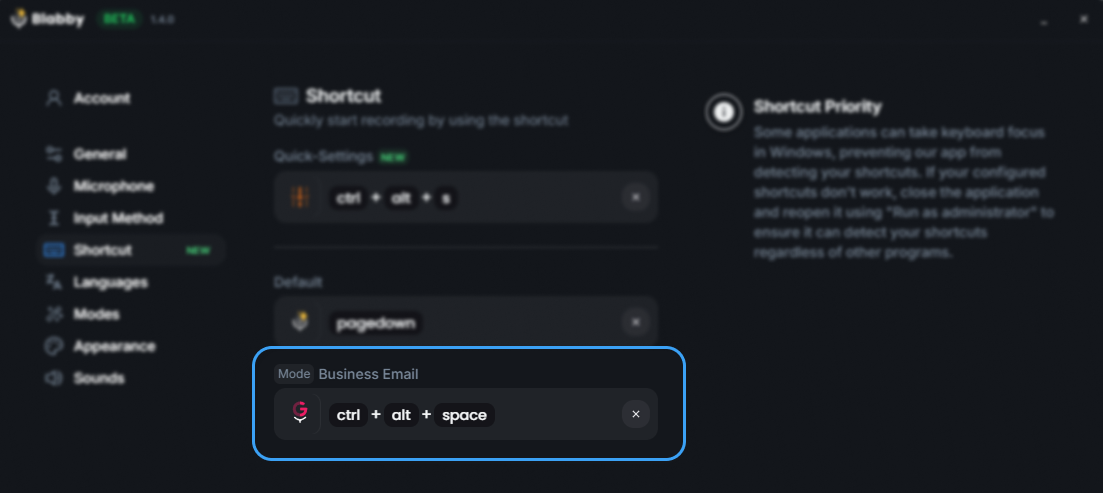
BlabbyAI handles that case by not living in the browser at all. It runs as a Windows app behind a global shortcut, Ctrl+Space by default. Press it in Gmail, press it in Word, press it in Slack, a terminal, or a patient record, and the behaviour is identical: speak, press again, and the text lands at your cursor. There is no per-site support list to check, because there is no site involved.
The second wall is the text itself. Voice In gives you a faithful transcript, which sounds like exactly what you want until you read it back. Speech has false starts, repeated words, and sentences that change direction halfway through. A faithful transcript preserves all of it, so you dictate for thirty seconds and then edit for sixty. The typing got faster and the writing did not.
What the Free Version of Voice In Actually Limits
Free is doing a lot of work in most write-ups of this extension. Voice In is free to install and free to use every day, but several things people assume are included sit behind Voice In Plus. These are the ones that actually change how the tool feels day to day:
| Capability | Voice In free | BlabbyAI free |
|---|---|---|
| Daily dictation cap | 60 minutes per day | 60 credits weekly, no card |
| Idle timeout | 60 seconds before it stops listening | Runs until you press the shortcut again |
| Site coverage | Basic sites; 1,000+ more need Advanced Mode | Every app on Windows, no site list |
| Custom voice commands | Plus only | Custom AI modes, included free |
| Dictating across tabs | Plus only | Not applicable, it works system-wide |
| Speech engine on the free plan | Browser speech recognition | Whisper v3 Turbo, same as paid |
The 60-second idle timeout is the one that surprises people. If you pause to think, the microphone closes and you restart it. Plus raises that to 30 minutes, which tells you how many users asked for it.
The line worth comparing carefully is the last one. Plenty of free tiers hand you a weaker model and save the good one for subscribers. BlabbyAI's free tier runs the same Whisper v3 Turbo that paid accounts use, so what you try is what you would be buying. The credits run out; the quality never changes.
A Browser Extension vs a System-Wide App
This is the first big difference. Voice In only works inside your browser. That is fine if all your writing happens on websites, but the moment you want to dictate into a desktop app, Word, Outlook, Slack, a code editor, a note-taking app, it cannot follow you there. You are back to typing.
BlabbyAI is a native Windows app, so it works everywhere. Press a hotkey, speak, and your words land at your cursor in whatever app is open, browser or desktop. And because BlabbyAI also has a voice-to-text Chrome extension, you do not lose the in-browser dictation Voice In gives you, you gain everywhere else on top of it. If Windows is your main machine, see our voice typing on Windows 11 guide for setup.
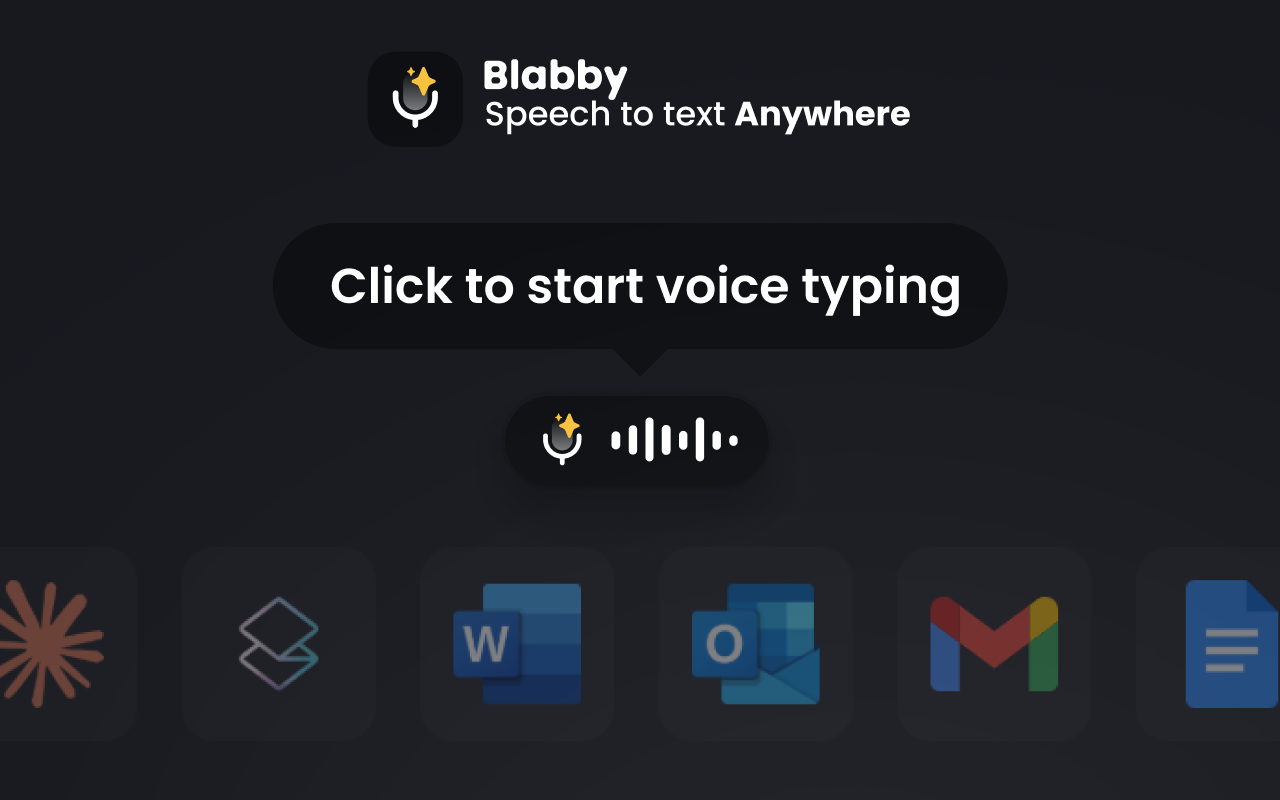
Why this matters: A browser extension is great until your work leaves the browser, and most of it does. Emails, documents, chat apps, and notes are often desktop apps. A system-wide tool like BlabbyAI works in all of them, and still covers the browser too.
Raw Transcription vs an AI Layer
This is the second big difference, and it is where the "old tech" label really shows. Voice In transcribes acoustically: it writes down what it heard, filler words, false starts, run-on sentences and all. It adds punctuation and voice commands, but there is no grammar correction, no rewriting, no tone change, and no translation. What you said is what you get, warts included.
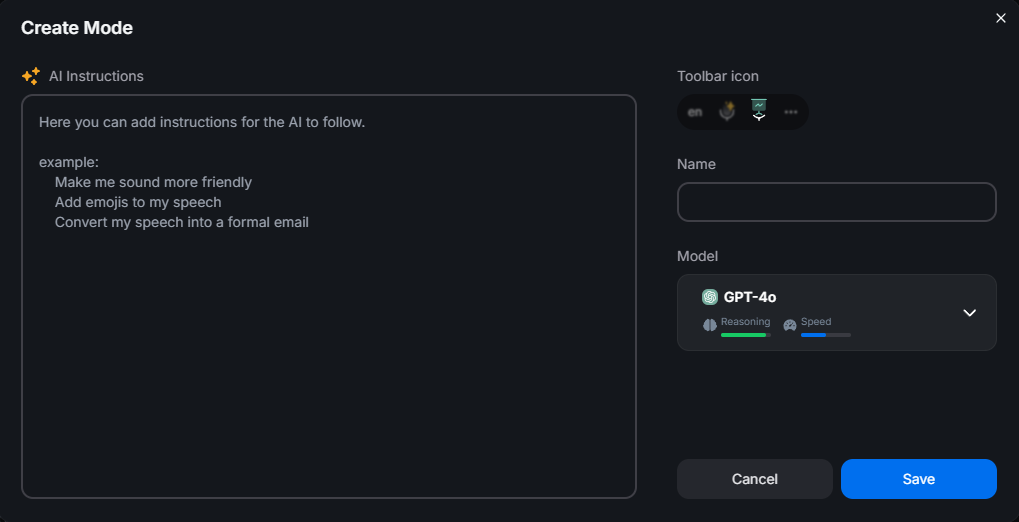
BlabbyAI puts an AI layer on top of transcription. Beyond turning your voice into text, it can clean up the result the way you tell it to, through custom modes you write yourself as plain instructions.
A few things you can set up in BlabbyAI in seconds:
- Clean it up: remove filler words and fix grammar automatically, so rambling speech comes out as tidy text.
- Translate as you speak: talk in your language, get clean English (or another language) out.
- Match a format: "turn this into a bulleted summary," or "write it as a short, professional email."
- Keep it raw: exact words, no cleanup, ideal for LLM prompts and code, the way Voice In always works, but only when you want it.
Why the engine matters: Voice In uses the browser's built-in speech recognition, which is fine for clear speech but has no published benchmark and no personalization. BlabbyAI runs on Whisper v3 Turbo, part of the Whisper large-v3 family that reached 97.93% word accuracy on clean LibriSpeech audio in MLCommons' MLPerf Inference v5.1 benchmark, published September 2025.
BlabbyAI vs Voice In: Feature Comparison
| Feature | BlabbyAI | Voice In |
|---|---|---|
| Speech engine | OpenAI Whisper v3 Turbo (public benchmark) | Browser's built-in Web Speech |
| Works system-wide | Yes, in any app on Windows | No, browser text fields only |
| Native Windows app | Yes (Windows 10 & 11) | No, extension only |
| Chrome extension | Yes | Yes (Chrome & Edge) |
| AI editing modes | Grammar, rewrite, translate, custom | None (raw transcription) |
| Punctuation & commands | Automatic | Automatic + voice commands |
| Languages | 90+ (auto-detect) | 100+ |
| Free tier | Yes, same Whisper engine as paid | Yes, 60 min/day cap |
| Entry price (unlimited) | $8.49/month (Windows) | $9.99/month ($59.99/year) |
The honest read: Voice In is genuinely good at one thing, free, dependable dictation inside your browser. BlabbyAI does that too (through its own extension) and then goes further: everywhere on Windows, a modern engine, and an AI layer Voice In simply does not have.
Pricing: BlabbyAI vs Voice In
Both let you start free. Voice In's free tier caps you at 60 minutes of dictation a day, and Voice In Plus removes that limit at $9.99/month or $59.99/year. BlabbyAI is also free to start, and its free tier runs the same Whisper v3 Turbo engine paid users get. When you outgrow it, unlimited Windows use is a flat $8.49/month with the ongoing Windows discount, cheaper than Voice In Plus month to month, and you get system-wide dictation and AI modes for it.
There is a third option most comparisons miss. Voice In also sells a lifetime licence at $149.99, offered periodically as a limited promotion. Against $9.99/month it pays for itself after about 15 months, so if you are certain that browser-only dictation is all you will ever need, it is the cheapest way to own this particular tool.
It is also worth being clear about what that $149.99 buys, because a lifetime price is only a bargain if the ceiling is where you want to live. It is a permanent licence to dictate inside a browser tab, with the same raw transcript at the end of it. It does not become system-wide later, and there is no AI layer waiting to be switched on. BlabbyAI at $8.49/month is a lower monthly number for a wider job: every Windows app rather than every website, and an AI pass over the text instead of a verbatim one. If you are still weighing the category as a whole, our dictation software guide lays out the options side by side.
The Feature Voice In Has No Equivalent For
Voice In has custom voice commands on the Plus plan, and they are useful: you say a trigger phrase and it inserts a snippet or performs a small edit. They are lookups, though. You define the phrase and the replacement in advance, and the extension matches one against the other.
BlabbyAI's modes work on a different principle. A mode is a free-form instruction you write once, and it runs an AI pass over everything you just said before the text is typed. You write the instruction in plain English, pick a model, and bind it to a shortcut.
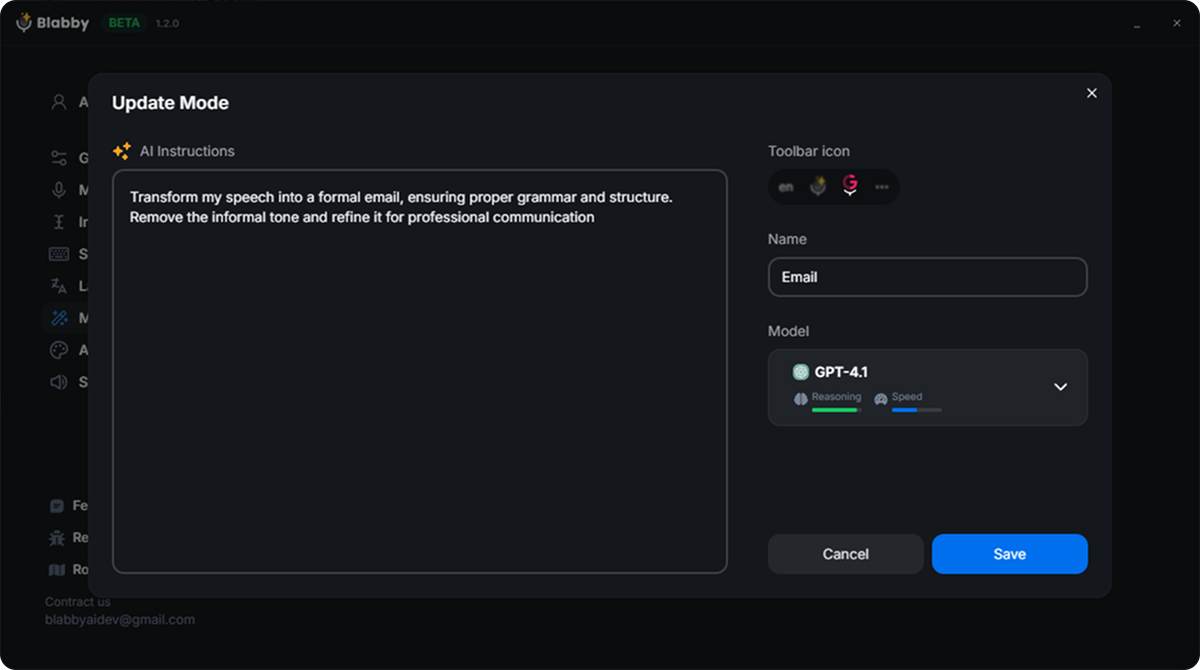
The practical difference shows up in the messy sentence. Say “hey Sarah, the report is going to be late, uh, probably Thursday, sorry about that” into Voice In and you get that sentence, filler intact. Say it with an email mode active and the filler is gone and the sentence is punctuated and shaped like something you would send. You did not proofread it, and you did not paste anything into a chatbot.
Because the instruction is free-form, the list of modes is not fixed. Grammar correction, translating to English as you speak, keeping developer notes terse, expanding shorthand into full sentences: if you can describe the change in a sentence, it can be a mode. BlabbyAI ships Grammar Correction, Translate to English, and Email to start from, and you write the rest yourself.
Which Should You Choose?
Choose BlabbyAI if
- You want to dictate into desktop apps, not just the browser
- You are on Windows and want a native app
- You want AI cleanup, rewriting, or translation, not raw text
- You want a modern, benchmark-leading Whisper engine
- You still want a Chrome extension as well
Choose Voice In if
- All your writing happens inside the browser
- You only need free, raw dictation under 60 min a day
- You do not need any AI cleanup
Voice In is a solid tool for what it is. But if you want dictation that follows you into every app and cleans up your words with AI, that is a newer generation of tool, and it is exactly what BlabbyAI is built to be.
Try BlabbyAI Free
Test real dictation on Whisper v3 Turbo with no credit card, then go unlimited on Windows from $8.49/month whenever you are ready.
Frequently Asked Questions
Is BlabbyAI a good Voice In alternative?
Yes. Voice In is a reliable browser extension for raw dictation, but it only works inside the browser and has no AI editing. BlabbyAI is a native Windows app on OpenAI’s Whisper v3 Turbo that dictates system-wide into any app, adds AI modes for grammar, rewriting, and translation, and also ships an Android app and a Chrome extension. For anyone who wants modern dictation that works everywhere, BlabbyAI is the upgrade.
Does Voice In work outside the browser?
No. Voice In is a Chrome and Edge extension, so it only types into text fields inside your browser. It cannot dictate into desktop apps like Word, Slack, or a code editor. BlabbyAI runs natively on Windows and works system-wide, so your words land at your cursor in any app, plus it has a Chrome extension for browser-only situations.
Does Voice In have AI features like grammar correction or rewriting?
Not really. Voice In does raw transcription: it writes down what it heard, including filler words and run-ons, with automatic punctuation but no grammar cleanup, rewriting, tone changes, or translation. BlabbyAI adds an AI layer on top of transcription, with custom modes you write yourself to fix grammar, reformat, translate, or keep the text raw when you want it.
What speech engine does Voice In use?
Voice In relies on the browser’s built-in speech recognition (the Web Speech API), which is accurate enough for clear speech in a quiet room but has no independent published benchmark and no personalization. BlabbyAI runs on OpenAI’s Whisper v3 Turbo, part of the Whisper large-v3 family that reached 97.93% word accuracy on clean LibriSpeech audio in MLCommons’ 2025 benchmark.
How much does Voice In cost compared to BlabbyAI?
Voice In has a free tier capped at 60 minutes of dictation per day, and Voice In Plus is $9.99/month or $59.99/year. BlabbyAI is also free to start, with a free tier that uses the same Whisper v3 Turbo engine paid users get, and unlimited Windows use is currently $8.49/month with the ongoing Windows discount.
Can I dictate into desktop apps with BlabbyAI?
Yes. That is the core difference from a browser extension like Voice In. BlabbyAI is a native Windows app, so you press a hotkey and speak, and your words appear at your cursor in any app: Word, Outlook, Slack, Notion, a code editor, or the browser. Voice In only works in browser text fields.
Does BlabbyAI still work in the browser like Voice In does?
Yes. BlabbyAI ships a Chrome extension too, so you get the same in-browser dictation Voice In offers, plus system-wide dictation on Windows and AI modes. The extension is a full product in its own right, so on a Chromebook or a locked-down work laptop where you cannot install desktop software it is the whole thing, not a cut-down version.
Should I choose BlabbyAI or Voice In?
Choose Voice In if all you need is free, browser-only dictation and you do not mind raw transcription with no AI cleanup. Choose BlabbyAI if you want to dictate into any app on Windows, run on a benchmark-leading Whisper engine, and get AI modes for grammar, rewriting, and translation, starting free and going unlimited from $8.49/month.
What is the best voice to text extension for Chrome?
Voice In is the most installed, with around 600,000 users and a 4.4 star average, and it is a solid pick if every text field you care about lives in a browser tab. BlabbyAI is the better choice if you also write in desktop apps: it is a Windows app on Whisper v3 Turbo that dictates system-wide into Word, Slack, Outlook or a code editor, adds AI modes that clean up what you said, and ships a Chrome extension as well. Start free on either.
Is Voice In free, and what is the catch?
Voice In is free to install and gives you 60 minutes of dictation per day. The limits people run into are the ones around it: the microphone stops listening after 60 seconds of silence, dictation across tabs and custom voice commands are Plus-only, and the 1,000+ extra sites need Advanced Mode. Voice In Plus is $9.99/month, $59.99/year, or $149.99 for a lifetime licence. BlabbyAI is free to start too, with 60 credits weekly and no card, and the free tier runs the same Whisper v3 Turbo engine as paid.
How do I install a voice typing extension in Chrome?
Add it from the Chrome Web Store, grant microphone permission when Chrome asks, pin the icon to your toolbar so it is one click away, then click into any text box and press the icon or its shortcut. If it seems to do nothing after install, the microphone permission was almost certainly declined. On Windows you can skip the browser entirely with BlabbyAI: install the app, press the global shortcut, and dictate into any application without a per-site list.
Can I keep using Voice In and BlabbyAI together?
Yes, they do not conflict. Some people keep Voice In for browser-only work and add BlabbyAI for everything outside Chrome. In practice most consolidate, because BlabbyAI covers browser text fields through its own Chrome extension while also handling desktop apps, so running both stops being useful once the desktop app is set up.
The Bottom Line
Voice In earned its popularity: it is a free, reliable way to dictate in your browser, and for that job it still works. But it is browser-only and stops at raw transcription, two limits that show their age next to modern tools. BlabbyAI is built for Windows, dictates system-wide into every app, runs on a benchmark-leading Whisper v3 Turbo engine, adds AI modes for cleanup and translation, and also ships an Android app for your phone and a Chrome extension so you keep the browser use too. If you want dictation that goes everywhere and does more than transcribe, start free with BlabbyAI and let your own results make the case.
Sources
Specifications, features, and pricing were gathered from each product's official website and documentation, plus the third-party sources listed below, as of August 2026. Pricing and features can change; check the vendor's site for the latest.
- MLCommons, "Whisper: An MLPerf Inference Benchmark for ASR," September 2025, mlcommons.org (retrieved 2026-07-21).
- Mobius MD, "Typing vs. Dictation: Which is faster?," mobius.md (retrieved 2026-07-21).
- Voice In (Dictanote), dictanote.co/voicein (retrieved 2026-07-21).
- Chrome Web Store, "Voice In - Voice Typing & Speech-to-Text Dictation" listing (user count, rating, version 4.47), chromewebstore.google.com (retrieved 2026-08-24).
- Voice In Plus pricing and plan limits, dictanote.co/voicein/plus (retrieved 2026-08-24).