
Published December 27, 2025 · Last updated August 17, 2026 · By Sumbat.T
Best Medical Dictation Software in 2026: Dragon Medical One vs Modern AI Tools
Short Answer
Dragon Medical One is the best medical dictation software for health systems: deep clinical vocabulary, EHR integrations, and enterprise contracts at roughly $99 per user per month. For an individual clinician on Windows, BlabbyAI (we build it) does the daily documentation job for $8.49 a month: it types into any EHR text field and a custom mode can enforce your report style automatically. If you want visit notes drafted for you rather than dictated, Freed is the ambient scribe route, from $39 a month.
Below: a comparison table, the Dragon pain points that push clinicians to switch, how custom AI modes fix them, and how to choose. Looking for transcription rather than dictation? Our medical transcription software comparison covers the ambient AI scribes and what the research says about whether they actually save time.
The best medical dictation software at a glance
| Tool | Best for | Price | How it works |
|---|---|---|---|
 BlabbyAI | Individual clinicians on Windows | $8.49/mo; free weekly tier | AI dictation with custom modes; types into any EHR text field |
 Dragon Medical One | Health systems, EHR deployments | ~$99/user/mo + ~$525 setup | Enterprise clinical speech recognition inside the EHR |
 Freed | Hands-off visit notes | From $39/mo | Ambient AI scribe; listens to the visit and drafts the note |
 Windows Voice Typing | Occasional free dictation | Free (built into Windows) | Win+H types basic speech into any text field |
Disclosure: we build BlabbyAI, so read its row with that in mind. Prices retrieved August 2026; Dragon figures via TechRadar, Freed via freed.ai.
Dragon Medical dictation software (e.g. Nuance's Dragon Medical One) is widely used in healthcare, an estimated 10,000 healthcare organizations use it, and it commands 80% of the U.S. radiologist markettechradar.com. Its speech recognition technology has helped many clinicians save time on documentation. However, medical professionals often encounter significant pain points when using Dragon dictation tools. The rest of this article digs into those pain points, how BlabbyAI's AI-powered custom modes fix them, and how to pick between the enterprise and individual options in the table above.
Common Pain Points with Dragon Dictation Tools
1. Lengthy Training and Vocabulary Challenges
Traditionally, Dragon requires users to train a voice profile and custom vocabulary, which is time-consuming. Medical terms, drug names, or new terminology (e.g. "COVID") often must be manually added or trained for accuracy. One physician lamented that Dragon Medical One "start[s] from scratch … not even being able to spell my name unless I enter each name separately and say it/spell it. It can't spell COVID… seriously, it can't"physicianassistantforum.com. In older versions, users could read medical texts in a "learn" mode to teach the software, but newer cloud versions eliminated that, forcing tedious manual vocabulary entry. Busy clinicians find this process frustrating, they want a tool that works accurately out-of-the-box without weeks of tinkering.
2. Persistent Transcription Errors
Even after training, Dragon isn't perfect. Clinicians frequently catch mis-transcribed words and phrases in their notes. Some errors are amusing, but others can be alarming or require careful proofreading. For example, a dictation error turned "antibiotics 3 times daily as directed" into "gargle antibiotics 3 times daily in your buttocks", which actually ended up in patient instructionsphysicianassistantforum.com. Another physician using voice recognition found entries like "gabapentin 903 times a day" (the software misheard "900 mg 3 times a day") and "illogical female who identifies as male" (instead of "biological female")kevinmd.com. These kinds of mistakes happen because pure speech-to-text software lacks real medical context understanding, it will dutifully transcribe what it "hears," even if the result is nonsensical or potentially offensive. Studies have shown that speech recognition note-taking has an error rate up to 3× higher than human transcription, meaning clinicians must spend extra time reviewing and correcting errorskevinmd.com. This proofreading burden adds to physician burnout and increases the risk of something incorrect slipping through.
3. Rigid Formatting and Lack of Customization
Dragon generally outputs exactly what is spoken (plus any voice commands for punctuation). Customizing the output style or formatting requires complex workarounds. For instance, doctors often have to explicitly say "period" or "new paragraph," and Dragon may not follow specialty-specific documentation styles by default. Ensuring standardized formatting, like always hyphenating measurements (e.g. "6 mm" vs "6-mm") or using the proper anatomical abbreviations, is not automatic. While Dragon does allow creating custom command macros or templates, this involves navigating menus and scripting in advancespeakeasysolutions.com. There is no simple way to spontaneously adjust the transcription style or terminology on the fly. Medical professionals end up manually fixing formatting issues (like capitalization, lists, or unit notations) in their notes after dictation. This rigidity makes it hard to achieve a polished, ready-to-sign report straight from voice dictation.
4. Unnatural Dictation Workflow
Many users report that achieving high accuracy with Dragon forces them to dictate in an unnatural way. The software might struggle with accents or fast, conversational speech, leading some to speak slowly and overly clearly (even to the point of enunciating every word). Ironically, despite being called "Naturally Speaking," some users "have complained that they need to speak unnaturally to improve voice recognition"techradar.com. This disrupts the doctor's workflow and train of thought. In cases of strong accents or rapid speech, errors are more common, so clinicians either alter their speech or pause frequently to correct misheard words ("scratch that…") mid-dictation. All of this slows down the documentation process; indeed, some frustrated providers find Dragon "slow… not as fast as me [typing]" and end up reverting to typingphysicianassistantforum.com. In short, the tool intended to save time can become cumbersome if the provider must constantly adapt to its quirks.
5. Cost and Platform Limitations
Professional Dragon Medical solutions are expensive and platform-dependent. Dragon Medical One, for example, costs about $99 per month (on a 1-year contract) plus a $525 setup feetechradar.com. Such high licensing fees are a pain point for small practices or individual clinicians. Additionally, Dragon's full functionality is largely limited to Windows (the legacy Dragon Medical Practice Edition was Windows-only, and support has been discontinueddictationdirect.com). There is a cloud offering and a mobile app (Dragon Anywhere Medical), but some users feel the mobile solution was poorly supported ("Microsoft dropped the ball with the Dragon Anywhere app" according to one discussion). Cross-platform support (e.g. on Mac or Linux) is either lacking or requires clunky workarounds. This means clinicians have less flexibility in where they can use the dictation tool, a drawback in an era where doctors might want to dictate notes on a tablet, a Mac at home, or within various web-based EHR systems.
How BlabbyAI's Custom Modes Fix These Issues
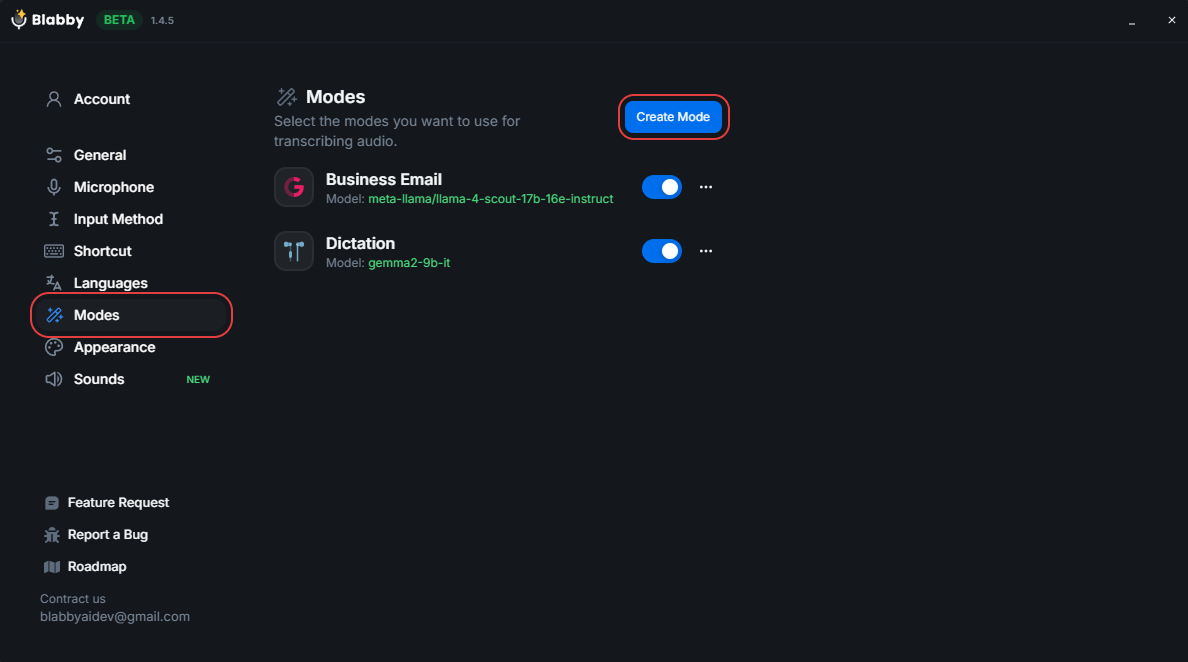
BlabbyAI is a next-generation speech-to-text tool that was built to address these very pain points. It combines accurate voice recognition with an AI post-processing step, allowing users to define "custom modes" for different needs. In practice, BlabbyAI works in a two-step process: first it transcribes your speech, then it runs the text through an AI model (LLM) with your custom instructions to refine itblabby.ai. This approach yields highly accurate and tailored outputs without the user drudgery that Dragon demands.
No Lengthy Training - Medical Terms Out-of-the-Box
BlabbyAI comes with a broad, pre-trained medical vocabulary, so it recognizes complex terms, medication names, and diagnoses accurately the first time. There's no need to spend hours "training" the software or building a custom dictionary for every abbreviation. For example, Blabby's engine (built on OpenAI's Whisper and other advanced models) has "clinical-grade" transcription capability and doesn't stumble on words like "pneumonia" or new drug names. One user noted they only needed to add very few custom words in Blabby, even for biomedical research dictations, whereas Dragon required many additions. This means you can start dictating immediately, and the tool will likely understand specialized terminology with no prior training on your part, saving you valuable time.
AI-Powered Error Correction and Contextual Understanding
The standout feature of BlabbyAI is the Custom Mode, essentially, you instruct the AI how to post-process your transcript. This addresses Dragon's context-blind errors by applying a layer of understanding after transcription. For instance, you can define a mode with instructions like:
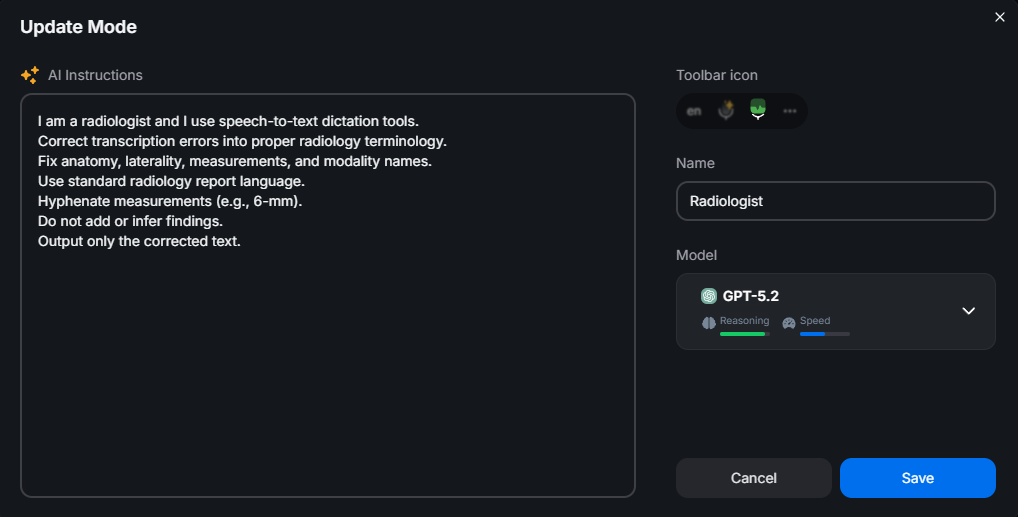
"I am a radiologist and I use speech-to-text dictation tools.
Correct transcription errors into proper radiology terminology.
Fix anatomy, laterality, measurements, and modality names.
Use standard radiology report language.
Hyphenate measurements (e.g., 6-mm).
Do not add or infer findings.
Output only the corrected text."
With this custom mode active, BlabbyAI will transcribe your voice and then automatically convert the raw text into a polished radiology report style. It will correct any misheard anatomy terms, ensure left/right laterality is correct, fix units to the preferred format (adding that hyphen in "6-mm"), and generally output a clean, standardized report. All of this happens in seconds, without the physician having to manually catch those errors. The AI's language understanding means obvious mistakes like "gargle antibiotics in your buttocks" simply would not make it to the final output, the AI would recognize the context is wrong and fix the phrase (e.g. to "take antibiotics… as directed"). This two-step method essentially gives you an intelligent editor for your dictation. As one reviewer put it, "Voice Recognition: Precision at its best… LLM Processing: Polished Perfection", the text can be refined or transformed in any way you instruct. The end result is that clinicians spend far less time proofreading; BlabbyAI catches the lion's share of typos and mistranscriptions automatically, according to your rules.
The Result:
You say:
The gallbladder is well-distended with a 12-mm echogenic focus demonstrating posterior acoustic shadowing, consistent with cholelithiasis. No gallbladder wall thickening or pericholecystic fluid is identified.
With Blabby Speech to Text
The gallbladder is well-distended with a 12-mm echogenic focus demonstrating posterior acoustic shadowing, consistent with cholelithiasis. No gallbladder wall thickening or pericholecystic fluid is identified.
Dragon Dictation
The goal
Your custom mode: (Ready to sign)
Uses standard radiology terminology, correct measurements and hyphenation, proper anatomy and laterality, and clear report-style sentence structure.
Standard Tool: (Requires editing)
Contains spelling errors, nonstandard measurements, missing hyphenation, and improper radiology terminology.
Flexible Formatting and Styling (No More Rigid Output)
BlabbyAI's custom modes let you specify formatting, punctuation, and style in plain English, which the AI then applies consistently. This is a game-changer compared to Dragon's inflexible approach. You can have one mode for general SOAP notes, another for referral letters, and another for research writing, each with its own stylistic guidelines. For example, a doctor can create a "clinical note mode" that automatically formats medication doses, adds headings, or structures the output in a template. If you prefer lists or bullet points for certain sections, you can instruct that. Blabby handles punctuation automatically as well: it adds commas, periods, and capitalization where needed without you having to say "comma" or fix run-on text. The BlabbyAI Gmail integration demo shows this clearly, a user can say something casual like "hey John please send me that report" and the Email Mode will output a properly formatted email with greeting, capitalization, and polite phrasing. In short, custom modes give you control over the output format and tone. It's as if you have your own personal transcriptionist who knows your style guide by heart. This flexibility means no more wrestling with Dragon's limited macro system or doing a bunch of re-formatting after dictating. Your dictated content comes out publication-ready in the format you need.
Natural Speech and Workflow
Because BlabbyAI is built on advanced speech models, it allows more natural dictation without special effort. Clinicians can speak normally, even casually, and let the AI sort it out. According to Blabby's documentation, you simply "speak naturally, [the] AI handles punctuation and formatting". The system also adapts well to different accents or fast speech, users report "impressive precision, even with accents or unclear speech". There's no need to pause and spell out uncommon words or acronyms; if the base transcription isn't perfect, the AI post-processor often will fix it in context. This frees doctors to dictate in their normal cadence and tone, focusing on the medical content rather than on enunciating for the computer. The overall workflow is smoother: you hit the microphone, dictate your note or report in one stream, and Blabby outputs a finished text that rarely needs manual editing. This is in stark contrast to the stop-start "dictate, then fix, then dictate more" loop that many experience with Dragon. By streamlining the process, BlabbyAI helps clinicians complete documentation faster and with less frustration, which ultimately means more time for patients and less mental fatigue.
Lower Cost, Cross-Platform Accessibility
BlabbyAI also removes the cost barrier. The Windows desktop app costs $8.49 a month for unlimited dictation, with a free tier of 60 credits (roughly 2,000 words) every week and no credit card required to start. Against Dragon Medical One's reported $99 per user per month plus setup fee, that is a different budget category entirely. The app works system-wide: press Ctrl+Space in any application with a text field, Epic, Cerner, Word, Outlook, a web-based EHR in a browser tab, and the transcribed text lands at your cursor. There is no per-application integration to buy or configure, which is exactly the pain Dragon's environment lock-in creates. Clinicians who chart on a non-Windows machine can fall back to the Chrome extension, which brings the same dictation into any website with a text box.
Built for clinical dictation



Your report format, enforced automatically
Dictate into Epic, Cerner, or any EHR text field. A custom mode fixes terminology and formatting before the text lands. Free to start.
How to choose medical dictation software
The medical dictation market splits into three tiers, and most of the confusion comes from comparing across them. Enterprise speech recognition (Dragon Medical One, and Solventum Fluency Direct, formerly 3M M*Modalfastchart.com) is bought by health systems, integrates directly with the EHR, and is priced per user through sales contracts. Ambient scribes (Freed, and a growing field of competitors) listen to the patient visit and draft the note for you, which is a different job from dictation: you review and edit a generated note instead of speaking one. AI dictation apps (BlabbyAI, and budget medical options like VoiceboxMD at around $49 a monthvoiceboxmd.com) sit in the middle: you still dictate, but modern speech models plus AI post-processing remove the training and correction burden the enterprise tools carry.
Three questions settle the choice quickly. First, who pays? If your organization deploys and funds the tool, Dragon Medical One or Fluency Direct through the health system is the path of least resistance. If the money comes out of your own pocket, the enterprise tier rarely makes sense for one clinician. Second, dictate or delegate? If you think in finished sentences and want control over the note, you want dictation. If you would rather have a draft appear from the conversation and edit it, you want an ambient scribe. Third, where does the text need to land? A tool that types into any text field works with every EHR by default, including Epic and Cerner, with no plugin or integration project. For the wider market beyond medicine, our dictation software comparison covers the general-purpose field, and the Dragon dictation software guide breaks down every current Dragon edition and its price. For a wider clinical comparison, the nine medical voice recognition tools roundup prices each one and separates the plugin-based systems from the ones that type into any field.
Frequently asked questions
What is the best app for medical dictation?
It depends on who is buying. Health systems deploying dictation across an organization buy Dragon Medical One, the enterprise benchmark for EHR-integrated clinical speech recognition. An individual clinician on Windows gets most of that daily value from BlabbyAI (our product): it types into any EHR text field, a custom mode can enforce your report format and terminology, and it costs $8.49 a month instead of an enterprise contract. Clinicians who want visit notes drafted for them use an ambient scribe like Freed.
What is the best medical transcription software?
Transcription and dictation are different jobs. Medical transcription software turns recorded audio, such as a saved dictation file or a visit recording, into a document, often with human review. The tools on this page are dictation tools: they type your live speech at the cursor. If you need recorded files transcribed, look at a transcription service. If you need to speak your notes directly into an EHR or document, you need dictation software. Our medical transcription software comparison covers the transcription tools, the ambient AI scribes, and what the research says about whether they save time.
What do doctors use to dictate?
Inside hospitals and large clinics, mostly whatever the health system deployed: Dragon Medical One or Solventum Fluency Direct, wired into the EHR. An estimated 10,000 healthcare organizations use Dragon Medical, and it holds around 80% of the US radiologist market (TechRadar). Outside enterprise deployments, clinicians use AI dictation apps like BlabbyAI, ambient scribes like Freed, or the free voice typing built into Windows.
What is the best HIPAA compliant dictation software?
Compliance comes from the deployment and how your practice handles patient data, not from the software alone. Dragon Medical One and Solventum Fluency Direct are sold into clinical workflows through enterprise agreements, which is why health systems standardise on them. For the dictation clinicians do outside the chart, referral letters, admin email, research notes and everything else typed in a day, BlabbyAI transcribes under a zero data retention policy and keeps your audio history on your own machine, at $8.49 a month against Dragon Medical One at roughly $99 per user.
How much does dragon medical dictation cost?
Reviewers report Dragon Medical One at roughly $99 per user per month on a one-year contract, plus a setup fee around $525 (TechRadar, retrieved August 2026). It is quoted per user through Microsoft and channel resellers, so exact pricing comes from a sales quote. The retired on-premise version, Dragon Medical Practice Edition, lost support in March 2022 and is no longer a current option.
Conclusion
Dragon Medical dictation software has long been the go-to solution for speech-to-text in healthcare, but its pain points, from steep learning curves and uncorrected errors to workflow friction, are very real for medical professionals. BlabbyAI's innovative two-step approach with custom modes directly tackles these issues. By leveraging AI to understand context and follow user instructions, Blabby delivers accurate, well-formatted medical documentation with minimal effort from the clinician. There's no need for arduous training or constant manual corrections. Doctors can simply speak naturally and let the AI do the heavy lifting, converting their spoken words into polished notes or reports that meet all their requirements.
If your health system already pays for Dragon Medical One or Fluency Direct, use what you have: the integration work is done and the tool is good at its job. If you are buying for yourself, start with the free options. Windows voice typing costs nothing and shows you whether dictation fits how you think, and BlabbyAI's free weekly credits let you test a radiology or SOAP-note custom mode against your real charting before spending anything. A week of real notes usually settles which tier you need.
Ready to save hours every month?
Join thousands of happy users saving hours every week.
Free to start • No credit card needed • Cancel anytime
Sources
techradar.com physicianassistantforum.com kevinmd.com speakeasysolutions.com nuance.com dictationdirect.com blabby.ai blabby.ai blabby.ai getfreed.ai voiceboxmd.com fastchart.com