
December 27, 2025 · Updated August 27, 2026
The Best Dictation Software for Lawyers in 2026 (Windows & Desktop)
Quick Answer
Time is your most limited resource
As an attorney, you sell your expertise, but you bill your time. Every hour spent manually typing out emails, briefs, or client notes is an hour you aren't spending on high-level strategy, or worse, an hour you can't bill for at all.
In 2026, advanced AI models have democratized high-accuracy transcription, making it faster, cheaper, and smarter than legacy tools like Dragon Legal. BlabbyAI for Windows runs Whisper v3 Turbo on your desktop and types into any text field, so it works in Word, Outlook, and your case management software without a plugin.
Built for legal dictation




Your defined terms, capitalized every time
Dictate into Word, Outlook, or your case management system. A custom mode fixes vocabulary and punctuation before the text lands.
For decades, the "gold standard" for legal dictation was expensive, heavy desktop software that required hours of training. But in 2026, the landscape has changed. Advanced AI models have democratized high-accuracy transcription, making it faster, cheaper, and smarter than legacy tools.
Here is why modern lawyers are switching to BlabbyAI for Windows, and how to set it up so it handles legal vocabulary and citations properly.
The Problem with "Standard" Windows Voice Typing
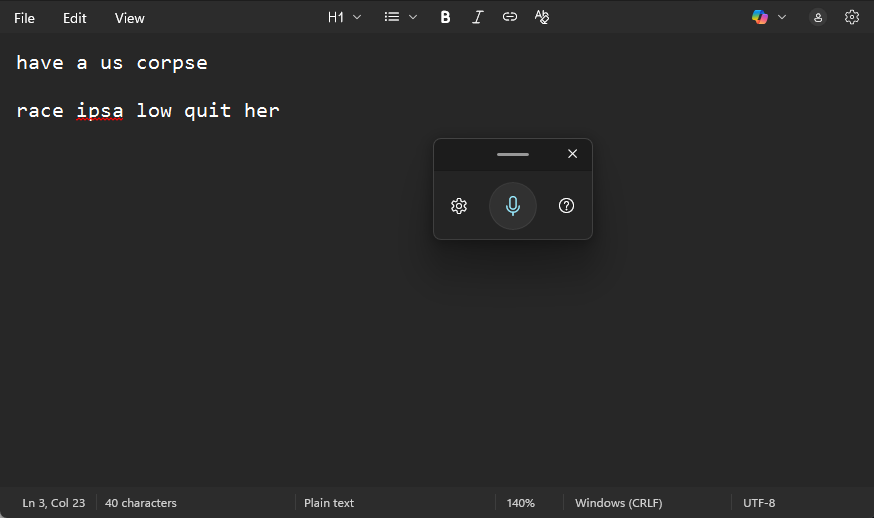
If you have ever tried to dictate a brief using the built-in Windows feature (Win + H), you know the frustration.
- It fails on terminology: Say "Habeas Corpus" or "Res Ipsa Loquitur," and you often get gibberish.
- It ignores legal conventions: It doesn't know that "Plaintiff" and "Defendant" should often be capitalized in your briefs.
- It lacks control: You usually have to go back and fix so many errors that you might as well have typed it yourself.
Lawyers don't just need a tool that "writes words." You need a tool that understands context.
Why BlabbyAI is the "Dragon Killer" for Modern Firms
Historically, if you wanted accuracy, you had to pay hundreds of dollars for Dragon Legal. It works, but it's expensive, clunky, and feels like software from 2010.
BlabbyAI takes a different approach. With our dedicated Windows App, you bring the power of OpenAI's Whisper v3 Turbo model directly to your desktop.
This means it works where you actually work: Desktop Microsoft Word, Outlook, PowerPoint, Slack, Teams, and case management software like Clio or MyCase.
Here are the three features that make it the superior choice for legal professionals:
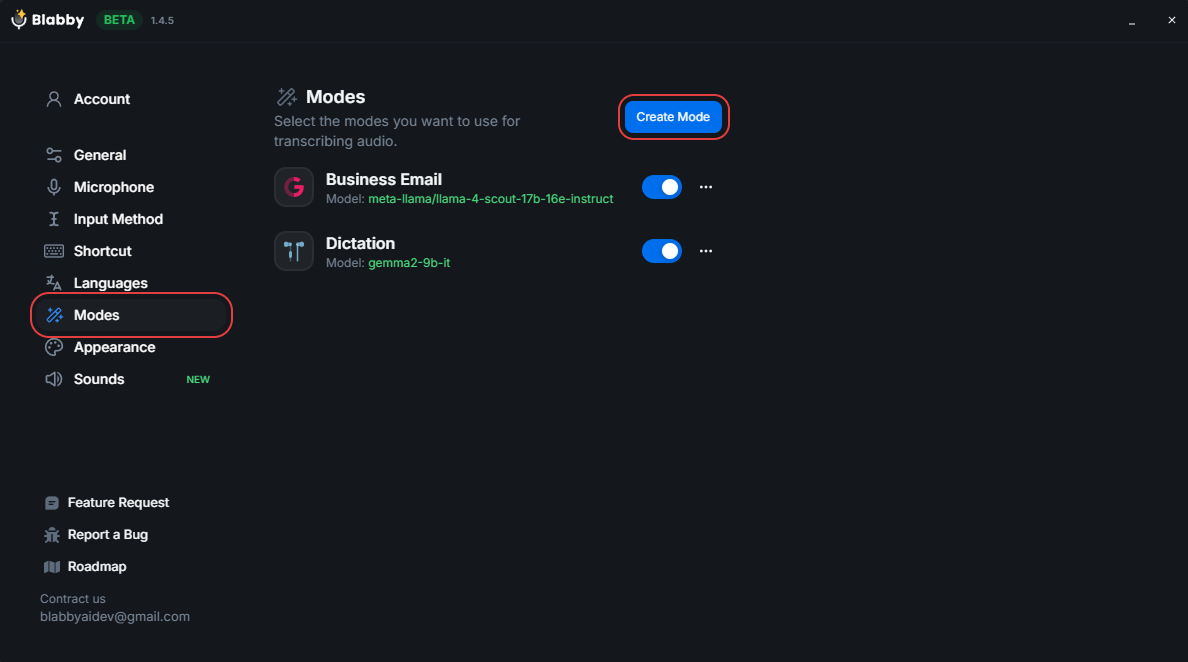
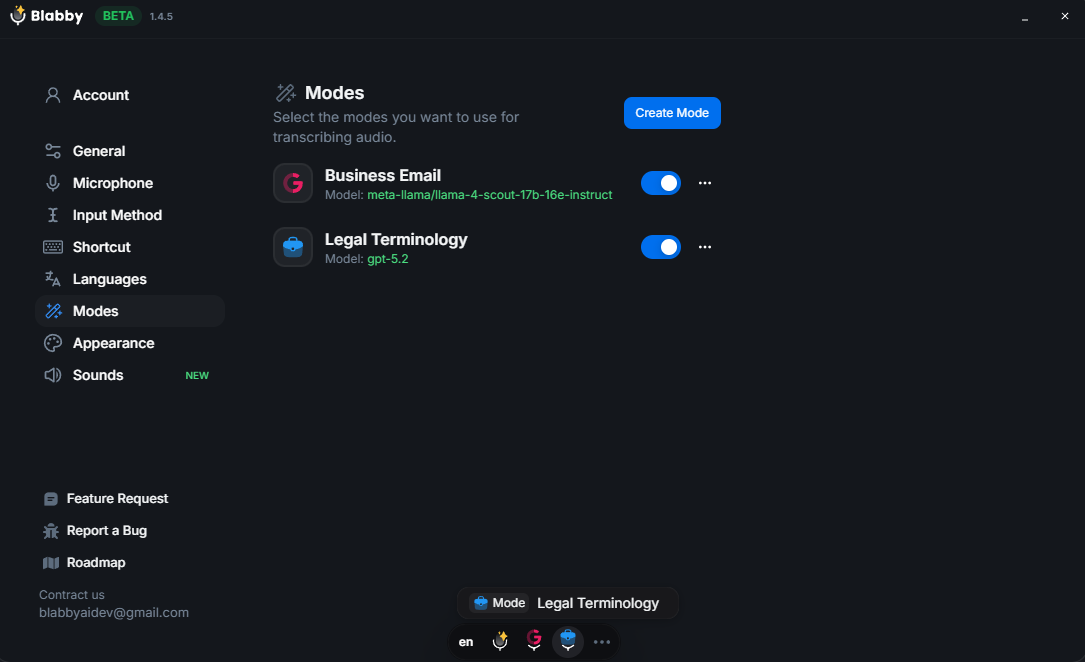
1. "Custom Modes" for Legal Drafting
This is the part that matters most for legal work. Most dictation tools just transcribe what they hear. BlabbyAI lets you create Custom Modes that process your text with specific AI instructions after you speak.
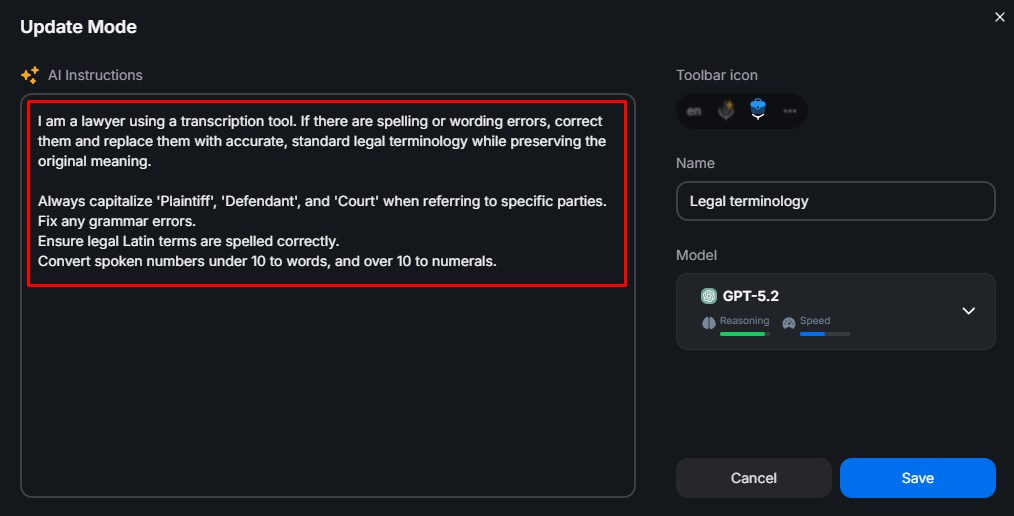
How to set up a "Legal Terminology Mode":
You can instruct BlabbyAI to:
- "Always capitalize 'Plaintiff', 'Defendant', and 'Court' when referring to specific parties."
- "Fix any grammar errors."
- "Ensure legal Latin terms are spelled correctly."
- "Convert spoken numbers under 10 to words, and over 10 to numerals."
The Result:
You say:
The Plaintiff established a prima facie case of negligence; because the Defendant failed to rebut the inference created by res ipsa loquitur, the Court must grant summary judgment in accordance with stare decisis
With Blabby Speech to Text
The Plaintiff established a prima facie case of negligence; because the Defendant failed to rebut the inference created by res ipsa loquitur, the Court must grant summary judgment in accordance with stare decisis
Dragon Dictation
The p
Your custom mode: (Ready to review)
Correct Latin terms (“prima facie,” “res ipsa loquitur”), proper capitalization (Plaintiff, Defendant, Court), correct punctuation, and no transcription errors.
Standard Tool: (Requires editing)
Misspelled Latin terms ("preema fashie," "resa ipsa loquitor"), incorrect capitalization (plaintiff, defendant, court), missing punctuation, and dictation artifacts not acceptable in legal writing.
2. Unmatched Accuracy (Whisper v3 Turbo)
BlabbyAI runs the Whisper v3 Turbo model, which is OpenAI's current speech-to-text model. It handles:
- Fast speaking speeds (for when you're rushing to finish a memo).
- Accents and background noise (perfect for busy offices).
- Complex multi-syllable legal terminology without needing to "train" the software for weeks.
3. Works Everywhere on Windows (10 & 11)
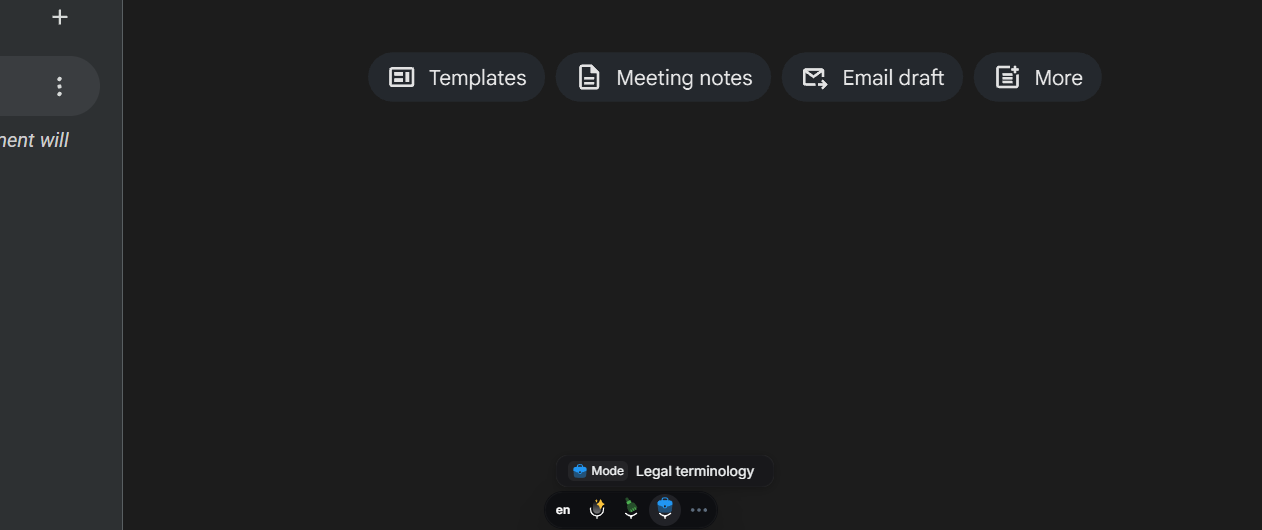
The BlabbyAI Windows App floats over your entire system, so it is not tied to one program or one browser tab.
Whether you are drafting a formal letter in Word, shooting off a quick reply in Outlook, or leaving a note in your practice management software, Blabby is there. Just click the floating microphone (or hit your custom shortcut) and start speaking.
Comparison: BlabbyAI vs. The Competition
| Feature | BlabbyAI (Windows App) | Dragon Legal | Windows Built-in Typing |
|---|---|---|---|
| Cost | Free tier, $8.49/mo unlimited | $500+ Upfront | Free |
| AI Correction | Custom Modes | ||
| Works in Word/Outlook | |||
| Setup Time | < 2 Minutes | Hours of Training | Instant |
| Model | Whisper v3 Turbo (AI) | Proprietary (Older) | Basic On-Device |
What law firms actually run, and what it costs
Search for legal dictation software and you get two categories of product presented as though they were one. They are not, and picking the wrong category costs more than picking the wrong brand inside it.
Category one
Digital dictation workflow
BigHand, Philips SpeechLive, Lexacom, Winscribe. You record audio, the system routes the file to a transcriptionist or a secretary, and typed text comes back later. These are built around the assumption that somebody else does the typing, which is why they price per seat, bundle hardware, and sell into firms with support staff. If your firm has a typing pool, this category exists for you. If it does not, you are buying a routing system for a journey with one stop.
Category two
Speech recognition that types for you
Dragon Legal, Windows voice typing, and modern AI dictation such as BlabbyAI. No second person, no audio file to chase. You speak and the words appear in the document already open in front of you. For a solo practitioner or a small firm without dedicated typing support this is almost always the right category, and it is the one where the price has fallen hardest in the past two years.
The figures below are what these products list publicly as of August 2026. Workflow systems are quote-based and move with seat count and hardware, so read those rows as the shape of the bill rather than a price tag.
| Tool | Category | Typical cost | Needs support staff |
|---|---|---|---|
| BlabbyAI | Speech recognition | Free tier, $8.49/mo unlimited | No |
| Dragon Legal Individual | Speech recognition | Roughly $499 to $649 perpetual | No |
| Dragon Legal Anywhere | Speech recognition | Quoted annually through a reseller | No |
| Windows voice typing (Win+H) | Speech recognition | Free, built in | No |
| BigHand | Workflow | Quoted per seat, firm scale | Yes |
| Philips SpeechLive | Workflow | Per user monthly, plus hardware | Usually |
Read that table as a question about your practice rather than a ranking. If billable work leaves your desk as audio for somebody else to type, a workflow system earns its cost. If you are the one typing the letter at seven in the evening, the entire value sits in the speech recognition, and BlabbyAI does that part for $8.49 a month against several hundred dollars for a Dragon license. That gap is the argument for testing the cheap option first: an afternoon on the free tier tells you whether you ever needed the expensive one.
What makes legal dictation software different
General dictation and legal dictation software diverge on three things: vocabulary, citations, and punctuation. Those are also the three configuration steps Google's AI Overview for "legal dictation software" currently surfaces, drawing on a r/Lawyertalk discussion where practising attorneys compare tools. Here is how each one actually behaves, and what to do about it.
Defined terms and party names
Latin phrases are the easy part. Modern speech models handle res ipsa loquitur and voir dire because they appear in ordinary text. What breaks is the vocabulary specific to your matter: an opposing counsel with an unusual surname, a corporate entity spelled a particular way, an internal abbreviation your firm uses. Custom spellings solve this directly. You type the term the way it should be written once, and it is matched from then on.
The capitalization convention is a separate problem, and it is a good fit for a custom mode rather than a dictionary entry. An instruction like capitalize Plaintiff, Defendant, Court, and Agreement when they refer to parties or documents in this matter applies to every recording made in that mode, which is the part a spelling list cannot do.
Citations: dictate in passes
This is the piece of practitioner advice worth taking seriously regardless of which tool you pick. Dictating a Bluebook citation aloud means narrating volume numbers, reporters, pin cites, and italics in one breath, and every dictation system on the market gets some of that wrong. The reliable workflow is to speak the substance of the paragraph first and leave a spoken placeholder where the citation goes, then fill in citations in a second pass with the keyboard and your citation tool.
A mode makes the placeholder tidy. Tell it when I say "cite pending", insert [CITE] in brackets and you get a consistent marker you can search for later, instead of the literal words appearing mid-sentence. Be clear about what this is: a dictation tool writes the citation you speak, it does not look authorities up or check whether they are still good law.
Punctuation and formatting commands
Older dictation systems required you to speak punctuation explicitly, saying "comma" and "new paragraph" as commands, and many attorneys learned that habit and kept it. Whisper v3 Turbo punctuates from context, so you can simply speak naturally and get sentences that end properly.
If you prefer the spoken-command habit, it still works, because you define the commands yourself in a mode. The AI receives your full transcript including the words you spoke as instructions, so telling it when I say "new paragraph", insert a paragraph break instead of writing those words gives you the old behavior on your own terms. You can define numbered-paragraph commands the same way, which matters for pleadings.
If your firm will not let you install software
Plenty of attorneys read a page like this, decide to try something, and then discover that IT has locked the machine down and a desktop installer is not an option. That is common in firms of any size and it is the reason the second product exists.
The BlabbyAI Chrome extension runs entirely in the browser. Nothing is installed on the operating system, so it clears the approval bar on a managed laptop that a desktop app will not, and it reaches every legal tool that already lives in a browser tab: Clio, MyCase, Westlaw and Lexis research notes, a webmail client, a court e-filing portal with a free-text field. The same custom modes and custom spellings apply, because both products read the same account settings.
The honest split between the two: the Windows app types into desktop Word, desktop Outlook and any installed practice management client, and it keeps a local History of your recordings. The extension covers anything inside Chrome, on any machine you can run Chrome on, including a work laptop you do not administer. Attorneys who can install software generally end up running both. Attorneys who cannot lose nothing that matters for browser-based practice.
What dictation looks like in four practice areas
Legal dictation advice tends to stop at the software and skip the part that decides whether you keep using it: which documents are worth speaking rather than typing. The pattern that holds across practices is that dictation wins on long prose you already have in your head, and loses on anything with heavy structure or a form to fill.
Litigation
Fact sections and statements of the case are the strongest candidates in the whole of legal work. You know the narrative, it runs to thousands of words, and the sentences are ordinary English rather than defined structure. A mode that capitalizes Plaintiff and Defendant and leaves a bracketed marker where citations belong turns a two-hour typing session into speaking the story once and cleaning it after. Numbered pleading paragraphs are the exception: define a spoken command for the numbering, or add them afterwards, because reciting numbers mid-flow interrupts the part that was going well.
Deposition summaries are the other reliable win. Reading a transcript and speaking the summary as you go is materially faster than alternating between reading and typing, because your hands never leave the transcript.
Transactional and corporate
Contract drafting is mostly assembly from precedent, so dictation adds less there than practitioners expect. Where it does pay is everything around the document: the covering email explaining the change, the summary to the client of what the amendment does in plain language, the internal note on why a clause was accepted. Those are prose, they are written under time pressure, and they are the ones that get shortened to the point of being unhelpful because typing them is tedious. Dictation makes the thorough version cost the same as the terse one.
Family and immigration
Both run on client narrative, and both involve names and places that no speech model will guess correctly on its own. This is where custom spellings earn their place: enter each client name, the spelling of a town, an unusual employer, once at the start of the matter and they come out right for the rest of it. Immigration practice adds a second benefit, since a client whose first language is not English can speak their own account in their language and get it typed in English, which is one mode instruction rather than a separate translation step.
Solo and small firm, any practice
The case for dictation is strongest where there is nobody to hand typing to, which is exactly the segment the expensive tools were never priced for. The highest-value target here is not a document at all: it is the backlog of client emails and matter notes that accumulate through the day. Speaking a matter note into your case management system immediately after a call, rather than intending to type it up later, is the single habit that changes how much of the day survives. It also removes the worst version of the problem, which is a note written three days late from memory.
Free tier, no card
Dictate one letter and compare it to typing it
60 credits a week, roughly 2,000 words. Enough to test defined terms and a punctuation mode on real work before you decide anything.
Client confidentiality and where your dictation goes
Dictating privileged material into a cloud service deserves more thought than it usually gets. Your duty of confidentiality does not pause because the text arrived by voice, and the relevant question for any vendor is what happens to the audio and the transcript after they leave your machine.
For BlabbyAI specifically: transcription runs under a zero data retention policy, and the History feature on the Windows app stores your recordings on your own disk rather than uploading them. One caveat worth stating plainly, because it affects which mode you pick: the Google and Meta models available for custom modes are also zero retention, while OpenAI models used as a mode's AI may retain data for up to 30 days. If you are dictating anything privileged, that is a reason to prefer the former. Your own professional judgment and your firm's policy govern here, not our marketing copy.
Legal dictation software questions
How much does Dragon Legal cost?
Dragon Legal Anywhere is sold as a subscription, generally quoted per user per year and usually purchased through a reseller rather than off a public price page, which is why you will see a range rather than a number. The older perpetual-license versions of Dragon Legal ran several hundred dollars upfront. Nuance is now part of Microsoft, and pricing is quote-based, so treat any specific figure you find online as dated and confirm it with a reseller.
Is there a free dictation software?
Yes, several. Windows has voice typing built in at Win+H on Windows 10 and 11, macOS has Apple Dictation, and Google Docs has voice typing inside Docs. All are free and all handle plain prose adequately. Where they fall short for legal work is custom vocabulary, defined-term capitalization, and reformatting. BlabbyAI has a free tier of 60 credits per week, roughly 2,000 words, with no credit card required, which is enough to test it on a real letter before deciding.
What software do legal transcriptionists use?
Transcriptionists work from recorded audio rather than dictating live, so their tools are different: playback software with foot-pedal support and variable speed, such as Express Scribe or the Philips SpeechExec workflow, often paired with an automated first-pass transcript they then correct. Digital dictation workflow systems like BigHand and Philips SpeechLive exist to route audio from an attorney to a typist and back. That is a different job from dictation software, which types your words as you speak them.
What is the best legal writing software?
Legal writing software and legal dictation software solve different problems and are often confused. For drafting and citation work, tools like Microsoft Word with a citation add-in, Westlaw Drafting Assistant, or Clearbrief handle citation checking and document assembly. Dictation software is the input method that feeds those tools. BlabbyAI types into whichever of them has your cursor, so the two stack rather than compete.
Does dictation software work inside case management software?
With BlabbyAI, yes, because it types into whatever text field is focused rather than connecting to a specific application. Clio, MyCase, Smokeball, PracticePanther, and browser-based systems all present ordinary text fields on Windows, so dictation lands in them the same way it lands in Word. To be exact about the mechanism: there is no plugin, no API connection, and no marketplace listing. It types where your cursor is, and it does not click buttons or save the record for you.
What software do most law firms use for dictation?
It splits by firm size. Large firms and those with a typing pool usually run a workflow system such as BigHand or Philips SpeechLive, where an attorney records audio and it is routed to a transcriptionist. Firms without support staff, and most solo and small practices, use direct speech recognition instead: Dragon Legal historically, and increasingly modern AI dictation such as BlabbyAI, where your words appear as text immediately and there is no second person in the loop. The difference matters more than the brand: a workflow system assumes someone else types, and a dictation tool assumes nobody does.
How much does legal dictation software cost?
The spread is wide. Dragon Legal Individual perpetual licenses list around $499 to $649, Dragon Legal Anywhere is a quoted annual subscription usually bought through a reseller, and full digital dictation workflow packages for a firm run into the thousands per seat once hardware and transcription are included. BlabbyAI is $8.49 per month for unlimited dictation with a free tier of 60 credits a week, roughly 2,000 words, and no credit card to start. For a solo attorney the practical question is whether you need a transcription workflow at all, because if you do not, the cheaper tier of the market now does the actual dictation just as well.
Can I dictate directly into Clio, MyCase, or Smokeball?
Yes, with a tool that types into the focused field rather than one that needs an integration. BlabbyAI puts text wherever your cursor is on Windows, so a browser-based matter note in Clio, a time entry in MyCase, or a document field in Smokeball all receive dictation the same way Word does. There is no plugin to install and no marketplace listing involved. The limit is worth stating: it types the text, it does not click Save or submit the form for you.
Do I need a dedicated dictation microphone?
Not for AI dictation. Hardware like a Philips SpeechMike or an Olympus recorder was built for the record-then-transcribe workflow, where audio quality had to survive a typist listening at speed, and for older engines that were sensitive to input noise. Whisper v3 Turbo handles an ordinary laptop microphone or a basic headset well. If you already own a SpeechMike it will work fine as a microphone, but buying one is not a prerequisite for getting accurate text.
Is dictation accurate enough for legal work?
Accurate enough for a first draft, not accurate enough to file unread. Modern models handle ordinary legal prose well, and the errors that remain tend to be specific: proper nouns, near-homophones, and anything numeric such as dates, dollar amounts, and citation numbers. Those are exactly the places where an error is costly, so the workflow that holds up is dictate the draft, then proofread with attention to names and numbers. That is also true of Dragon, and of typing.
Get Started In 2 Minutes
Try it on one real document
Join thousands of happy users. 60 credits every week on the free plan, no credit card. Dictate a letter with your own defined terms and see what comes back.
Free to start • No credit card needed • Cancel anytime