


Legal Dictation Software
for Lawyers
Speak your briefs, client letters, emails and time entries, and BlabbyAI types them into Word, Outlook, Clio or any other app, with legal terms spelled right and your formatting applied. $8.49 a month, free to start.
Free tier, no card · Windows app and Chrome extension
What is legal dictation software?
Legal dictation software turns what a lawyer says into written text. Two kinds of product share the name. Digital dictation workflow systems, like BigHand and Philips SpeechLive, record your voice and route the audio to a transcriptionist or a speech engine for someone to finish. Speech recognition software, like Dragon Legal, types your words as you speak them, so the draft exists the moment you stop talking.
BlabbyAI is the second kind. It is a Windows app and a Chrome extension that types into any text field: a pleading in Word, an email in Outlook, a time entry in Clio. It costs $8.49 a month, against about $799 upfront for Dragon Legal v16, and the free tier gives you 60 credits a week, roughly 2,000 words, with no card.
Legal vocabulary, out of the box
Whisper v3 Turbo handles res judicata, interrogatories, voir dire and indemnification without voice training. Teach it the rest once with custom spelling: client surnames, opposing counsel, case captions.
Formats as you dictate
Write a mode once and every dictation comes out in that shape: numbered paragraphs, capitalized defined terms, rule and citation numbers as digits, or a letter with the salutation and sign-off in place.
Integrates with Word, Outlook and Clio
BlabbyAI types into any text field, so it works in Word, Outlook, Clio, MyCase, PracticePanther, NetDocuments and iManage, with no plugin to install in any of them.
What a dictated motion actually looks like
The gap between what you say out loud and what belongs in a filing is the whole job of legal dictation software. Here is one paragraph of a motion to dismiss, dictated into Word through a BlabbyAI mode set up for court filings.
WHAT YOU SAY
"pursuant to rule twelve b six of the federal rules of civil procedure defendant moves to dismiss the complaint for failure to state a claim new paragraph the complaint alleges no facts showing that defendant owed plaintiff any duty of care see twombly five fifty u s five forty four at five seventy"
WHAT BLABBYAI TYPES
Pursuant to Rule 12(b)(6) of the Federal Rules of Civil Procedure, Defendant moves to dismiss the Complaint for failure to state a claim.
The Complaint alleges no facts showing that Defendant owed Plaintiff any duty of care. See Twombly, 550 U.S. 544, 570.
THE MODE INSTRUCTION BEHIND IT
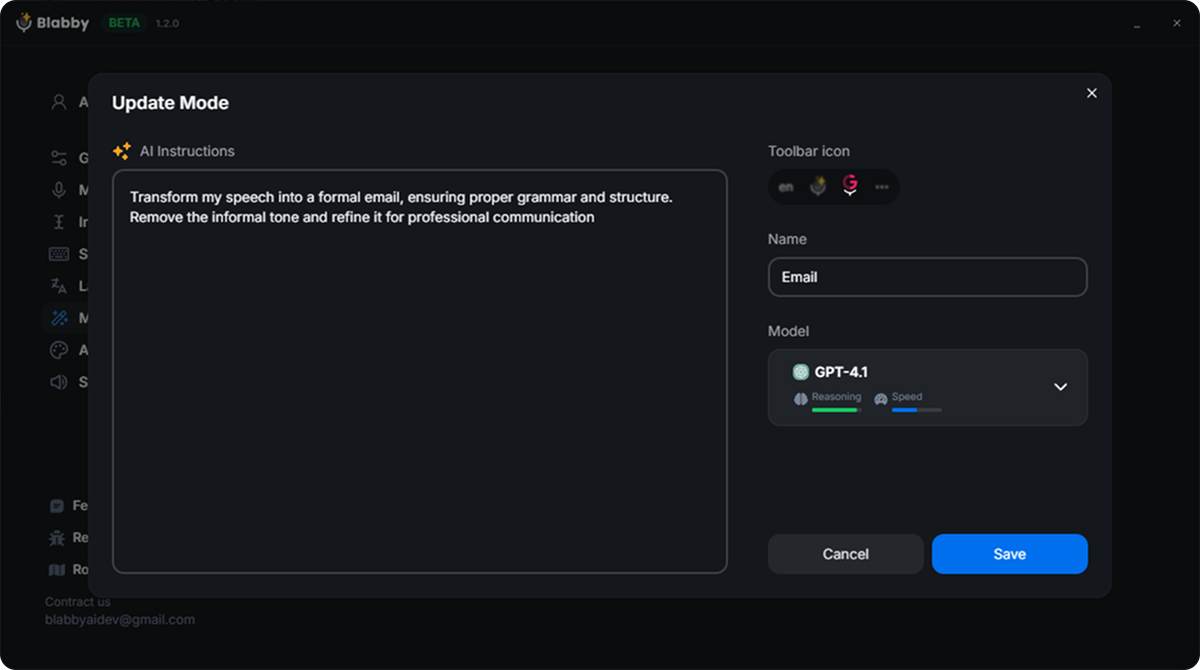
"Format my dictation as text for a court filing. When I say new paragraph, start a new paragraph instead of writing those words. Write rule and statute numbers in standard form, for example Rule 12(b)(6). Capitalize the defined terms Plaintiff, Defendant, Complaint and Agreement. Write citation numbers as digits. Never add words, facts or citations I did not say."
Four things happened between those two boxes, and every one came from that instruction. The spoken "new paragraph" became a paragraph break. "Rule twelve b six" became Rule 12(b)(6). The defined terms came out capitalized. And the citation became 550 U.S. 544, 570. The substance stayed exactly as dictated, because the instruction says so. Change your style and you edit one sentence, not a template library.
Legal dictation software compared
What each option costs and how it works. Nuance publishes no price for Dragon Legal, so its figures come from authorized resellers.
| Tool | Price | How it works | Platforms |
|---|---|---|---|
 BlabbyAI | $8.49/mo, free tier of about 2,000 words a week | Live dictation into any app, with custom modes and custom spelling | Windows app and Chrome extension |
 Dragon Legal v16 | About $799 one-time at resellers | Live dictation with a legal vocabulary | Windows |
Dragon Legal Anywhere | $65/user/mo on a 1-year term at resellers | Cloud-hosted live dictation | Windows |
 Philips SpeechLive | $12.90 to $17.90/user/mo billed yearly; legal speech recognition from $43.80 | Records your audio and routes it to a typist or speech engine | Cloud, desktop and mobile apps |
BigHand | Quote only | Dictation workflow that routes audio to support staff | Firm-wide deployment |
 Wispr Flow | $15/mo, or $12/mo billed yearly | Live AI dictation | Mac, Windows, iOS, Android |
Microsoft 365 Dictate | Included with Microsoft 365 (Personal from $99.99/yr) | Live dictation inside Word and Outlook | Microsoft 365 apps |
 Windows voice typing | Free | Live dictation with Windows key + H | Windows |
Prices checked on 5 October 2026 on each vendor's own pricing page, or at authorized resellers where the vendor publishes none.
Everything a lawyer types, dictated
Dragon Legal and the workflow systems were built around the long document. Most of a working day is shorter than that, and spread across six or seven programs. BlabbyAI uses the same shortcut in all of them.
Pleadings, motions and briefs
Dictate into Word with a filing mode that numbers paragraphs, capitalizes defined terms and writes citations as digits. You review a draft instead of typing one.
Client letters and emails
Say what you want the client to know and an email mode returns it with a greeting, clean paragraphs and your sign-off, in Outlook, Gmail or any web mail.
Time entries and matter notes
Dictate the narrative for each entry in Clio, MyCase or PracticePanther right after the task, while you still remember exactly what you did and for how long.
Contracts and clause drafting
Speak a clause and get it back in the house style your mode describes: defined terms capitalized, cross-references written as Section 14.2, no filler words.
Deposition and meeting summaries
Talk through what the witness said while it is fresh, and a summary mode turns your spoken recap into a structured memo for the file.
Research memos
Think out loud through the analysis and let a memo mode organize it under Question Presented, Short Answer and Discussion headings.
On your Windows PC, or in Chrome
BlabbyAI comes as a Windows app and as a Chrome extension. Both run on Whisper, both support custom modes, and both start on the free tier, so pick the one that matches where you draft.
The Windows app
Types into every program on your PC, desktop Word and Outlook included. Press Ctrl+Space, speak, press it again, and the text lands wherever your cursor is. History keeps every recording on your own computer, so a long dictation is never lost, and you can run an old recording through a different mode later.
Word, Outlook and every other desktop program
Recordings saved locally in History
No sign-in needed to start
The Chrome extension
Puts a microphone next to every text field in your browser, which is where Clio, MyCase, PracticePanther, Gmail and Word for the web all live. It installs in one click and works on any computer that runs Chrome, so the practice management system you already use becomes a place you can dictate.
Clio, MyCase, PracticePanther and web mail
Works on any computer with Chrome
Custom modes for filings, letters and emails
How BlabbyAI handles what you dictate
Lawyers have a duty to protect client information, so it is worth knowing exactly where your dictation goes. Here is how BlabbyAI handles it.
Transcription runs under zero data retention
Your audio is transcribed under a zero data retention policy, so what you dictate about a matter is turned into text and not kept.
Recordings stay on your computer
On Windows, History saves each recording to your own disk before transcription starts and never uploads it. If your connection drops halfway through a long dictation, the audio is still there to transcribe again.
You choose the AI model for each mode
A mode runs on the model you pick. Google Gemma and Meta Llama models also run under zero data retention, so a filing mode or a letter mode can stay on those.
Set up your first legal mode in five minutes
Install BlabbyAI, then do these three things once. After that, every dictation comes out ready for the file.
01
Teach it your names and terms
Open Settings, then Languages, and add custom spellings for the words no model can guess: your clients, opposing counsel, the judge, the firm name, any Latin you use often. Each one takes a few seconds and stays fixed from then on.
02
Write one instruction in plain English
Under Modes, create a mode and describe the output you want, like the filing instruction above. Add your own spoken commands: "when I say scratch that, delete the sentence I just said."
03
Give it a shortcut and dictate
Assign the mode a keyboard shortcut. Keep one for filings, one for client emails and one for time entries, and switch between them with a keystroke.
Legal dictation questions, answered
What lawyers ask before they switch from typing.
What is the best legal dictation software?
It depends on who finishes the document. Firms with a typing pool use workflow systems like BigHand or Philips SpeechLive, where your recording is routed to someone else to complete. If you draft your own documents, live dictation is faster because the text appears as you speak. BlabbyAI is built for that: it types into Word, Outlook, Clio or any other app, handles legal terms, formats your text with custom modes, and costs $8.49 a month with a free tier.
How much does Dragon Legal cost?
Nuance publishes no price for Dragon Legal. Authorized resellers list Dragon Legal v16 at about $799 for a one-time license, and Dragon Legal Anywhere, the cloud version, at $65 per user per month on a one-year term. BlabbyAI is $8.49 a month with nothing upfront, and the free tier lets you try it on a real document first.
Which speech to text is most accurate for legal terminology?
Modern transformer models handle legal vocabulary far better than the engines lawyers used ten years ago. BlabbyAI runs on Whisper v3 Turbo, which transcribes terms like res judicata, interrogatories, voir dire and indemnification without the per-word voice training older systems required. What no general model can know is your own vocabulary: client surnames, opposing counsel, case captions, a judge whose name it keeps mangling. Custom spelling fixes those once, and they stay fixed.
Does it work with Clio, Word and Outlook?
Yes. BlabbyAI integrates with Clio, MyCase, PracticePanther, Word, Outlook, NetDocuments and iManage in the simplest possible way: it types into any text field your cursor is in, so there is no plugin to install in any of them. The Windows app covers desktop programs like Word and Outlook. The Chrome extension covers anything in the browser, which is where Clio, MyCase and PracticePanther run.
Do I need digital dictation equipment, like a dictaphone or foot pedal?
No. A foot pedal is a transcriptionist’s tool for playing back recorded audio, and a handheld recorder exists to capture audio for someone else to type. With live dictation the words appear as you speak, so neither is needed. Any USB headset or the microphone built into your laptop works. A decent headset helps in a noisy office, but it is optional.
Is there free legal dictation software?
Windows has free voice typing (press the Windows key and H), and Microsoft 365 subscribers get Dictate inside Word and Outlook. Both transcribe general speech, but neither reformats your dictation the way a filing or a client letter needs. BlabbyAI has a free tier of 60 credits a week, roughly 2,000 words, with no card required, which is enough to dictate a real letter and a few time entries before you decide. Unlimited use is $8.49 a month.
Can it format pleadings, numbered paragraphs and citations?
Yes, through a custom mode. You write one instruction, for example to start a new paragraph when you say "new paragraph", capitalize defined terms like Plaintiff and Agreement, and write rule and citation numbers as digits, and every dictation through that mode comes out in that shape. You can keep a mode for filings, one for client letters and one for time entries, each on its own keyboard shortcut. A mode reformats what you said. It does not add facts or citations you did not dictate.
What happens to client information I dictate?
Transcription runs under a zero data retention policy. On Windows, the History feature keeps your recordings on your own computer and never uploads them, so a long dictation is never lost even if your connection drops. For custom modes you choose the AI model yourself, including Google Gemma and Meta Llama models that also run under zero data retention.
What BlabbyAI users say
Trung Thinh
A phenomenon product to increase your productivity. With another way of Voice typing, you will have to double check or check or supervise before send it. But with BlabbyAI, it trying to understand context that you say. So most of the time the output is correct and you just need to send it
Dr. David Ramos Barbón
I had been long time waiting for a speech-to-text dictation tool that would free me from Dragon Naturally Speaking with its very high cost and, still, significant limitations. Moreover, a cross-platform tool that would allow me to work on any OS including Linux. It finally came with amazing super-accuracy, even if you dictate specialized scientific or technical text. It has a tool to add your own custom words (really few to add in the biomedical field!). The direct English translation tool yields top quality English and you can enable grammar correction modes. The future of cross-platform speech-to-text dictation has arrived!!!
Felipe Ramos
Incredible!! I use this feature a lot because it's much easier to say than type
Sam "Anselme" Levan
This tool is extraordinary. I usually don't spend time writing reviews, but it's such a game changer. I've tried a lot of different tools to do the voice-to-text, but none of those have the simplicity and the level of integration like this one. I'm happily paying for a paid plan. It's been a game changer in the way I do my emails, or write for work, or even journal.
Sean Stahursky
It is the best option for voice typing, as it allows for forming sentences with proper conventions. I would like to see Safari support added. Good job so far!
Nod Ulus
This plugin is a top-tier tool that shines in both design and functionality. Interface: Simply Stunning The UI/UX is sleek and intuitive, making it a pleasure to use. The design is clearly well-thought-out and user-friendly. Two-Step Processing: A Game Changer Voice Recognition: Precision at Its Best The voice recognition is highly accurate, converting speech to text with impressive precision, even with accents or unclear speech. LLM Processing: Polished Perfection The text undergoes LLM processing, where it CAN be refined like this or translating or whatever you want!!!!:
Dictate your next letter instead of typing it
BlabbyAI is free to start, with no card. Unlimited dictation is $8.49 a month.