
Published July 21, 2026 · By Sumbat.T
SpeechTexter Alternative: BlabbyAI vs SpeechTexter in 2026
Quick Verdict
- SpeechTexter is a free, no-install browser page for quick voice notes. It is genuinely handy for that, but it only works inside its own website, shows ads, and runs on the browser's built-in Google speech engine.
- BlabbyAI is a real Windows app on OpenAI's Whisper v3 Turbo that dictates system-wide into any app, not just one tab, with automatic punctuation and AI modes for cleanup and translation. On your phone, the BlabbyAI Android app does the same in any app, free during the beta.
- BlabbyAI is also free to start, and its free tier uses the same Whisper engine paid users get, no weaker "lite" model.
- If you want to dictate everywhere you write, not copy-paste out of a web page, BlabbyAI is the easy upgrade. Unlimited Windows use is $8.49/month.
The Best SpeechTexter Alternative for Each Job
People leave SpeechTexter for different reasons, so there is no single answer. Here is the short version, by what you are actually trying to do. Prices checked on each vendor's own pricing page in September 2026.
Best for dictating into any app on Windows: BlabbyAI
BlabbyAI runs as a native Windows app, so you press a hotkey and your words appear at the cursor in Gmail, Word, Slack or an IDE rather than in a separate tab you copy out of.
Watch out for: the desktop app is for Windows, the Android app covers your phone, and a Chrome extension covers everything else.
Price: free tier with 60 credits a week, $8.49/month unlimited.
Best for a zero-install browser notepad: SpeechTexter
SpeechTexter stays the fastest way to dictate a paragraph with no account and no download, and it is genuinely good at that one job.
Watch out for: it runs only on desktop Chrome, its own site says "other browsers are not supported", and the page is ad-supported.
Price: free, ad-supported.
Best for dictating inside a browser without a download: Speechnotes
Speechnotes is the closest like-for-like swap: another browser dictation pad with a similar editor, so nothing about your workflow changes.
Watch out for: it inherits the same limitation, your text lands in its editor and you still paste it somewhere else.
Price: free tier, with a paid premium plan.
Best for typing by voice into web apps only: Voice In
Voice In is a Chrome extension rather than a website, so it types into the field you are already in, as long as that field is in a browser tab.
Watch out for: nothing outside the browser, so desktop Word, Outlook or an IDE are still out of reach.
Price: free tier, with a paid plan.
Get BlabbyAI for Windows
Dictate in any app on your PC, not just one browser tab.
Most people talk at roughly 130 to 150 words a minute but type at around 40 (Mobius MD, 2025). That gap is why so many people reach for a free voice-typing tool, and SpeechTexter is one of the first they find. It is free, opens in a browser, and needs no account. But the moment you want to dictate somewhere other than that one web page, its limits show. This is an honest, side-by-side look at BlabbyAI versus SpeechTexter, so you can pick the right one.
What Are BlabbyAI and SpeechTexter?
Both turn your speech into text, but they are built very differently. The core split is simple: SpeechTexter is a website you dictate into, and BlabbyAI is an app that dictates into everything else.
SpeechTexter is a free, browser-based speech-to-text tool. You open its site in Google Chrome, click the microphone, and your words appear in an on-screen editor that you then copy out. It leans on the browser's built-in Google Web Speech recognition, supports 70+ languages, and handles punctuation through spoken commands like "period" and "question mark." It is free and ad-supported, with no AI editing features.
BlabbyAI is AI dictation built on OpenAI's Whisper v3 Turbo, one of the most accurate open speech models available. It is Windows-first, works system-wide across every app you use, formats punctuation automatically, and adds custom AI modes you write yourself for grammar fixes, rewriting, and translation. For the wider landscape, see our guide to the best voice typing software in 2026.
Dictate Everywhere, Not Just in One Tab
This is the biggest practical difference. SpeechTexter only works inside its own web page. You dictate into its editor, then copy and paste the result into wherever you actually needed it, your email, a document, a chat box. That extra round trip adds up fast if you write all day.
BlabbyAI works the opposite way. Press a hotkey, speak, and your words land directly at your cursor in whatever app is open, Gmail, Word, Notion, Slack, ChatGPT, anywhere. No copy-paste, no switching tabs. If you do want a browser-only option too, BlabbyAI also has a voice-to-text Chrome extension. And if Windows is where you work, see our voice typing on Windows 11 guide for setup.
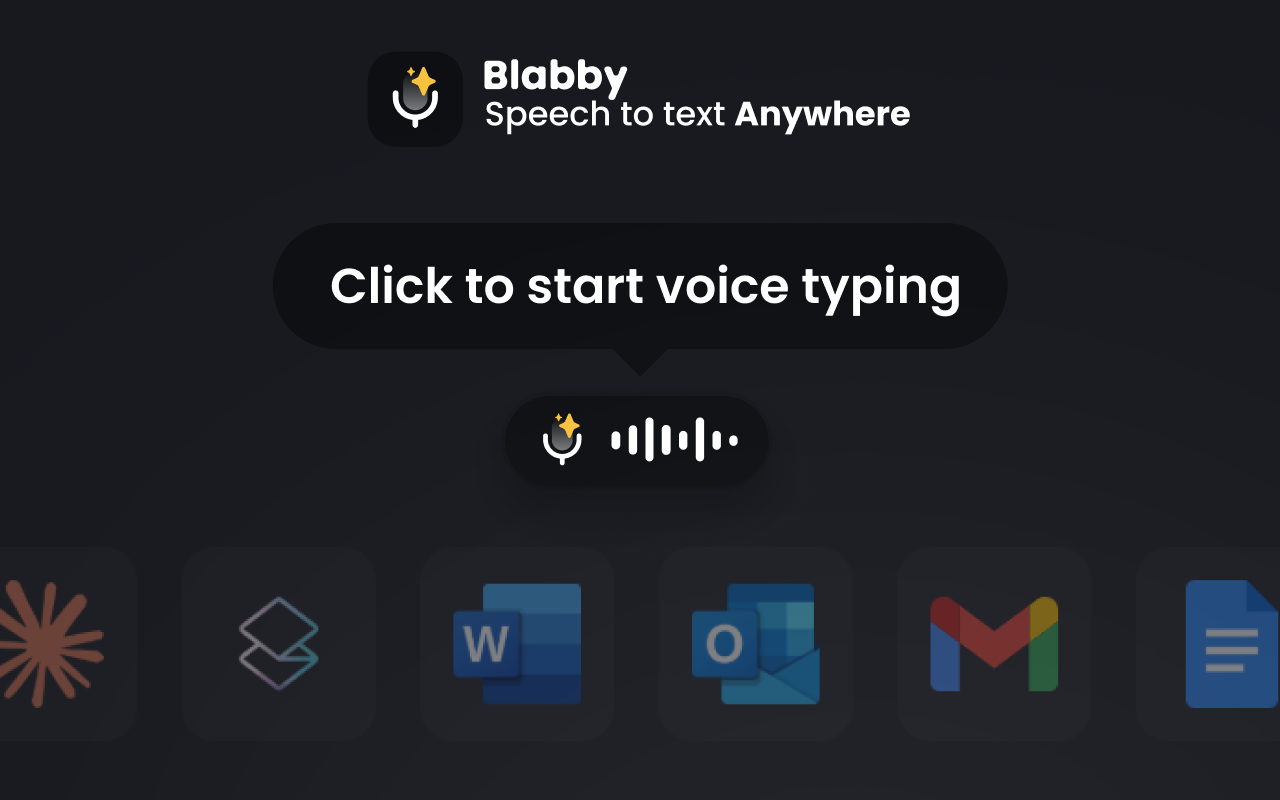
Why this matters: A browser dictation page is fine for jotting a note you will paste later. But most writing does not happen on a single website, it happens across a dozen apps. A system-wide tool like BlabbyAI meets you where you already are, instead of making you come to it.
Four Limits SpeechTexter Documents on Its Own Site
Most roundups describe SpeechTexter from the outside. Its own homepage is more useful, because it states the constraints plainly and they are the four things people hit. All quotes below are from speechtexter.com, checked in September 2026.
1. Desktop support is Chrome and nothing else
“other browsers are not supported”, speechtexter.com
This is the constraint that catches most people. SpeechTexter is built on the Web Speech API, which Chrome implements and Firefox and Safari largely do not. If your workplace standardises on Edge or Firefox, or you simply prefer Safari, the tool does not degrade gracefully, the microphone button stops working. BlabbyAI does not depend on a browser engine at all: the Windows app captures audio itself, and the Chrome extension is an option rather than a requirement.
2. The Android app has been discontinued
“the android app is no longer supported”, speechtexter.com
SpeechTexter used to ship a mobile app and no longer maintains it. The mobile web version still works in Chrome on Android, but iPhone and iPad are explicitly out, the site says "iPhones and iPads are not supported". That matters if you were counting on the same tool across devices.
3. Commands are a fixed list, and two of them are hashtags
“#newparagraph, #newline, #undo, #redo”, speechtexter.com
SpeechTexter has a built-in command panel, visible on the right of its editor. Punctuation is spoken naturally ("period", "comma", "question mark"), but structural commands are typed as literal hashtags. You say "hash newparagraph" to get a paragraph break. It works, and it is a fixed vocabulary you have to learn and cannot change.
4. It needs a live internet connection
“Network error: the internet connection is poor”, speechtexter.com
Recognition happens on Google servers, not on your machine, so a weak connection produces the error above rather than a slower transcript. There is no offline mode to fall back on.
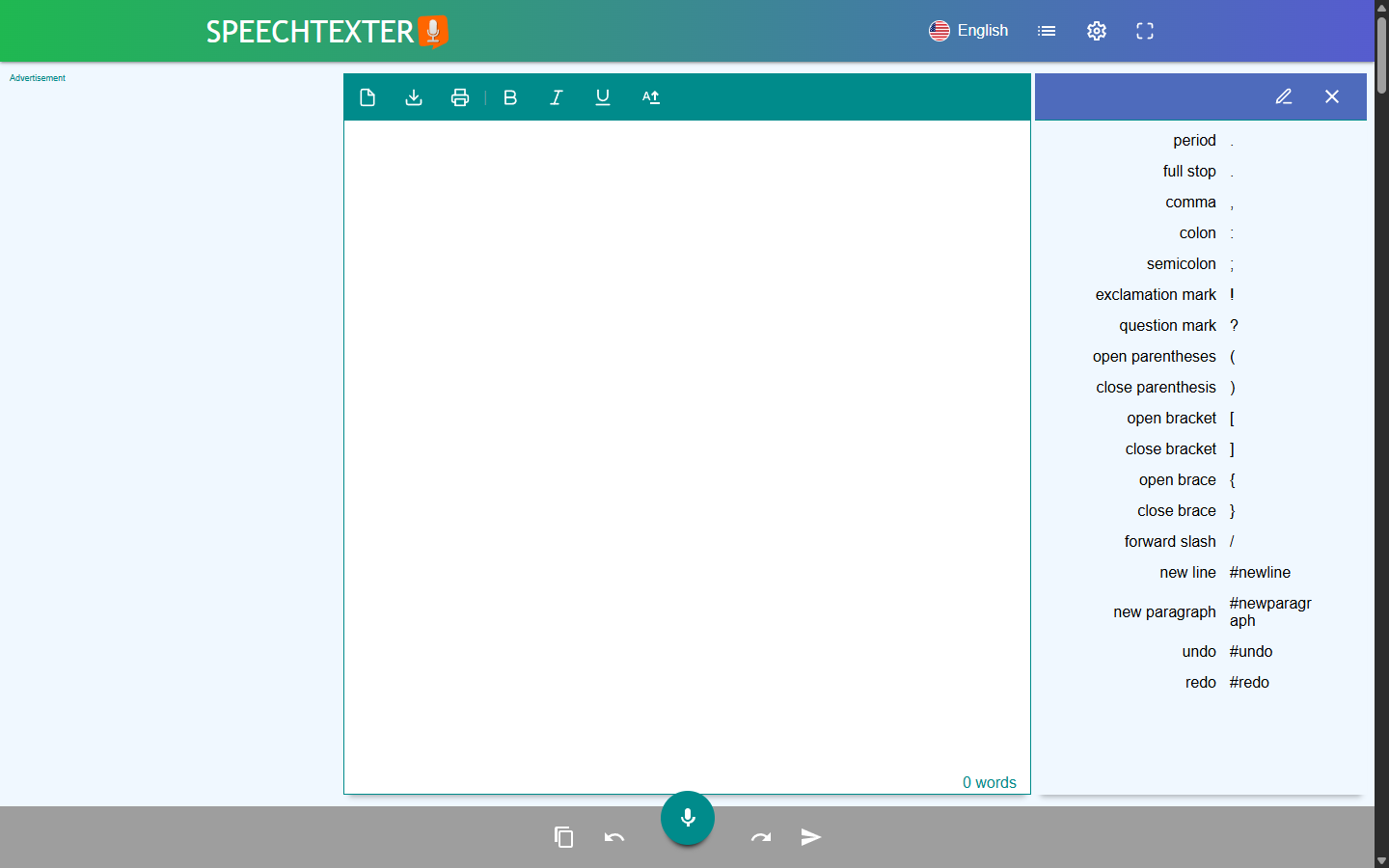
Source: the SpeechTexter web editor. The command panel on the right is the full list, and the advertisement slot sits to the left of the writing area.
Accuracy: A Modern Engine vs the Browser Default
SpeechTexter routes your voice through the browser's built-in Google Web Speech recognition. For simple notes in a quiet room it is fine, users generally report better than 90% accuracy, but that older engine tends to stumble on proper nouns, technical terms, and any background noise, and there is no learning or personalization on top.
BlabbyAI runs on OpenAI's Whisper v3 Turbo, the same family of models that set recent benchmark records. In MLCommons' 2025 benchmark, Whisper reached 97.93% word accuracy on clean LibriSpeech audio (MLCommons, September 2025). Your real-world number always depends on your microphone, accent, and surroundings, but building on Whisper means the accuracy ceiling is genuinely high, and independently verified.
Why the engine matters: Picking a dictation tool is partly picking a speech model. BlabbyAI runs on Whisper v3 Turbo, a model with public, third-party accuracy results you can look up. The browser's default engine has no comparable published benchmark, and no way to improve for your voice.
Where Both Engines Struggle, and What You Can Do About It
Benchmarks use clean, read speech. Real dictation is full of things no benchmark contains: a colleague's surname, your company's product names, an acronym your industry uses and nobody else does. Any speech engine will guess at these, and it will guess the common word.
With SpeechTexter there is no lever here. Recognition happens in Google's service through the browser, and the page gives you no way to teach it anything. You correct the same word by hand every time.
BlabbyAI has a custom spelling list per language. You add the exact spelling you want, whether that is a name, a brand, or "colour" over "color", and the transcript matches it from then on. It is a small feature that quietly removes most of the repeated corrections in daily use, and it is the practical answer to the accuracy question for anyone whose work has its own vocabulary. There is more in our guide to dictation with custom vocabulary.
Where Your Audio Actually Goes
This question comes up more with browser tools than desktop ones, partly because a free ad-supported page invites it. It is worth being concrete rather than reassuring.
SpeechTexter uses the browser's Web Speech API, which means your audio goes to Google's speech service for recognition rather than being processed on your own machine. That is why the site reports a network error when the connection drops, instead of simply running slower. The text itself stays in the browser editor until you copy it out or close the tab.
BlabbyAI transcribes under a zero data retention policy, so audio sent for transcription is not kept once the text comes back. The part worth knowing about is History: BlabbyAI keeps a record of your recent dictations, including the audio, and that record lives on your own disk rather than on a server. It holds 500 entries by default, dropping the oldest as new ones arrive, and you can raise that limit or switch it off in settings. Nothing in History is uploaded.
The practical difference: with a browser dictation page, your last hour of dictation exists only as text you either pasted somewhere or lost when the tab closed. With a local History you can go back and find what you said this morning, and it never left your machine to make that possible.
BlabbyAI vs SpeechTexter: Feature Comparison
| Feature | BlabbyAI | SpeechTexter |
|---|---|---|
| Speech engine | OpenAI Whisper v3 Turbo (public benchmark) | Browser's built-in Google Web Speech |
| Works system-wide | Yes, in any app | No, only on its own site |
| Native Windows app | Yes (Windows 10 & 11) | No, web only (needs Chrome) |
| Punctuation | Automatic | Manual or spoken commands |
| AI editing modes | Grammar, rewrite, translate, custom | None |
| Languages | 90+ (auto-detect) | 70+ (pick one at a time) |
| Browser requirement | None for the desktop app | Desktop Chrome only |
| Voice commands | You define your own, in plain English | Fixed list, two are hashtags |
| Custom spelling | Yes, per language | No |
| Mobile app | Android app (free during the beta) | Android app discontinued; no iPhone or iPad |
| Ads | None | Yes (ad-supported) |
| Price | Free tier, $8.49/month unlimited | Free (ad-supported) |
The honest summary: SpeechTexter competes on one thing, being free and instant in a browser. BlabbyAI competes on everything after that, where the words go, how accurate they are, and what the AI can do with them, while still giving you a free tier to start.
AI Modes: More Than Raw Transcription
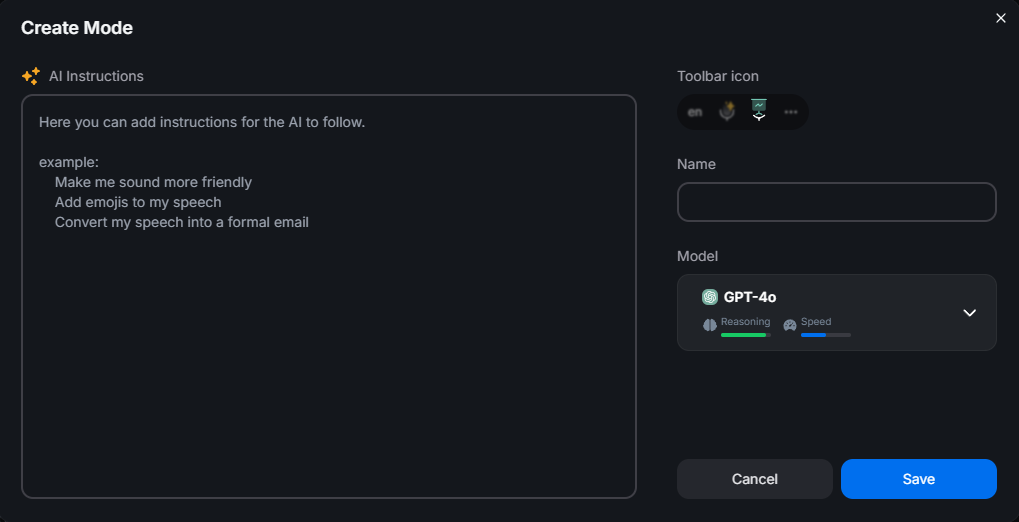
SpeechTexter does one job: it converts speech to text and stops there. There is no grammar cleanup, no rewriting, no translation. BlabbyAI adds a layer on top, custom modes you write yourself as plain instructions.
A few things you can set up in BlabbyAI in seconds:
- Translate as you speak: talk in your language, get clean English (or another language) out.
- Match a format: "turn this into a bulleted summary," or "write it as a short, professional email."
- Keep it raw: exact words, no cleanup, ideal for LLM prompts and code.
- Grammar-only: fix mistakes without changing your voice or tone.
Fixed Commands Versus Commands You Define
This is the difference that shows up every day, and it is the part most comparisons miss. Both tools let you control formatting by voice. They just disagree about who writes the command list.
SpeechTexter ships a fixed vocabulary, shown in the panel above. You learn its words, including the two hashtag ones, and that is the set. If you want a command it does not have, there is no way to add one.
BlabbyAI has no built-in command list at all, which sounds like less until you see why. A mode sends the AI your full literal transcript, command words included, so you describe the commands you want in plain English inside the mode's instructions. Write "whenever I say new paragraph, insert an actual paragraph break instead of writing those words" once, and it works from then on. The same trick defines anything else you want:
| What you want | SpeechTexter | BlabbyAI |
|---|---|---|
| A paragraph break | Say "hash newparagraph" | Say whatever you told it to listen for |
| Delete the last sentence | Not available | "If I say scratch that, remove the sentence I just said" |
| Start a bullet list by voice | Not available | "When I say bullet point, start a new list item" |
| Strip "um" and false starts | Not available | One line in the mode instructions |
| Speak Spanish, type English | Not available (pick one language at a time) | One mode, same keystroke |
One honest limit worth stating: a BlabbyAI mode works on one finished recording, after you stop talking, rather than editing live while you speak. So "scratch that" cleans up the transcript when you release the key, it does not erase words mid-sentence on screen. In practice that is how most people dictate anyway, in short bursts rather than one continuous stream.
Pricing: Free vs Free (and What You Get)
Both are free to start, so price alone will not decide this. SpeechTexter is free but ad-supported and limited to its own website. BlabbyAI is free to start with no ads, and its free tier runs the same Whisper v3 Turbo engine paid users get. When you outgrow it, unlimited Windows use is a flat $8.49/month with the ongoing Windows discount, which buys system-wide dictation, automatic punctuation, and AI modes.
How to Move Off SpeechTexter in About Five Minutes
There is nothing to export. SpeechTexter keeps your text in the browser editor, so once you have copied out anything you still need, switching is just installing the new tool and picking a key. On Windows it looks like this.
Install and sign in
Download the Windows app and create an account. The free tier gives you 60 credits a week, roughly 2,000 words, and no card is required to start. On an Android phone, install the Android app from Google Play instead. Anywhere else, add the Chrome extension, which covers anything you write in a browser tab.
Pick a push-to-talk key
Open Settings and choose a shortcut you can reach without looking. Most people use a key they never otherwise press, so it is worth spending a moment here. This is the step SpeechTexter has no equivalent of, because there you click a microphone button on a page.
Test it outside the browser
Put your cursor somewhere SpeechTexter could never reach: a Word document, the Outlook desktop app, a terminal, the search box of another program. Hold your key, say a sentence, release. The point of the test is the destination, not the transcript.
Rebuild your commands as a mode
If you leaned on #newparagraph or #newline, create one mode and describe those commands in plain English. Add anything SpeechTexter never offered while you are there, such as stripping filler words or fixing grammar. Assign it a second shortcut so you can switch between raw and cleaned output.
Add your own spellings
Names, brands and technical terms are where browser speech engines slip most. Under Settings, Languages, add the exact spelling you want for anything the transcript keeps getting wrong, and it will match it from then on.
Keep SpeechTexter bookmarked if you like. It costs nothing to leave it there for the odd moment you are on someone else's machine with only Chrome and no permission to install anything. That is the job it is genuinely best at, and it is a narrower job than most people realise when they first land on it. For a wider look at the category, see our guide to the best dictation apps, or the Windows speech to text page if you just want the download.
Which Should You Choose?
Choose BlabbyAI if
- You want to dictate into any app, not copy-paste from a web page
- You are on Windows and want a native app
- You want modern Whisper accuracy and automatic punctuation
- You want AI cleanup, rewriting, or translation as you talk
- You would rather not type next to ads
Choose SpeechTexter if
- You just want a free, zero-install browser page
- You only need occasional quick notes
- You do not mind copy-pasting and don't need AI
Both are capable at what they set out to do. But if you dictate more than the occasional note, and you want those words to land straight in the app you are working in, BlabbyAI is built for exactly that, and it still starts free.
Try BlabbyAI Free
Test real dictation on Whisper v3 Turbo with no credit card, then go unlimited on Windows from $8.49/month whenever you are ready.
Frequently Asked Questions
Is BlabbyAI a good SpeechTexter alternative?
Yes. SpeechTexter is a free browser page for quick notes, but it only works on its own website and runs on the browser’s built-in speech engine. BlabbyAI is a real Windows app built on OpenAI’s Whisper v3 Turbo that dictates system-wide into any app, adds AI modes for cleanup and translation, and still has a free tier to start, with an Android app and a Chrome extension alongside it. For anyone who wants to dictate everywhere, not just in one tab, BlabbyAI is the upgrade.
Is SpeechTexter really free?
Yes, SpeechTexter is free with no download or account, but it is ad-supported, so you type next to advertisements. It also only works inside the SpeechTexter website. BlabbyAI is free to start with no ads and no credit card, and unlimited Windows use is currently $8.49/month with the ongoing Windows discount when you outgrow the free tier.
Why can’t SpeechTexter type into Gmail, Word, or ChatGPT?
SpeechTexter runs entirely inside its own web page, so your words land in its on-screen editor and you copy-paste them out. It does not insert text at your cursor in other apps. BlabbyAI is system-wide: you press a hotkey and speak, and your words appear directly wherever your cursor is, in Gmail, Word, ChatGPT, Slack, and everywhere else you write.
Is BlabbyAI more accurate than SpeechTexter?
BlabbyAI runs on OpenAI’s Whisper v3 Turbo, part of the Whisper large-v3 family that reached 97.93% word accuracy on clean LibriSpeech audio in MLCommons’ 2025 benchmark. SpeechTexter uses the browser’s built-in Google Web Speech engine, which is fine for simple notes but tends to stumble on proper nouns, technical terms, and background noise. A modern Whisper engine sets a noticeably higher accuracy ceiling.
Do I have to say punctuation out loud in BlabbyAI?
No. In SpeechTexter you add punctuation manually or by speaking commands like “period” and “question mark.” BlabbyAI formats punctuation automatically as you talk, and its AI modes can clean up grammar and structure on top, so you get finished text without narrating every comma.
Does SpeechTexter work on Windows and in any browser?
SpeechTexter runs in the browser and needs the latest Google Chrome on desktop; it is not a native Windows app and does not support iPhone or iPad. BlabbyAI is built natively for Windows 10 and 11 and also ships an Android app and a Chrome extension, so you can dictate on your desktop system-wide, on your phone, or in the browser when that is all you have.
How much does BlabbyAI cost compared to SpeechTexter?
SpeechTexter is free but ad-supported and limited to its own site. BlabbyAI is also free to start, with a free tier that uses the same Whisper v3 Turbo engine paid users get. Unlimited Windows use is currently $8.49/month with the ongoing Windows discount, which buys you system-wide dictation, AI modes, and no ads.
Does SpeechTexter work in Firefox, Safari, or Edge?
No. SpeechTexter’s own site states that on desktop it needs the latest version of Google Chrome and that "other browsers are not supported". It is built on the Web Speech API, which Chrome implements and Firefox and Safari largely do not. On Android it also lists Edge, Opera, Brave and Vivaldi, but iPhones and iPads are not supported. BlabbyAI does not depend on a browser engine: the Windows app captures audio itself, so your browser choice is irrelevant.
Does SpeechTexter still have a mobile app?
No. SpeechTexter’s site states that the Android app is no longer supported. The mobile web version still runs in Chrome on Android, and iPhone and iPad are explicitly not supported. If you were relying on the same tool across desktop and phone, that path is closed. BlabbyAI has an Android app that adds a floating mic to any text field on your phone, on top of the keyboard you already use, and it is free during the beta.
How do voice commands like "new paragraph" work in each tool?
SpeechTexter ships a fixed command list shown beside its editor. Punctuation is spoken naturally ("period", "comma", "question mark"), but structural commands are literal hashtags: #newparagraph, #newline, #undo and #redo. You cannot add to that list. BlabbyAI has no built-in command list. Instead a custom mode receives your full transcript, so you describe the commands you want in plain English once, for example "whenever I say new paragraph, insert an actual paragraph break instead of writing those words", and it works from then on. You can define commands SpeechTexter never offered, such as removing a sentence or starting a bullet list.
Can I use SpeechTexter offline?
No. Recognition runs on Google’s servers through the browser, not on your machine, so a weak connection produces a network error rather than a slower transcript. SpeechTexter documents this in its FAQ. There is no offline mode in either tool, but BlabbyAI keeps its History of recent dictations, including the audio, locally on your own disk rather than on a server.
Should I choose BlabbyAI or SpeechTexter?
Choose SpeechTexter if you just want a free, zero-install browser page for occasional quick notes and you do not mind copy-pasting the result. Choose BlabbyAI if you want to dictate directly into any app on Windows, with a modern Whisper engine, automatic punctuation, and AI modes, starting free and going unlimited from $8.49/month.
The Bottom Line
SpeechTexter is a genuinely useful free tool for quick voice notes in a browser, and if that is all you need, it does the job. But it lives in one tab, runs on the browser's built-in engine, and stops at raw transcription. BlabbyAI is built for Windows, dictates system-wide into every app, runs on a benchmark-leading Whisper v3 Turbo engine, formats punctuation for you, and layers on AI modes, all with a free tier to start and unlimited use from $8.49/month. If you dictate more than the occasional note, start free with BlabbyAI and let your own results make the case.
Sources
Specifications, features, and pricing were gathered from each product's official website and documentation, plus the third-party sources listed below, as of July 2026. Pricing and features can change; check the vendor's site for the latest.
- MLCommons, "Whisper: An MLPerf Inference Benchmark for ASR," September 2025, mlcommons.org (retrieved 2026-07-21).
- Mobius MD, "Typing vs. Dictation: Which is faster?," mobius.md (retrieved 2026-07-21).
- SpeechTexter, speechtexter.com (retrieved 2026-07-21).