
Published July 21, 2026 · By Sumbat.T
Speechify Alternative: BlabbyAI vs Speechify for Dictation in 2026
Quick Verdict
- Speechify is a text-to-speech app first: its whole reputation is built on reading text aloud with 1,000+ AI voices. Its Voice Typing dictation is a free add-on, not the main product.
- BlabbyAI is built for dictation from the ground up, running on OpenAI's Whisper v3 Turbo, with fully customizable modes and a Windows app, an Android app and a Chrome extension.
- If you want your voice turned into clean, formatted text (and want control over how), a dictation-first tool fits better than a reading app that also dictates.
- BlabbyAI is free to start with no card, and unlimited Windows dictation is $8.49/month. Speechify Premium (the reader) runs about $139/year.
Get BlabbyAI for Windows
Dictation-first AI, built for turning your voice into clean text.
Speechify is one of the biggest names in voice tech, with more than 60 million users. But most of those users came for one thing: having articles, PDFs, and documents read aloud to them. Speechify has since added a free Voice Typing feature that goes the other way, turning your speech into text. It is genuinely useful. The question this article answers is simple: if dictation is what you actually care about, is a text-to-speech app the right tool, or is a purpose-built dictation app like BlabbyAI the better fit? Here is an honest, side-by-side look.
What Are BlabbyAI and Speechify?
The two tools point in opposite directions at their core, then overlap on one feature. Understanding that is the whole comparison.
Speechify is a text-to-speech platform. Its flagship products read written content out loud in 1,000+ AI voices across 60 languages, plus voice cloning, dubbing, and an AI voice generator. On top of that, it offers a free Voice Typing feature that dictates into your apps with automatic punctuation and cleanup. Dictation is a recent addition to a company whose identity is reading, not writing.
BlabbyAI is a dictation tool, full stop. It is built on OpenAI's Whisper v3 Turbo, one of the most accurate open speech models available, and it is Windows-first. It turns your voice into clean text system-wide, adds automatic punctuation, and lets you write your own custom AI modes to shape the output. It also ships an Android app and a Chrome extension. Everything in the product exists to make dictation better, because that is the only job it does. If Windows is where you work, see our voice typing on Windows 11 guide for setup.
Built for Dictation vs Bolted On
Speechify Voice Typing is a good free feature. It types into apps like Gmail, Google Docs, Notion, and Slack, adds punctuation, and removes filler words. If you already pay for Speechify to read your documents, getting dictation for free is a nice bonus.
But it is one feature inside a reading app, and it shows. There are no custom modes, no way to write your own formatting instructions, and no translation-as-you-speak. The cleanup is a fixed pass you cannot steer. For a company, that is the right call: dictation is not their core business, so it does not get the depth a dedicated tool gives it. BlabbyAI spends all of its engineering on exactly this problem, which is why the dictation experience goes deeper.
The simple test: if your main need is having text read aloud, Speechify is excellent and BlabbyAI does not compete. If your main need is turning your voice into clean, formatted text, you want the tool that was built for that, not the reading app that also does it.
Custom Modes: You Write the Instructions
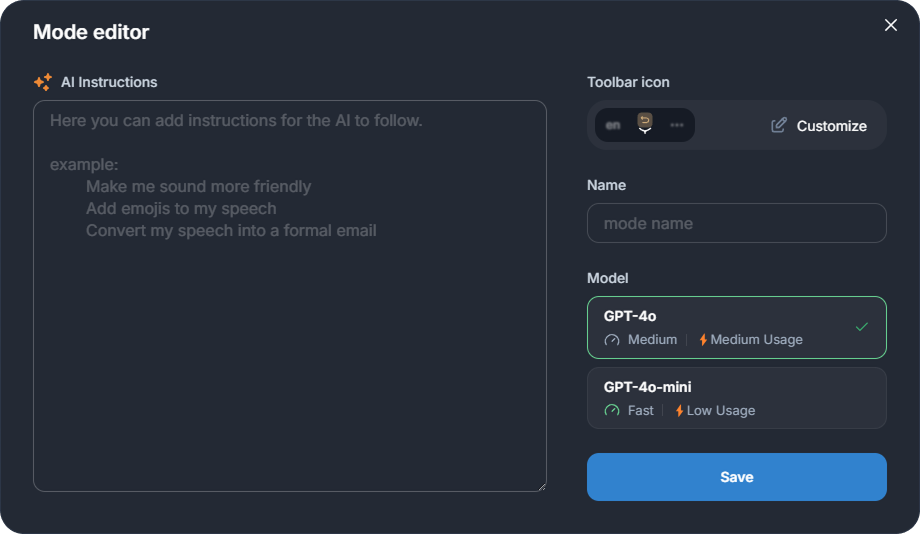
This is the clearest capability gap. Speechify Voice Typing gives you one fixed cleanup behavior. BlabbyAI lets you write your own modes, instructions the AI applies after it transcribes your speech.
A few things you can set up in BlabbyAI in seconds:
- Translate as you speak: talk in your language, get clean English (or another language) out.
- Match a format: "turn this into a bulleted summary," or "write it as a short, professional email."
- Match your field: a legal style, a clinical note style, or any repeating workflow you use.
- Keep it raw: exact words, no cleanup, ideal for prompting ChatGPT, Claude Code, and other LLMs.
Speechify cannot do this. Its Voice Typing has one job and one behavior. That is fine for quick notes, but it means the output is whatever Speechify decided, not what you need. For the wider landscape, see our guide to the best voice typing software in 2026.
BlabbyAI vs Speechify: Dictation Feature Comparison
| Feature | BlabbyAI | Speechify |
|---|---|---|
| Core product | Dictation (speech to text) | Text to speech (reading aloud) |
| Speech engine | OpenAI Whisper v3 Turbo (public benchmark) | Proprietary (no public WER) |
| Custom modes | Yes, write your own | No, fixed cleanup |
| Auto punctuation | Yes | Yes |
| Dictation Chrome extension | Yes | No (extension is for the reader) |
| Windows focus | Windows-first | Cross-platform, reader-led |
| Dictation price | Free to start, $8.49/mo unlimited | Free (Premium reader ~$139/yr) |
A Note on Pricing
To be fair to Speechify: its Voice Typing dictation is free with no usage caps. So if all you want is basic free dictation, price is not a reason to switch. The pricing conversation only matters if you are weighing Speechify's paid ecosystem.
Speechify Premium, the text-to-speech reader with 1,000+ voices and faster playback, runs about $139/year or $29/month. It is also worth knowing that Speechify is not BBB-accredited and has drawn roughly 90 Better Business Bureau complaints in the last three years, clustering around billing and cancellation, so read the trial and refund terms before you sign up (Better Business Bureau, 2026). BlabbyAI keeps it simple: free to start with no card, and unlimited Windows dictation at a flat $8.49/month.
Which Should You Choose?
Choose BlabbyAI if
- Your main goal is dictation, not listening
- You want custom modes for your own style
- You prompt ChatGPT, Claude Code, and other LLMs
- You are on Windows and want it built for you
- You want a Chrome extension for dictation
Choose Speechify if
- Your main goal is having text read aloud
- You want 1,000+ AI voices and voice cloning
- You just need basic free dictation now and then
These are not really the same product, and a lot of people use both: Speechify to listen, a dictation tool to write. If writing by voice is the part you care about, BlabbyAI is built for exactly that.
Try BlabbyAI Free
Purpose-built AI dictation on Whisper v3 Turbo, no credit card. Unlimited Windows use from $8.49/month whenever you are ready.
Frequently Asked Questions
Is BlabbyAI a good Speechify alternative for dictation?
Yes, if dictation is what you actually want. Speechify is a text-to-speech app first, and its Voice Typing is a free add-on. BlabbyAI is built specifically for dictation, running on OpenAI’s Whisper v3 Turbo, with custom modes you write yourself and a Chrome extension. For turning your voice into clean text on Windows, it is the more focused tool.
Does Speechify do speech-to-text, or just text-to-speech?
Both, but text-to-speech is the core product. Speechify built its brand on reading text aloud with 1,000+ AI voices. It added a free Voice Typing dictation feature that types into your apps with automatic punctuation and cleanup. It works, but it sits on top of a reading app rather than being the main event.
Is Speechify Voice Typing free?
Yes, Speechify Voice Typing (its dictation feature) is free with no usage caps. Note that Speechify Premium, the text-to-speech product with 1,000+ voices and faster playback, is a separate paid subscription at around $139/year or $29/month.
How much does Speechify cost?
Speechify Voice Typing is free. Speechify Premium (the TTS reader) is about $139/year, or $29/month billed monthly. Speechify is not BBB-accredited and has drawn roughly 90 Better Business Bureau complaints in three years, many about billing and cancellation, so read the trial and refund terms before signing up. BlabbyAI is free to start with no card, and unlimited Windows dictation is $8.49/month.
Can I customize how BlabbyAI formats my text?
Yes. BlabbyAI custom modes let you write your own instructions: translate to another language, match a specific email format, keep it as raw text for LLM prompts, fix grammar only, or match a professional style like legal or medical. Speechify Voice Typing applies a fixed AI cleanup you cannot steer.
Does BlabbyAI have a Chrome extension for dictation?
Yes. BlabbyAI ships a Chrome extension built for dictation, which is handy when you cannot install a desktop app, on a Chromebook or a managed work laptop. Speechify also offers browser tools, so check its site for the current details; the difference is that BlabbyAI is purpose-built for turning your voice into text, in the browser and system-wide on Windows.
How accurate is BlabbyAI?
BlabbyAI runs on OpenAI’s Whisper, which reached 97.93% word accuracy on clean LibriSpeech audio in MLCommons’ 2025 benchmark. Real-world accuracy depends on your microphone, accent, and background noise, but a Whisper-based engine sets a high, independently verified ceiling.
Should I choose BlabbyAI or Speechify?
Choose BlabbyAI if your main goal is dictation: turning your voice into clean, formatted text with custom modes, on Windows, on Android or in the browser. Choose Speechify if your main goal is having text read aloud to you, since that is what it is built for and does best. Many people end up using a reader and a dictation tool for two different jobs.
The Bottom Line
Speechify is an excellent text-to-speech app, and its free Voice Typing is a nice bonus if you already live in that ecosystem. But dictation is a side feature there, not the mission. BlabbyAI is built for dictation alone: a benchmark-leading Whisper v3 Turbo engine, custom modes you write yourself, a Windows-first app, an Android app, and a Chrome extension. If turning your voice into clean text is the job you actually want done, start free with BlabbyAI and let your own results make the case.
Sources
Specifications, features, and pricing were gathered from each product's official website and documentation, plus the third-party sources listed below, as of July 2026. Pricing and features can change; check the vendor's site for the latest.
- MLCommons, "Whisper: An MLPerf Inference Benchmark for ASR," September 2025, mlcommons.org (retrieved 2026-07-21).
- Speechify, speechify.com (retrieved 2026-07-21).
- Better Business Bureau, "Speechify Inc, Complaints," bbb.org (retrieved 2026-07-21).