
Published October 8, 2026 · By Sumbat.T
The 7 Best Speech to Text Apps for Android in 2026
Quick Answer
The best speech to text app for Android depends on how much you write
For the odd short text, the mic on Gboard or Samsung Keyboard is free and already on your phone. For longer messages, emails and notes, our pick is Blabby: a floating mic that types into any app on top of the keyboard you already use, with Whisper accuracy, automatic punctuation, and AI modes that turn a rambling voice note into a clean email.
Blabby for Android is in beta, and it's completely free while the beta runs, no card needed. The closest AI alternative, Wispr Flow, is $15 a month and allows 1,000 free words a week on mobile. Disclosure: Blabby is our app.
Works in every Android app





Talk in any app. Get clean, punctuated text.
A floating mic for WhatsApp, Gmail, Google Docs and every other app on your phone. Keeps your keyboard. Free during the beta.
Talking is the fastest way to get words into a phone. In a Stanford study published in 2017, people entered English text by speech at 153 words per minute against 52 on a phone keyboard, nearly three times faster, and made fewer mistakes along the way. Android runs on 69% of the world's phones (StatCounter, September 2026), and every one of them already has a mic on the keyboard.
So the real question is what you get beyond that free mic. We compared seven apps on the things that decide whether you keep using one: whether it types into other apps or only into its own notepad, whether it fixes punctuation and filler words for you, whether you have to give up your keyboard, and what it actually costs. Prices were read from each vendor's own pricing page on October 8, 2026.
| App | How it works | Types into other apps | Free plan | Paid price |
|---|---|---|---|---|
 Blabby Blabby | Floating mic over your keyboard | Yes, any app | Free while in beta, no card | None during the beta |
 Gboard voice typing Gboard voice typing | Mic key on the Gboard keyboard | Yes, while Gboard is your keyboard | Fully free | None |
Samsung voice input | Mic key on Samsung Keyboard | Yes, while Samsung Keyboard is active | Fully free | None |
 Wispr Flow Wispr Flow | Floating bubble (Android 13+) | Yes, any app | 1,000 words a week on mobile | $15/mo, or $12/mo billed yearly |
 Aqua Voice Aqua Voice | Floating button (Android 10+) | Yes, any app | 1,000 words | $10/mo, or $8/mo billed yearly |
 Typeless Typeless | AI voice keyboard | Yes, while it is your keyboard | Limited words each week | $30/mo, or $12/mo billed yearly |
 Otter.ai Otter.ai | Recorder and meeting notes | No, text stays in Otter | 300 minutes a month | $16.99/mo, or $8.33/mo billed yearly |
Keyboard mic or floating mic: the difference that matters most
Android gives a dictation app two ways to put text into WhatsApp, Gmail or anything else, and which one an app uses shapes your whole experience.
Keyboard apps replace your keyboard. Gboard, Samsung voice input and Typeless work this way: the mic is a key, so you can only dictate while that keyboard is active. If you love your current keyboard's swipe typing, layout or autocorrect, switching to dictate means giving those up or flipping keyboards back and forth.
Floating apps sit on top of whatever keyboard you use. Blabby, Wispr Flow and Aqua Voice show a small button next to the focused text field and type into it through Android's accessibility service. Your keyboard stays exactly as it is, and the mic shows up in every app. The trade-off is a one-time Accessibility permission during setup, because that is the only way Android lets one app type into another.
1. Blabby: best for writing in every app
Best for: anyone who writes real sentences on their phone, from long WhatsApp replies to work email, and wants finished text instead of a raw transcript.
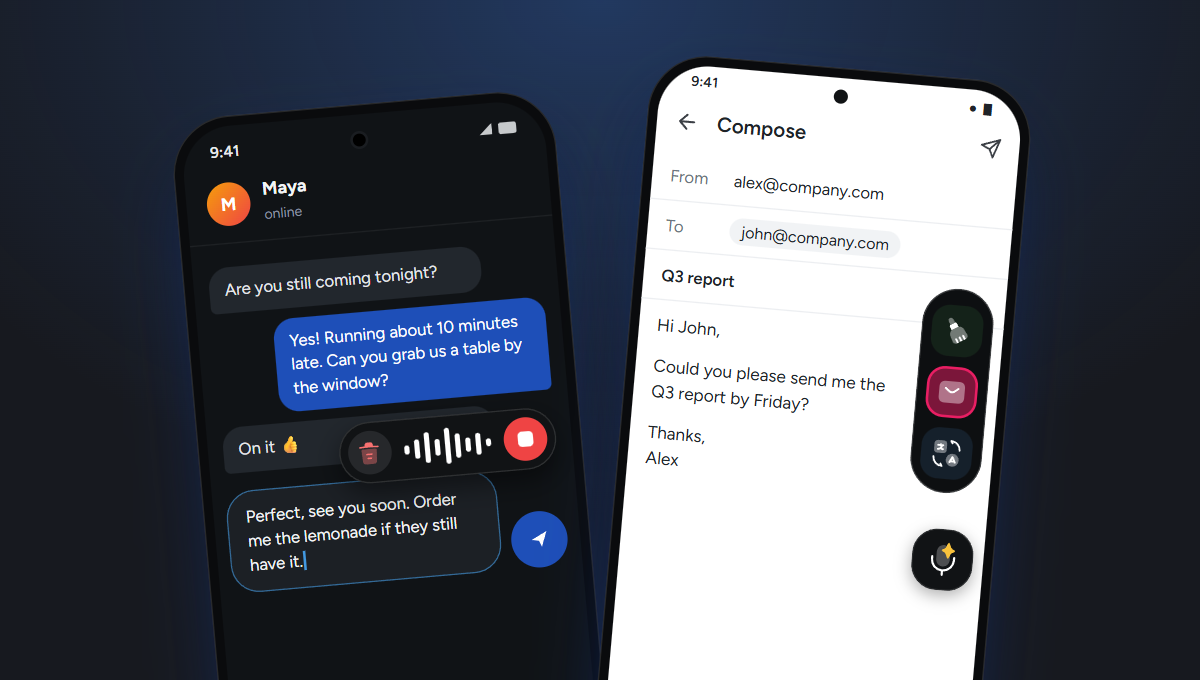
Blabby adds a floating mic that appears whenever a text field is focused, in any app, even with the keyboard hidden. Tap it to start and tap stop when you are done, or hold it like a voice note and let go to send. Slide toward the trash while holding to cancel. Your speech is transcribed by OpenAI's Whisper large v3 turbo model, punctuated, and typed straight into the field you were in, while Gboard, Samsung Keyboard or SwiftKey stays as your keyboard.
What separates it from the keyboard mics is modes. A mode is a short instruction Blabby applies to what you said before it lands. Open the side bar, tap Email, and say:
What you say
“hey john send me the q3 report by friday thanks”
What Blabby types
Hi John, Could you please send me the Q3 report by Friday? Thanks, Alex
It ships with Cleanup, Email and Translate modes, and you can write your own: bullet points, a friendlier tone, or a rule that turns “new paragraph” into an actual line break. Custom spellings teach it names and jargon, snippets swap a phrase like “my address” for saved text, and it handles 90+ languages with auto-detect.
- Pros: works in every app; keeps your keyboard; automatic punctuation; your own AI modes; custom spellings and snippets; 90+ languages; text already in a field never leaves your phone
- Requires: Android 10 or later and a Google sign-in
- Price: free while the Android app is in beta, no card needed
Setting it up takes two minutes: install it from Google Play, turn it on in Accessibility settings (the app opens the right screen and floats a short video over it), then tap any text field. More on Blabby's voice to text app for Android.
2. Gboard voice typing: best free built-in
Best for: short texts and searches, with nothing to install.
Gboard is the default keyboard on most Android phones, and its mic key types into any app. On most phones you add punctuation by saying it (“comma”, “period”, “new line”). Pixel 6 and later phones get advanced voice typing with more automatic punctuation and voice editing, and the newer editing commands are gated further: “Fix it” and detailed edits need a Pixel 8 in US English, and rewrite commands like “Formalize” need a Pixel 9.
In 2026 Google added Rambler, which removes filler words and handles self-corrections. It launched with the Pixel 11, text appears only after you tap a checkmark rather than as you speak, and Google notes that usage limits may apply. If your phone is not a recent Pixel, you get the basic mic. If voice typing stops responding, our guide to voice typing not working covers the usual fixes.
- Pros: free; already installed; types into any app
- Cons: only works while Gboard is your keyboard; the best features are limited to recent Pixels; no custom instructions
- Price: free
3. Samsung voice input: best free option on Galaxy phones
Best for: Galaxy owners who use Samsung Keyboard and want dictation without extra apps.
Samsung's mic lives in Samsung Keyboard, and per Samsung's own support page it is only available while that keyboard is in use. You can switch it to Google voice typing in the keyboard settings, and you can download language packs so it keeps working without a connection. Galaxy AI's Writing assist can proofread and change the tone of a message, but it is a separate step after you dictate rather than part of the dictation itself.
- Pros: free; built into Galaxy phones; offline language packs
- Cons: tied to Samsung Keyboard; cleanup is a separate manual step
- Price: free
Keep Gboard or Samsung Keyboard
Add AI modes on top of the keyboard you have
Blabby floats over any keyboard. Say a rough message, get a clean email or a translation, in the same tap.
4. Wispr Flow: well-known AI dictation, at a higher price
Best for: people already paying for Wispr Flow on a Mac or iPhone.
Wispr Flow came to Android in February 2026. Like Blabby, it uses a floating bubble rather than a keyboard and types into any app through accessibility. It removes filler words, handles backtracking (“5, actually 6pm” becomes “6pm”), and lets you pick a style per app. It needs Android 13 or later, hides the bubble in password and number fields, and turns itself off in banking apps.
The catch is cost. Wispr Flow Pro is $15 a month, or $12 billed yearly, and the free tier allows 1,000 words a week on mobile, half of what you get on desktop. Blabby covers the same floating, any-app dictation and is free while its Android app is in beta. Our Wispr Flow pricing breakdown has the details.
- Pros: floating bubble keeps your keyboard; filler removal; per-app styles
- Cons: Android 13+ only; $15/month; 1,000 free words a week on mobile
- Price: $15/month, or $12/month billed yearly
5. Aqua Voice: floating button with tiered plans
Best for: people who want voice editing and style rules, and do not mind a word-capped plan structure.
Aqua Voice is also a floating button, not a keyboard, on Android 10 and later. It removes ums, fixes grammar, supports voice edits, and has a custom dictionary and style rules. Pricing starts with 1,000 free words, then Pro at $10 a month ($8 yearly) and Max at $30 ($24 yearly), with one subscription covering every platform. Our Aqua Voice review goes deeper.
- Pros: floating button; voice editing; style rules
- Cons: small free allowance; top features on the $30 plan
- Price: $10/month ($8 yearly), Max $30/month ($24 yearly)
6. Typeless: AI voice keyboard
Best for: people happy to make a dictation app their main keyboard.
Typeless launched on Android in January 2026 as an AI voice keyboard. It removes filler words, handles self-corrections, formats lists and translates, across 100+ languages. Because it is a keyboard, you dictate while Typeless is your active keyboard rather than alongside your usual one. Pro is $30 a month, or $12 a month billed yearly, with a limited weekly free allowance. See our Typeless alternatives for how it compares.
- Pros: strong AI cleanup; translation; 100+ languages
- Cons: replaces your keyboard; $30/month unless you pay a year upfront
- Price: $30/month, or $12/month billed yearly
7. Otter.ai: for meetings, not for typing
Best for: recording and transcribing meetings, lectures and interviews.
Otter shows up on every “speech to text” list, but it is a different kind of app. It records a conversation and builds searchable notes inside Otter, with speaker labels and summaries; it does not type into WhatsApp or Gmail. The free plan covers 300 minutes a month at 30 minutes per conversation, and Pro is $16.99 a month or $8.33 billed yearly. Many people use both kinds of app: Otter to record the meeting, and Blabby to write the follow-up email.
- Pros: speaker labels; summaries; meeting integrations
- Cons: does not type into other apps; per-minute caps
- Price: free 300 min/month, Pro $16.99/month ($8.33 yearly)
Also considered
- Voicy has an Android app and lists Pro at $8.49 a month after a 30-minute free trial. Its site does not say whether it works as a keyboard or a floating button.
- Superwhisper now has an Android app with a floating bubble for phones (not tablets), covered by its Pro license.
- Speechnotes is a dictation notepad: you dictate inside the app and copy the text out. It does not type into other apps. See our Speechnotes alternatives.
- Dragon Anywhere is gone. Nuance's own store notes say it stopped selling on July 1, 2026, and renewals are no longer possible.
- Not on Android: Willow Voice (Mac, Windows and iPhone), Monologue and VoiceInk (Apple only).
Which one should you install?
- You send short texts and want free: use the mic that is already on your keyboard, Gboard or Samsung voice input.
- You write long messages, emails or notes: install Blabby. Punctuation, cleanup and your own modes save you from fixing the text afterwards, and your keyboard stays as it is.
- You speak one language and write in another: Blabby's Translate mode turns what you say into English in the same tap.
- You record meetings or lectures: that is a recorder's job, which is what Otter.ai does. Pair it with Blabby for everything you type afterwards.
Blabby on your computer too
The same dictation works at your desk. The Windows app types into any program with Ctrl+Space and keeps a local history of every recording, and the Chrome extension adds a mic to every text field in Chrome on Mac, Windows and Chromebook. For a wider comparison across platforms, see our best dictation apps guide.
Try it on your next message
Free while we're in beta. No card. Works in WhatsApp, Gmail, Docs and every other app.
Android speech to text questions
What is the best speech to text app for Android?
For writing messages, emails and notes in any app, Blabby: it puts a floating mic over the keyboard you already use, transcribes with Whisper large v3 turbo, adds punctuation, and can rewrite what you said with AI modes such as Email or Translate. The Android app is in beta and free while the beta runs, with no card. If you only send the odd short text, the free mic on Gboard or Samsung Keyboard is already on your phone. For recording meetings rather than typing, Otter.ai is a different kind of app built for that job.
Which is better, Google Voice typing or Samsung voice typing?
Both are free and both work in any app, but only from inside their own keyboard: Google voice typing lives in Gboard and Samsung voice input lives in Samsung Keyboard, and Samsung lets you switch its mic to Google voice typing if you prefer it. On a Pixel 6 or later, Gboard adds advanced voice typing with voice editing commands, and the Pixel 11 adds Rambler, which removes filler words. Neither lets you write your own AI instructions. Blabby runs on top of either keyboard, so you can keep the one you like and add AI modes to your dictation.
Is there a free dictation app for Android?
Yes. Gboard voice typing and Samsung voice input are completely free and already installed on most phones. For AI dictation, Blabby for Android is in beta and completely free while the beta runs, with no card. By comparison, Wispr Flow allows 1,000 free words a week on mobile and Aqua Voice starts with 1,000 free words.
Does Google have a dictation app?
Google’s dictation on Android is the voice typing mic built into the Gboard keyboard, which types into any app. Pixel phones add advanced voice typing, and on the Pixel 11 a feature called Rambler that cleans up filler words. For AI rewriting beyond that, such as turning a spoken note into a formatted email, you need a separate app like Blabby.
Do I have to switch keyboards to use a dictation app on Android?
It depends on how the app is built. Gboard, Samsung voice input and Typeless are keyboards, so you dictate while that keyboard is active. Blabby, Wispr Flow and Aqua Voice are floating buttons that use Android accessibility to type into the focused field, so your normal keyboard, swipe typing and autocorrect stay as they are.
Can I use speech to text in WhatsApp on Android?
Yes. Any keyboard mic works in the WhatsApp message box. With Blabby, tap the message box, tap the floating mic and speak; the text is typed into the box with punctuation so you can read it before you send it, instead of sending a voice note.
Is Dragon Anywhere still available for Android?
No. Nuance stopped selling Dragon Anywhere on July 1, 2026, and its own store notes say new subscriptions and renewals are no longer possible. Former users who want dictation that types into any Android app can use Blabby, which is free while its Android app is in beta.
Is there a Wispr Flow alternative for Android?
Yes. Blabby works the same way on Android, with a floating mic that types into any app over your own keyboard, and it supports Android 10 and later where Wispr Flow needs Android 13. Blabby for Android is free while it is in beta, while Wispr Flow is $15 a month ($12 billed yearly) with 1,000 free words a week on mobile.
Is talking faster than typing on a phone?
Yes, by a wide margin. In a Stanford study published in 2017, people entered English text by speech at 153 words per minute against 52 on a phone keyboard, nearly three times faster, and made fewer errors along the way. A dictation app that adds punctuation and cleans up your words keeps most of that speed for the final text.