
Updated August 28, 2026 · By Sumbat.T
Medical Voice Recognition Software in 2026: 9 Tools, Compared and Priced

The short answer
- The category is two different things wearing one name. Clinical systems such as Dragon Medical One integrate with the EHR and cost roughly $79 to $99 per user per month, often with a setup fee near $525. General dictation tools type into any text field for a fraction of that.
- The cheapest way to dictate into a record is a keyboard-level tool. BlabbyAI is $8.49/month unlimited, types into whatever field your cursor is in with no plugin and no per-EHR setup, and covers every other thing you write during the day as well. Free tier of 60 credits weekly, no card.
- Ambient AI scribes are a separate purchase at $99 to $199 per month. They draft the encounter note from the consultation. They do not help with the referral letters, email and paperwork around it.
- The question that decides it: what share of your typing is the encounter note, and what share is everything else? If it is mostly everything else, you are choosing the wrong category by starting with clinical systems.
The nine tools, compared
Prices below are per clinician and, where a vendor publishes only a range or quotes on request, that is what the row says rather than an invented figure. The column that matters most is not price, it is approach: whether the tool reaches your text through an integration or through the keyboard.
| Tool | Price | How it reaches your text | What it covers | Free option |
|---|---|---|---|---|
 BlabbyAI BlabbyAI | $8.49/mo | Types into any text field, no plugin | Notes plus everything else you type | 60 credits weekly, no card |
 Dragon Medical One Dragon Medical One | ~$79-$99/user/mo + ~$525 setup | Deep EHR integration | Clinical documentation | None |
 VoiceboxMD VoiceboxMD | Quoted | OS-level, EHR-agnostic | Clinical documentation | Demo |
 Suki Suki | ~$99-$199/user/mo | Ambient AI scribe | Encounter note only | Trial |
 Freed Freed | ~$99/user/mo | Browser-based AI scribe | Encounter note only | Limited trial |
 Amazon Transcribe Medical Amazon Transcribe Medical | Per second of audio | API, you build the front end | Whatever you build | Free tier by volume |
 Speechmatics Speechmatics | API pricing | API, you build the front end | Whatever you build | Trial credits |
 Philips SpeechLive Philips SpeechLive | Per user subscription | Dictation workflow plus hardware | Dictate now, transcribe later | Trial |
 Windows Win+H Windows Win+H | Free | Built in, any text field | Raw words, no cleanup | Unlimited |
Read down the price column and the range is close to two orders of magnitude, from free to roughly $2,400 a year per clinician. Software categories do not normally spread that far, and when one does it is almost always a sign that the products are not really substitutes for each other. That is exactly what is happening here.
The split nobody explains before you buy
Search for medical voice recognition software and the results mix two product types that solve overlapping but distinct problems. Almost every disappointed purchase in this category traces back to buying from the wrong column.
Clinical systems
Dragon Medical One, VoiceboxMD, PowerScribe, Suki, Freed
Built around the patient record
Cost: $79 to $199 per clinician per month
Reach: The EHR they support, and structured actions inside it. Strongest where documentation is templated and high volume.
General dictation tools
BlabbyAI, Wispr Flow, Superwhisper, Windows Win+H
Built around the keyboard
Cost: Free to about $15 per month
Reach: Every text field on the machine, including EHR boxes, email, referral letters, chat and documents. No per-system integration.
A clinical system earns its price when documentation is templated, structured and enormous in volume, and when the text has to do something inside the record rather than simply appear in it. Radiology reporting is the clearest example, which is why those systems are entrenched there and why we treat it separately on our radiology dictation software page.
A general dictation tool earns its place on a different argument entirely: it does not care what application you are in. BlabbyAI types into whatever text field currently has your cursor, so an EHR note box, an email, a referral letter, a chat message and a Word document are all the same operation. There is no plugin to install into the record system and nothing to configure per application, because from the tool's point of view it is simply typing on your behalf.
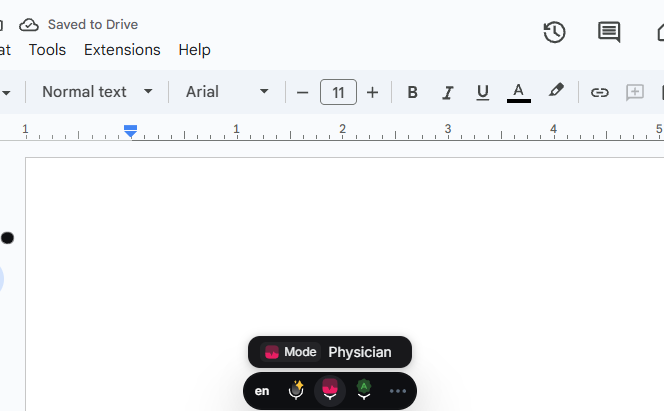
The toolbar sits over whatever you are working in, here in a Physician mode. The cursor is in the document, so that is where the text lands.
Count where your typing actually goes
This is the exercise worth doing before spending anything, and it takes one clinic day. Keep a rough tally of everything you type. Most clinicians who try it are surprised by the split, because the encounter note feels like the whole job and turns out to be a minority of the keystrokes.
Where the words go on a normal day
- Referral letters and clinic correspondence
- Email to colleagues, labs and administrators
- Internal chat and handover messages
- Insurance and prior authorisation paperwork
- Teaching material, audit notes and case write-ups
- The encounter note itself
Only the last line on that list is covered by an ambient scribe. A clinical dictation system covers that line and, depending on the integration, some of the correspondence. A keyboard-level tool covers every line, because every line is a text field. If your tally comes out heavily weighted toward the first five items, the expensive product is solving the smaller half of your problem.
Dictation that goes wherever your cursor is






One shortcut, every text field on the machine
BlabbyAI types into any Windows application on Ctrl+Space, into any app on your Android phone through a floating mic, and into any tab through the Chrome extension. No plugin, no per-system setup, $8.49 a month with a free tier of 60 credits weekly, and the Android app is free during the beta.

Dragon Medical One: the incumbent, and what it costs
Dragon Medical One is the reference point for the whole category, and for structured clinical documentation at scale it deserves that position. It carries a very large medical vocabulary, it has been refined against clinical speech for decades, and its integrations into major record systems are genuinely deep in a way that no general tool replicates.

Dragon Medical One's own options panel. Auto-text fields and voice-command feedback are the structured, in-record machinery that the licence fee pays for. Source: Microsoft product documentation.
The cost is the part people underestimate, because the monthly figure is quoted alone. Licences generally land between $79 and $99 per user per month and there is typically a setup fee around $525, so a single clinician's first year lands near $1,700 and a ten-person practice is in five figures before anyone has dictated a word. We break the arithmetic down properly on our Dragon Medical One pricing page.
None of that is an argument that Dragon is overpriced for what it does. It is an argument for being precise about what you are buying. If the structured, in-record capability is the thing you need, that is what the money is for. If what you actually wanted was to stop typing, you are paying a documentation-platform price for a dictation job, and BlabbyAI covers that job at $8.49 a month across every application rather than one.
Ambient scribes: Suki, Freed and the note-drafting group
Ambient AI scribes are the fastest-growing part of this market and they are frequently returned in searches for voice recognition, which confuses the comparison. They work differently from everything else here: the software listens to the consultation and drafts a structured note afterwards. You are not dictating. You are being recorded, and the model decides what belongs in the note and how to phrase it.
When that works well it is a genuine reduction in after-hours documentation, which is the problem it was built for. Two things follow from the design, and both are worth knowing before you buy. First, you review rather than compose, which some clinicians much prefer and others find slower than saying what they meant in the first place. Second, the scribe stops at the note. The referral letter you write afterwards, the email to the lab and the prior authorisation form are all still typed by hand at $99 to $199 a month.

What an ambient scribe actually does: it records the consultation, then drafts the structured note from it. You review rather than dictate. Source: Suki.
That is why scribes and general dictation are complements rather than competitors, and the pairing is affordable precisely because the second half does not have to be expensive. A scribe on the encounter note and BlabbyAI at $8.49 on everything else is a coherent setup. Two clinical platforms is mostly duplicated spend.
Amazon Transcribe Medical and Speechmatics: not products yet
These two appear near the top of the search results and they are excellent at what they do, but a clinician searching for software to use tomorrow should know what they are: APIs. Amazon Transcribe Medical is a speech recognition service billed per second of audio, with a medical vocabulary and specialty models. Speechmatics is a transcription engine sold to people building products.
Neither has a way for you to press a key and have words appear in your note. Somebody has to build that part. If your organisation has engineering capacity and a specific workflow to automate, they are strong foundations and the per-second billing can be very economical. If you want to dictate a letter this afternoon, they are the wrong shelf entirely, and the per-second model is unpredictable for sustained daily use in a way that a flat monthly price is not.
aws transcribe start-medical-transcription-job \
  --medical-transcription-job-name my-note \
  --language-code en-US \
  --specialty PRIMARYCARE \
  --type DICTATION \
  --media MediaFileUri=s3://bucket/recording.wav \
  --output-bucket-name my-output-bucket
This is the whole interface. Amazon Transcribe Medical is called from a terminal or from code, returns JSON, and has no window a clinician could open. That is the difference between a service and a product.
The free options, and what each one costs you instead
Free medical speech to text is one of the most common follow-up searches in this category, so it is worth being concrete. Three routes exist and each trades money for something else.

Windows dictation on Win+H. Free, unlimited and it types into any field, but the words arrive raw with no cleanup layer.
- Windows built-in dictation, Win+H. Free, unlimited, already installed, and it types into any field including an EHR box. What you give up is the cleanup layer: you speak punctuation aloud, and formatting and tidying are yours to do afterwards. For short entries it is genuinely fine and it costs nothing to try today.
- Open-source models such as Whisper. Free to run and very capable, but you are running them. That means hardware, a front end, and someone to maintain it. This is a project, not a tool, unless your organisation already has the engineering to absorb it.
- Free tiers on commercial tools. BlabbyAI gives 60 credits weekly, roughly 2,000 words, with no card required. That is deliberately not a working week, but it is easily enough to dictate fifty of your own real clinical sentences and count how many corrections you make, which is the only accuracy test that means anything.
What does not exist is a free tier of a full clinical platform. Dragon Medical One, Suki and Freed all gate access behind a sales conversation or a time-limited trial. If testing on your own text before committing matters to you, that narrows the field on its own.
Medical vocabulary: where accuracy is actually won
The standard argument for a dedicated medical engine is terminology, and it used to be decisive. It is much less so in 2026. General speech models are trained on corpora that contain a great deal of clinical and scientific language, so common drug names, anatomy and procedures usually transcribe correctly without any medical-specific tuning.
The residual gap is the long tail, and it is a real gap: rare drug names, local abbreviations, and the cases where a near-homophone would matter clinically. The mitigation is not switching vendors, it is teaching the tool your own vocabulary. BlabbyAI supports custom spellings per language, so the terms you say every day get locked to the exact form you want them written.
What a custom spelling list is worth adding
- Drug names you prescribe daily, locked to the exact spelling
- Local ward, unit and clinic names
- Colleague and referrer names that no general model would guess
- Specialty abbreviations you want expanded, or left alone
Twenty minutes spent on that list moves your practical accuracy more than any vendor comparison will, because it fixes exactly the words you repeat and no general model could have guessed. It is also the reason published accuracy percentages are close to useless: they are measured on somebody else's vocabulary.
Getting structured notes out of a general tool
The second argument for clinical systems is structure: the note should come out in a consistent shape every time rather than as a paragraph of speech. This is more reproducible than the price gap suggests.
BlabbyAI custom modes are a free-form AI instruction applied to whatever you just dictated. You write the instruction once, assign it a shortcut, and every dictation through that mode comes out shaped the same way. A mode can reorganise spoken findings into a fixed template, strip filler words and false starts, enforce a consistent register, or translate and clean up in the same pass.
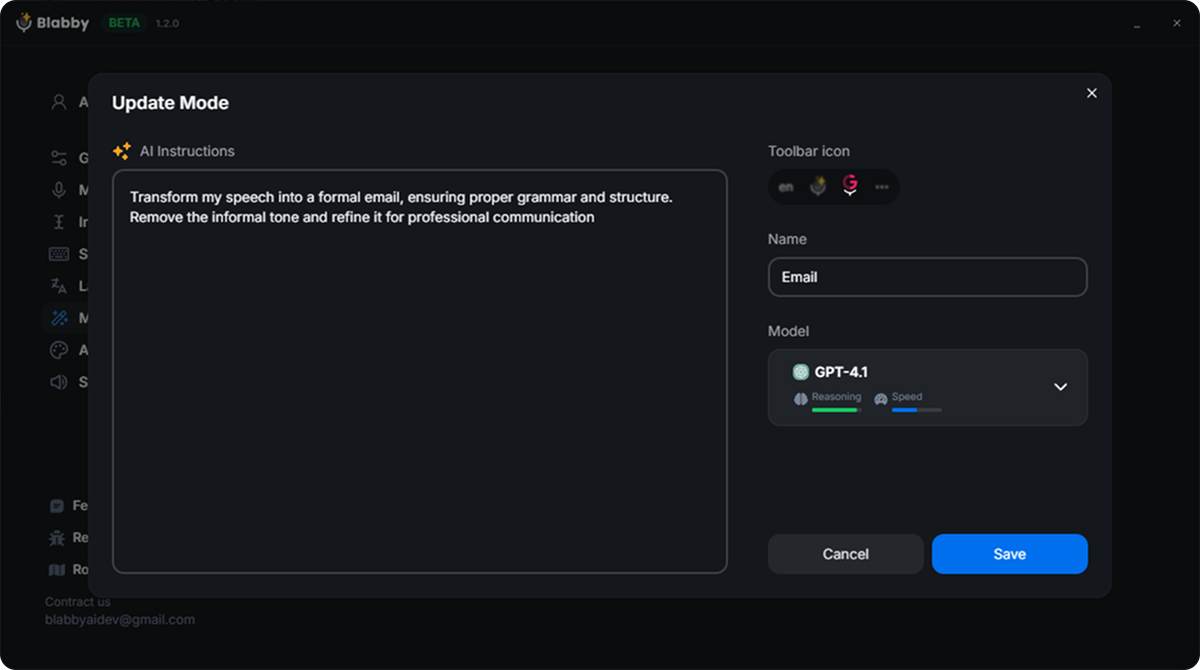
A mode is just an instruction you write, plus the model that applies it. Whatever you dictate through that mode comes out shaped the same way every time.
The mechanic worth understanding, because it is the one people get wrong: the mode receives the full literal transcript, including words you spoke as commands. So you can define your own spoken vocabulary in the instruction. Write "whenever I say new paragraph, insert a paragraph break instead of writing those words" and that is how it behaves from then on. The classic dictation commands work, you simply define which ones you want rather than accepting a fixed list.
The honest limit is worth stating plainly. A mode reshapes what you said. It does not answer you, invent content you did not speak, or decide clinically what belongs in a note. You dictate the findings and the mode formats them. That is a different thing from an ambient scribe drafting a note from a conversation, and for a lot of clinicians the first is preferable precisely because the words remain theirs.
Browser-based records and locked-down machines
A large and growing share of clinical software runs in a browser tab, and a large share of clinical hardware does not let you install desktop applications. Both of those facts rule out a good deal of this category before price enters the conversation.
This is the case the BlabbyAI Chrome extension is built for. It dictates into any text field in the browser, which covers web-based record systems, webmail, portals and forms, without needing local install rights on the machine. It is the same account and the same $8.49 subscription as the desktop app, and it is also the route for anyone working on a Mac or a Chromebook, where a Windows desktop application is not an option at all.
If you are on a managed work laptop, the extension is usually the faster route to a trial regardless of platform, because it needs nothing from your IT department beyond permission to add an extension. Our voice to text Chrome extension guide covers how it behaves in practice.
How to choose, in five questions
- Where does the text need to land? If it has to do something structured inside a specific record system, you are shopping for a clinical platform. If it needs to appear in a text box, you are shopping for a dictation tool and the price difference is enormous.
- What share of your typing is the encounter note? Spend one clinic day counting. This single number decides the category more reliably than any feature list.
- What is the annual cost per clinician, with setup? Monthly figures quoted alone hide implementation fees and per-seat multiplication. Do the arithmetic for your actual headcount.
- Can you teach it your vocabulary? Custom spellings and instruction-driven formatting move real accuracy more than a vendor's benchmark ever will.
- Can you test it on your own text first? Anything that will not let you dictate fifty of your own real sentences before committing is asking you to buy on a promise.
One practical closing note that applies whatever you choose: give any dictation tool five working days before judging it. Composing out loud is a different skill from composing with your fingers, and nearly everyone is slower on day one. Clinicians frequently conclude a tool is inaccurate on day two when what they are experiencing is the learning curve. Start with material where you already know what you want to say, such as correspondence and routine entries, rather than the note you are still thinking through.
Dictate into any field, $8.49 a month
BlabbyAI types into any Windows application on Ctrl+Space and into any Chrome tab through the extension, with custom spellings for your specialty vocabulary and formatting instructions you write yourself. On your phone, the Android app adds a floating mic to any text field. Free tier of 60 credits weekly, no card required.
Frequently asked questions
What is medical voice recognition software?
Medical voice recognition software converts a clinician's speech into written text, usually so it can go into a patient record instead of being typed by hand. The category splits into two very different things that share a name. Dedicated clinical systems such as Dragon Medical One ship a large medical vocabulary and connect into an EHR, and they are priced accordingly, often $79 to $99 per user per month. General dictation tools such as BlabbyAI at $8.49 per month type into whatever text field your cursor is in, which includes an EHR text box, without any plugin or per-system integration. The first group is built for the record. The second group is built for everything you type all day, which for most clinicians is a far larger pile than the notes themselves.
How much does medical voice recognition software cost in 2026?
The spread is wider than in almost any other software category. Dragon Medical One runs roughly $79 to $99 per user per month and typically adds a setup fee in the region of $525, so a first year lands near $1,700 per clinician. Ambient AI scribes such as Suki and Freed sit in the $99 to $199 per month range. Amazon Transcribe Medical is billed per second of audio rather than per seat, which is cheap for light use and unpredictable for heavy use. General dictation tools are an order of magnitude below all of it: BlabbyAI is $8.49 per month unlimited with a free tier of 60 credits weekly and no card required. The right question is not which is cheapest but which part of your typing each one actually covers.
Does medical dictation software need to integrate with my EHR?
It depends entirely on which approach you take, and this is the single most useful thing to understand before you buy. Plugin-based systems install into a specific EHR and can then do structured things inside it, such as dropping text into a named field or triggering a template. That power is why they cost what they cost, and it is also why they only work in the systems they support. Keyboard-level tools take the opposite approach: they type wherever your cursor already is, so an Epic note field, a Cerner text box, an email, a referral letter and a Word document are all the same thing to them. BlabbyAI works this second way. There is nothing to install into the EHR and nothing to configure per system, because from the software's point of view it is simply typing.
Can general dictation software handle medical terminology?
Better than most clinicians expect, and the gap has narrowed a lot since 2024. Modern general-purpose speech models are trained on enormous and varied corpora that include a great deal of clinical and scientific language, so common drug names, anatomy and procedure terms usually come through correctly. Where a dedicated medical engine still has an edge is the long tail: rare drug names, unusual abbreviations, and terms where a near-homophone would be clinically dangerous. The practical mitigation on a general tool is a custom spelling list. BlabbyAI lets you add specific spellings per language, so the drugs, procedures and colleague names you say every day get locked to the exact form you want. The honest test is to dictate fifty of your own real sentences and count the corrections, because your specialty vocabulary matters far more than any published accuracy figure.
What is the difference between an AI scribe and dictation software?
They solve genuinely different problems and get confused constantly. An ambient AI scribe such as Suki or Freed listens to a consultation between you and a patient and drafts a structured note from the conversation afterwards. You are not dictating, you are being recorded, and the software decides what belongs in the note. Dictation software transcribes what you deliberately say, when you choose to say it, and puts those words where your cursor is. Scribes are aimed squarely at the encounter note. Dictation covers the note plus every other thing you write in a day. Many clinicians end up wanting both, and the pricing works out because the dictation half of that pair does not have to be expensive.
What is the best voice recognition software for radiology?
Radiology is the one specialty where dedicated systems have the clearest advantage, because reporting is highly structured, template-driven and enormous in volume. Dragon Medical One and PowerScribe are the entrenched names, and radiology-specific reporting workflows are their strongest ground. That said, the templating benefit is reproducible more cheaply than most people assume. BlabbyAI custom modes let you write a free-form instruction that formats every dictation into a fixed structure, so a mode can shape spoken findings into a consistent report skeleton every time. We cover the specialty in more detail on our radiology dictation software page. If your reporting sits inside a dedicated RIS with deep voice integration, keep it. If you are dictating findings into ordinary text fields, a general tool with a structuring mode does more of that job than the price difference suggests.
Is there free medical voice recognition software?
There are three genuinely free routes and each has a real catch. Windows built-in dictation on Win+H is free and unlimited and works in any text field including an EHR, but it produces raw words with no cleanup layer, so you speak punctuation aloud and tidy up afterwards. OpenAI Whisper and other open-source models are free to run if you have the hardware and the willingness to operate them, which in practice means an engineering project rather than a tool. Free tiers on commercial products are the third route: BlabbyAI gives 60 credits weekly, around 2,000 words, with no card required, which is enough to test it on real clinical text before spending anything. What does not exist is a free tier of a full clinical system such as Dragon Medical One.
Does medical voice recognition software work on Windows?
Almost all of it does, and Windows remains the dominant platform in clinical settings because that is what most EHR client software targets. Dragon Medical One is Windows-first. BlabbyAI ships a Windows desktop app that runs system-wide on Ctrl+Space, meaning it works in every application on the machine rather than in one. For anyone working in a browser-based EHR or on a locked-down machine where installing desktop software is not an option, BlabbyAI also ships a Chrome extension that dictates into any text field in the browser, which covers web-based clinical systems, webmail and portals without needing local install rights.
How accurate is medical voice recognition in practice?
Vendors publish figures between 93% and 99%, and those numbers are close to meaningless in isolation because they depend on the microphone, the room, the accent and the vocabulary. A far more useful way to think about it: accuracy on ordinary connecting language is essentially solved across every serious tool in 2026, and the differences all live in specialty terminology and proper nouns. That is why a custom spelling list moves real accuracy more than switching vendors does. Two practical things beat any published percentage: use a decent headset microphone rather than the laptop's built-in one, and dictate in complete sentences rather than fragments, because the model uses surrounding context to disambiguate.
What should I look for when choosing clinical dictation software?
Work through five questions in this order. First, where does the text need to land, and does the tool reach that field without a plugin. Second, what proportion of your typing is the encounter note versus everything else, because that ratio decides whether you need a clinical system or a general one. Third, what does it cost per clinician per year including setup, not per month in isolation. Fourth, can you teach it your specialty vocabulary, since that is where accuracy is actually won. Fifth, can you test it on your own real text before committing, which rules out anything that will not let you try it. Tools with a real free tier, BlabbyAI among them, let you answer the accuracy question with your own sentences rather than a vendor's benchmark.
Related reading: our medical dictation software comparison, the Dragon Medical One pricing breakdown, our radiology dictation software page, and the general guide to dictation software if you are still deciding what kind of tool you need.