
Updated September 5, 2026 · By Sumbat.T
Free Dragon Dictation Alternative: What to Use in 2026

The short answer
- There is no free Dragon, and there is no longer a cheap one either. Dragon Anywhere Mobile stopped selling subscriptions on 1 July 2026, and Dragon Professional v16 has no published price and no checkout button on its own product page.
- The best free option is probably already on your computer. Press Windows key + H on Windows 10 or 11 for built-in Voice Typing, or use Apple Dictation on macOS. Both are free, need no account, and handle plain dictation in any text field.
- If you want the part Dragon never did, you want a rewriting layer. BlabbyAI is free for 60 credits a week with no card, works in any text field on Windows or Android and on any site in Chrome, and its custom modes turn a spoken ramble into a clean email or a bulleted list as you dictate.
- Skip the "free Dragon download" results. Those are repackaged legacy installers on third-party download portals, not a vendor release. A decade-old speech engine is not a bargain.
Most articles about free Dragon alternatives are working from an out-of-date picture of what Dragon still is. They compare a list of modern tools against a $699 desktop licence, which sounds like a fair fight until you try to actually buy the $699 licence and find there is no price and no cart. The Dragon you are being told to replace has quietly stopped being purchasable in the ordinary way, and the free Dragon that people are searching for has not existed for years.
What is actually left of Dragon
Google's own AI Overview for "dragon dictation free" gets the headline right and the detail wrong. It says the product "has been discontinued and is no longer available for download", which is true of the original free iPhone app, but it does not tell you what happened to everything else that carries the Dragon name. Here is the current state of each product, as of September 2026.
Gone
Dragon Dictation (the free iPhone app)
The free app people remember. Long removed from the App Store and not replaced by anything free.
No longer sold
Dragon Anywhere Mobile
Both store listings carry the same vendor notice: no new subscriptions and no renewals as of 1 July 2026.
Absent from the lineup
Dragon NaturallySpeaking / Home
No consumer or home edition appears in the current product range on dragon.nuance.com.
Sold, but contact only
Dragon Professional v16
Live product page, no price shown, no checkout. Every call to action reads "Contact us".
Moved to Microsoft
Dragon Medical One / Dragon Copilot
Now sold on microsoft.com rather than by Nuance. No public price on either page.
The single most concrete fact in that grid is the mobile one, because it is the only place Nuance published a date. Both the Apple App Store and Google Play listings for Dragon Anywhere carry the same sentence from the developer.
"As of July 1, 2026, Dragon Anywhere Mobile is no longer available for sale. Purchasing new subscriptions and renewing existing subscriptions is no longer possible."
Nuance Communications, developer notice on the Dragon Anywhere listings, Apple App Store and Google Play
A retirement, then, stated plainly by the vendor, and it is not mentioned on most of the pages currently ranking for Dragon alternatives. Anyone still holding one of those subscriptions has a fixed horizon on it, whether or not they have noticed yet.
What this changes for you
If your reason for wanting a Dragon alternative is that your Dragon Anywhere subscription will not renew, you are not choosing between Dragon and something else. You are choosing between something else and nothing, on a deadline you did not set. The quickest way to stop worrying about it is to put a working tool in place today: BlabbyAI is free to start and needs no card, and the rest of this page covers the built-in options alongside it.
The $699 figure everyone quotes is not on any Nuance page
Search for Dragon pricing and you will find $699 repeated across dozens of articles, including some that rank on page one. We went looking for it on the vendor's own site and could not find it. The page at dragon.nuance.com is titled "Buy Dragon Professional", is live, and still markets the current version.
"Built on a quarter-century of expertise, Dragon Professional v16 is optimized for Windows 11 and backwards-compatible to Windows 10."
dragon.nuance.com, Dragon Professional product page, read September 2026
What the page does not contain is a number or a way to pay. There is no price anywhere on it, no Buy Now, and no Add to Cart. Every call to action routes to "Contact us". Meanwhile the old self-serve store at shop.nuance.com no longer sells anything: those URLs now redirect to the marketing page. The consumer checkout has been removed, and buying Dragon Professional means a sales conversation or a reseller.
This matters for a free-alternative decision in a way that is easy to miss. A published price gives you something to weigh against free. A "contact us" gives you a procurement process, and for one person who just wants to stop typing, a procurement process is a heavier cost than the licence fee. The free tools below are filling that gap more than they are undercutting a price.
Free tier, no card






Dictate anywhere for free, and have it come out written
60 credits a week at no cost. Works in any text field on Windows and on any site in Chrome, with custom modes that clean up your speech as you go.
Choose by where you type, not by feature list
Every roundup of free dictation tools presents a list as though the items were interchangeable. They are not, and the difference that actually decides it is scope: which applications the tool can put text into. A tool that only works inside its own web page is a very different proposition from one that types wherever your cursor is, and no feature comparison surfaces that clearly.
| Tool | Price | Where it types | Rewrites your speech |
|---|---|---|---|
 BlabbyAI | Free tier, then $8.49/mo | Any text field on Windows or Android, any site in Chrome | Yes, custom modes |
 Windows Voice Typing | Free, built in | Any text field on Windows 10 and 11 | No |
 Google Docs Voice Typing | Free | Google Docs, in Chrome only | No |
 Speechnotes | Free tier | Its own web editor | No |
 SpeechTexter | Free | Its own web editor | No |
 Otter | Free tier, limited minutes | Meetings and recordings, not a text field | Summaries, not dictation |
 Dragon Professional v16 | No published price | Windows desktop | No |
Read the third column first. Some of these type wherever your cursor already is, some only work inside a single window, and one is not a dictation tool at all. That distinction decides more than the price column does, given how much of it says free.
Windows Voice Typing: free, built in, and the honest first answer
If you are on Windows 10 or 11, press Windows key + H in any text field right now. A small dictation bar appears and starts transcribing, with automatic punctuation. There is no install, no account and no cost, which makes it the right thing to try first if all you need is words on a screen.
It works the same way Dragon did in one important respect: it types into whatever window has focus, so Word, Outlook, a browser and a code editor are all just text fields to it. That scope is worth having, and it is the reason the browser-only tools further down this page are a narrower answer than they look.
Where it stops
Voice Typing transcribes what you said, exactly as you said it, including the false starts and the "um, actually, no, make that Thursday". It has no concept of tidying, no custom vocabulary, and no way to say "make this an email". If your speech is already well-formed, that is fine. If you think out loud, you will spend the time you saved on cleanup.
BlabbyAI: free tier, any text field, and it rewrites as you speak
BlabbyAI is the option on this page that closes the gap the built-in tools leave open. The free tier is 60 credits a week with no card required, so it is a genuine free alternative rather than a trial with a countdown. It runs as a Windows desktop app that types into any text field, as an Android app that adds a floating mic to any text field on your phone, and as a Chrome extension that works on any site, which means Gmail, Google Docs, Notion, Jira and a company web app are all covered without installing anything on a managed laptop.
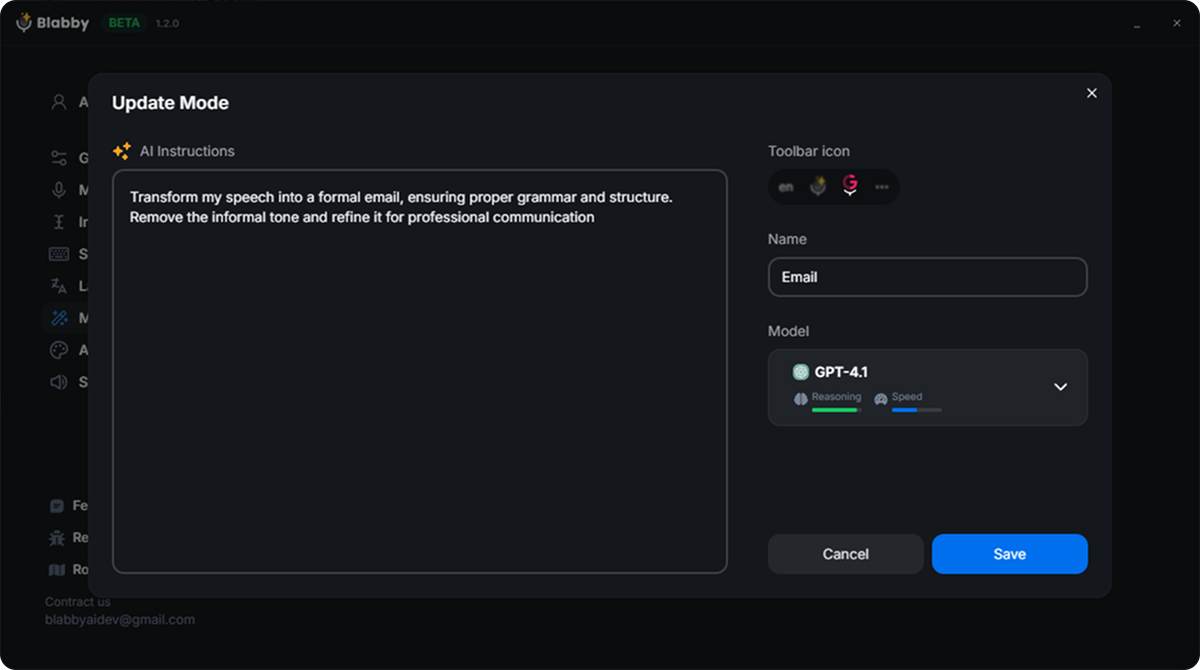
A custom mode is a free-form instruction. You write it once in plain language and it runs on everything you dictate in that mode.
Custom modes are the part with no Dragon equivalent. A mode is a free-form AI instruction that runs on what you said, so you can define one that strips filler words and fixes the false starts, one that turns spoken notes into a bulleted summary, and one that rewrites a blunt sentence into a polite email. You speak the content, not a request: say "hey Sarah, the report is going to be late, I hit a problem with the data" and an email mode returns that as a properly written note rather than answering you.
Switching between them is a keyboard shortcut, so the same voice can produce a Slack message, a commit message and a client email in the same minute without you reformatting anything. This is the capability people were hoping Dragon had, and it belongs to a generation of tools built after Dragon's.
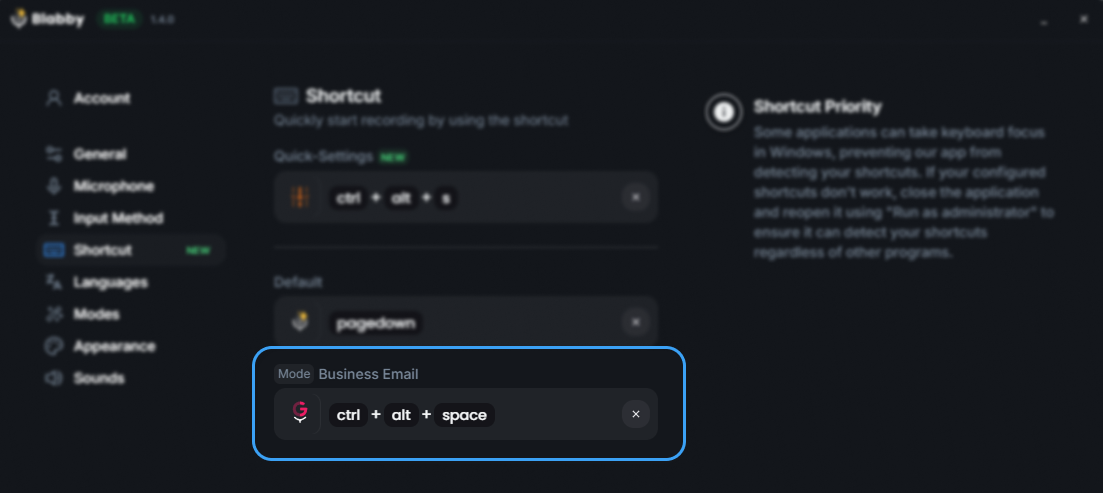
Push-to-talk on a shortcut, so dictation starts in whatever application already has focus.
Where your recordings live
Dictation with BlabbyAI is transcribed in the cloud under a zero data retention arrangement, so nothing is kept there to train on. On top of that, the Windows app's History saves each recording to your own disk the moment you stop, along with its transcript, and that library stays on your machine. You can replay an old recording or run it through a different mode months later without it having become somebody else's stored asset.
Google Docs Voice Typing: free, excellent, and only in one place
Open a document in Google Docs in Chrome, go to Tools and choose Voice typing. It is free, the recognition is good, and it supports spoken punctuation and a set of formatting commands. For drafting long-form writing inside Google Docs, it is a legitimate Dragon replacement and it costs nothing.
The constraint is absolute rather than partial: it is a Google Docs feature, so it does not work in Gmail, it does not work in Word, and it does not work in the browser generally. The moment your writing day includes replying to email or filling in a form, you need a second tool, which is the argument for something that follows your cursor instead. We have a full guide to speech to text in Google Docs if that is the only place you need it.
Works in one application
Google Docs Voice Typing, Speechnotes, SpeechTexter. You go to the tool, dictate, then copy the text to wherever it was actually needed.
Works where you already are
Windows Voice Typing, Apple Dictation, BlabbyAI. The text appears in the field you were already in, so there is no copy and paste step.
Speechnotes and SpeechTexter: free web notepads
Both are free browser-based dictation notepads that have been around for years. You open the site, click the microphone, talk, and text appears in an editor on the page. Neither needs an account to start, and for occasional dictation of a block of text that you are going to paste somewhere else anyway, they do the job at no cost.
They belong in the first column of that grid above. The workflow is always dictate here, then copy, then paste there, and that extra step is the thing that stops people using dictation habitually. They are also plain transcription with no rewriting layer. Worth knowing about, rarely the tool you settle on. We compared these directly in our writeups of Speechnotes alternatives and SpeechTexter alternatives.
Otter: a good tool that is not a Dragon replacement
Otter appears in almost every list of free Dragon alternatives and it does not belong there. Otter transcribes meetings and recordings: you give it audio, or let it join a call, and it produces a transcript and a summary afterwards. Useful, and a different job from dictation.
Dictation means you speak and text appears in the field you are working in, right now. If you are replacing Dragon, that is what you are replacing, and no amount of meeting transcription substitutes for it. Otter has a free tier with a monthly minute limit and it is worth having if you sit in a lot of calls, but choose it alongside a dictation tool rather than instead of one.
A warning about the "free Dragon download" results
Search for Dragon dictation free download and the results include third-party download portals offering installers for old Dragon versions, some of them a decade old. These are not vendor releases and they are not a free version of the current product. What you get is an unsupported build of a discontinued speech engine, with no updates, no security patches and no guarantee it will run on a current Windows install.
The comparison worth making is that Windows Voice Typing is free, current, supported by Microsoft and already installed. There is no version of the trade-off where a 2015 Dragon installer from a download portal is the better option.
What replaced the thing Dragon was good at
Dragon was not popular by accident. It transcribed accurately at a time when nothing else did, and the professional editions shipped specialised vocabularies for legal and medical work. That was the product, and for twenty years it was worth paying for.
Accurate transcription is now the floor rather than the product. Modern speech models need no enrolment and no voice training, which was one of Dragon's more tedious requirements, and they arrive accurate in the first minute. So the question stopped being how faithfully a tool types what you said, and became what it hands you afterwards.
Which is where a custom mode earns its place. Dragon transcribed and stopped; a mode takes the same spoken paragraph and returns it structured, cleaned and in the register you asked for, so the editing pass disappears along with the typing. Specialist vocabulary is handled the same way, by telling a mode about your recurring terms in plain language instead of enrolling them one at a time. On a free tier, that is a better deal than a licence you have to phone someone to buy.
How to switch in about five minutes
| Step | What to do | Why |
|---|---|---|
| 1 | Try Windows key + H in the app you write in most | Costs nothing and tells you immediately whether plain dictation is enough for you |
| 2 | Dictate one real piece of work, not a test sentence | Test sentences are always clean. Real work is where the false starts show up |
| 3 | Count the seconds you spend editing the result | This is the number that decides whether you need a rewriting layer |
| 4 | If editing dominated, add a free tier with custom modes | A mode removes the editing pass, which is the part built-in tools cannot do |
| 5 | Write one mode for the thing you send most | Usually email or Slack. One good mode delivers most of the benefit |
The reason to start with the built-in tool is that it calibrates the question for free. Almost everyone who runs that test finishes it slightly annoyed at how much tidying the raw text needed, and that annoyance is the useful result: it tells you the thing you are actually shopping for is not better transcription, it is not having to rewrite what you just said. That is the part a mode does, and it is where the free tier starts earning its place.
Replace Dragon with something you can actually download today
Free tier, 60 credits a week, no card. Windows app, Android app or Chrome extension, custom modes included.
Frequently asked questions
Is Dragon dictation free?
No, and the free product people remember is gone. The original Dragon Dictation was a free iPhone app, and it has not existed for years. Its successor, Dragon Anywhere Mobile, carried a notice on both the Apple App Store and Google Play saying "As of July 1, 2026, Dragon Anywhere Mobile is no longer available for sale. Purchasing new subscriptions and renewing existing subscriptions is no longer possible." The surviving desktop product, Dragon Professional v16, has no free tier and, as of September 2026, no published price and no checkout button on its own product page: every call to action reads "Contact us". So the honest answer is that there is no free Dragon, no trial you can start from the website by yourself, and no advertised price. If you want free dictation today you want a different tool, and there are good ones, including options already installed on your computer.
What is the best free alternative to Dragon NaturallySpeaking?
It depends on where you type. If you work in Windows desktop apps, Windows Voice Typing (Windows key + H) is free, built in, and covers plain dictation in any text field with automatic punctuation. If you write in a browser, a Chrome extension is the better fit because it follows you across Gmail, Docs, Notion and every other web app. BlabbyAI has a free tier of 60 credits a week with no card required, works in any text field on Windows, on Android, or in Chrome, and adds the thing the built-in tools do not have: custom modes, a free-form AI instruction that rewrites what you said into the format you actually want. Google Docs Voice Typing is free but only inside Google Docs in Chrome. The wrong way to choose is by feature list. Pick by where your cursor spends the day.
What happened to Dragon NaturallySpeaking?
The name is effectively retired and the consumer line is gone. The current dragon.nuance.com product lineup offers Dragon Professional for Windows plus business, legal and medical lines, with no home or consumer edition listed. The healthcare products moved to Microsoft entirely: Dragon Medical One and Dragon Copilot are now sold on microsoft.com rather than by Nuance. The old shop.nuance.com store URLs no longer sell anything, they redirect to marketing pages on dragon.nuance.com. Nuance has not published a dated end-of-life notice for the consumer editions that we could verify on a vendor page, so the accurate statement is that the products are absent from the lineup and unpurchasable rather than formally announced as dead. The practical effect for a buyer is the same.
Can I still buy Dragon Professional?
Only by talking to someone. The page at dragon.nuance.com titled "Buy Dragon Professional" is live and still markets Dragon Professional v16, describing it as "optimized for Windows 11 and backwards-compatible to Windows 10". What it does not have is a price or an add-to-cart button. Every call to action on the page routes to "Contact us", and the old self-serve store at shop.nuance.com now redirects to that marketing page instead of a checkout. Resellers still list the software and some advertise trials, but those are third parties setting their own terms, not a vendor price. The widely repeated $699 figure does not appear on any Nuance page we could find, so treat it as reseller history rather than a current number.
Is there a free Dragon alternative for Windows?
Yes, and one of them is already on your machine. Press Windows key + H in any text field on Windows 10 or 11 and you get Voice Typing: free, no account, no install, with automatic punctuation. It handles ordinary dictation well. Where it stops is formatting and cleanup, because it types what you said as you said it, including the false starts. BlabbyAI runs on Windows as a desktop app with a free tier of 60 credits a week, roughly 2,000 words, and no card required, works in any text field including Word, Outlook, Slack and code editors, and its custom modes let you define a rewrite once so your spoken draft arrives already tidied into an email, a bulleted list or a commit message. Both are genuinely free to start, so the real question is what you want back. If you only need the words down, Voice Typing has you covered. If you would rather not re-edit every spoken paragraph, that rewriting step is the whole point of a mode, and it is in the free tier.
Is there a free Dragon alternative for Mac?
Apple Dictation is built into macOS, costs nothing and works in any text field, which makes it the direct answer for plain dictation. Dragon has not shipped a Mac consumer version since 2018, so there is no current Dragon to migrate from on that platform anyway. For browser work on a Mac, a Chrome extension covers Gmail, Google Docs, Notion and anything else on the web, and it does not care which operating system it is running on. That is the route to check first if most of your writing happens in a browser tab rather than in a desktop application.
Do free dictation tools work in Microsoft Word?
Some do and some do not, and this is where most roundups mislead. Windows Voice Typing works in Word because it types into whatever text field has focus, so it treats Word like any other application. Microsoft also builds a Dictate button directly into Word, but it requires a Microsoft 365 subscription, which means a perpetual Office licence does not get it. Google Docs Voice Typing does not work in Word at all: it is a Google Docs feature and lives inside that one product in Chrome. A dictation tool that types into any focused text field, which is how BlabbyAI works on Windows, sidesteps the whole question because Word is just another window. Check this before you commit, because "works on Windows" and "works in Word" are not the same claim.
What can free dictation do that Dragon could not?
Rewrite as you dictate. Dragon was built around accurate transcription and voice commands for controlling a computer, and it was very good at that. What it did not do is take a rambling spoken paragraph and hand back a clean written one, because there was no language model in the loop. Modern AI dictation adds that layer: BlabbyAI custom modes are a free-form AI instruction, so you can define one that strips filler words, one that turns spoken notes into a bulleted summary, one that rewrites a rushed sentence into a polite email, and switch between them with a shortcut. You speak the content, not a request, and the mode reshapes it. The gap is that rewriting layer, and it sits on a free tier rather than behind a $699 licence.
Are free dictation tools accurate enough for professional work?
For most professional writing, yes, and the reason is that the underlying speech recognition stopped being the differentiator. Modern systems require no voice training or enrolment, which was one of Dragon's more tedious requirements, and they arrive accurate in the first minute rather than after a training session. Where accuracy still needs care is specialised vocabulary: unusual proper nouns, drug names, legal citations and internal jargon are where any general model can slip, so proofread anything consequential. That was true of Dragon too, and it is the one place to slow down. The practical difference is that you can tell a custom mode about your recurring vocabulary in plain language, in a sentence, instead of enrolling terms one at a time.
What is the catch with free dictation software?
Usually one of three things, and it is worth knowing which one you are accepting. Built-in tools such as Windows Voice Typing and Apple Dictation are free with no catch at all, but they are plain transcription with no rewriting and no customisation. Browser-only tools such as Google Docs Voice Typing are free but confined to one application. Freemium AI tools give you a real free tier with a usage limit, which is how BlabbyAI works at 60 credits a week with no card required. The pattern worth avoiding is the download site that offers an old Dragon installer as a "free download": those are repackaged legacy versions from third-party download portals, not a vendor release, and an unsupported speech engine from a decade ago is not a bargain.
Sources
- Dragon Anywhere developer notice, Apple App Store and Google Play listings, read September 2026.
- dragon.nuance.com, Dragon Professional product page, read September 2026. Checked for price and checkout.
- microsoft.com health solutions pages for Dragon Medical One and Dragon Copilot, read September 2026.
- Apple App Store and Google Play listings for Dragon Anywhere, read September 2026, for the store ratings and the developer notice.