


AI Physician Dictation
Built for Clinicians
Stop fighting with clunky dictation tools. BlabbyAI understands complex medical terminology and formats your notes exactly the way you need them.
Free to Start
Medical Terminology
BlabbyAI recognizes drug names, diagnoses, procedures, and medical abbreviations. No more correcting 'hypertension' or 'metformin' manually.
Custom Instructions
Define your own formatting rules. Whether you prefer SOAP notes, problem-oriented formats, or your clinic's specific template, BlabbyAI follows your instructions perfectly.
EHR Compatible
BlabbyAI works in any Windows application, including Epic, Cerner, Athenahealth, and all major electronic health record systems.
REAL-TIME PROCESSING
Spend more time with patients, not paperwork.
Documentation burden is driving physician burnout. BlabbyAI processes speech instantly, allowing you to complete clinical notes 3x faster than traditional typing. Reclaim your evenings and weekends.
- Zero latency transcription
- Works in any EHR (Epic, Cerner, Athenahealth, etc.)
- No extensive voice training required
From Voice to Perfect Clinical Note
Dictate naturally and let BlabbyAI handle the formatting. Your custom mode transforms raw speech into polished clinical notes.
What You Say
"Chief complaint shortness of breath times three days. Patient is a 58 year old male with history of CHF and type 2 diabetes presenting with worsening dyspnea. BNP elevated at 850, chest x-ray shows cardiomegaly with pulmonary edema."
BlabbyAI Result
AI FormattedChief complaint: Shortness of breath × 3 days. Patient is a 58-year-old male with history of congestive heart failure (CHF) and type 2 diabetes presenting with worsening dyspnea. BNP elevated at 850 pg/mL. Chest X-ray shows cardiomegaly with pulmonary edema.
But how does it work?
Set up your custom physician mode in 3 simple steps.
STEP 1
Go to Mode Settings
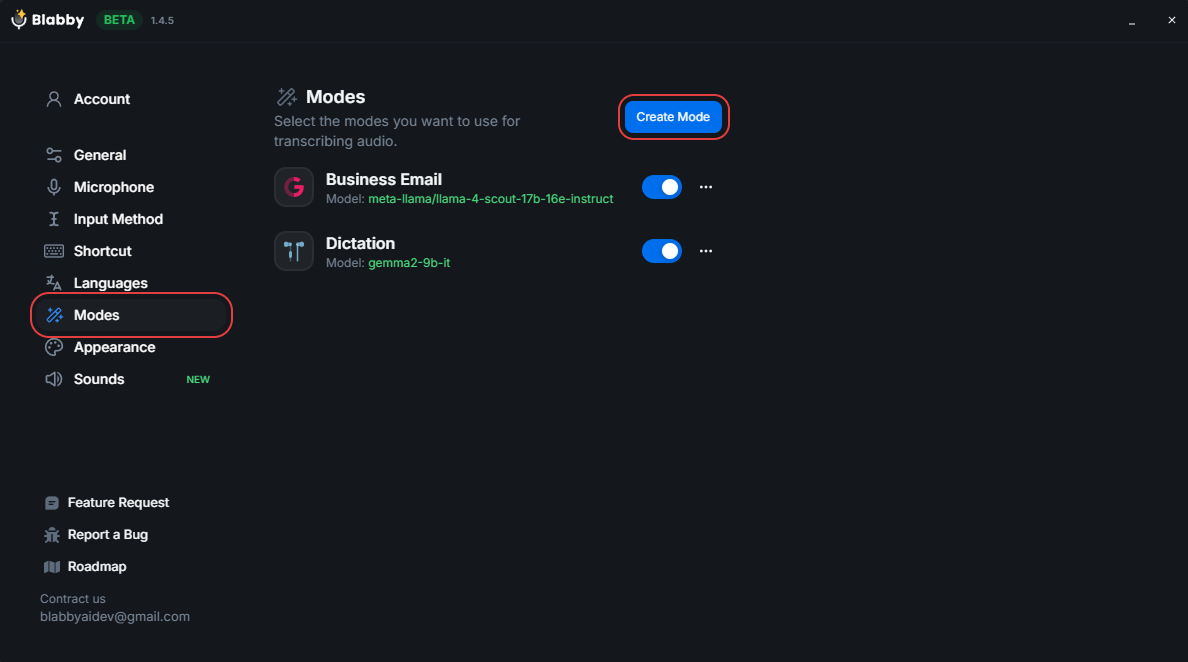
Open BlabbyAI and navigate to the Modes panel. Click the "Create Mode" button to create a new custom mode for your physician workflow.
1
STEP 2
Add Your Instructions
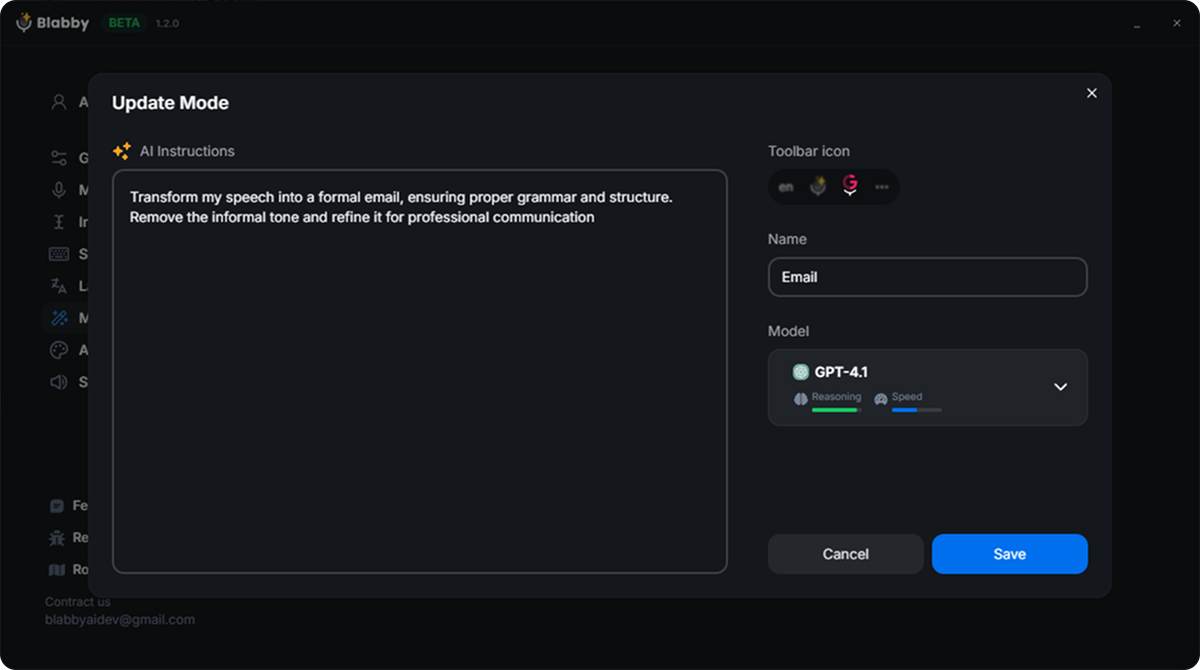
Name your mode and add your custom instructions. For example:
"I am a physician. Correct transcription errors into proper medical terminology. Format age as '58-year-old'. Expand abbreviations on first use (e.g., CHF becomes 'congestive heart failure'). Use proper spelling for all medical terms. Output only corrected text."
2
STEP 3
Start Dictating
Select your new mode from the toolbar and start dictating. Your clinical notes will be automatically formatted with proper medical terminology and your preferred style.
3
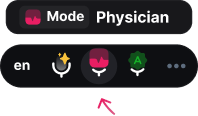
Your Workflow, Your Rules.
Stop adapting to your software. BlabbyAI adapts to you. Create custom "Modes" for different tasks like SOAP notes, discharge summaries, or referral letters and define exactly how the AI should format them.
Define Custom Rules
Tell the AI to expand abbreviations, format diagnoses, or structure notes specifically for your specialty.
Switch Modes Instantly
Toggle between "SOAP Note Mode", "H&P Mode", or "Prescription Mode" with a simple keyboard shortcut.
AI Instructions in Plain English
Just describe what you want (e.g., "Format as SOAP note with ICD-10 codes") no complex coding required.
Trusted by Physicians
4.7
Average Rating
Trung Thinh
A phenomenon product to increase your productivity. With another way of Voice typing, you will have to double check or check or supervise before send it. But with BlabbyAI, it trying to understand context that you say. So most of the time the output is correct and you just need to send it
Dr. David Ramos Barbón
I had been long time waiting for a speech-to-text dictation tool that would free me from Dragon Naturally Speaking with its very high cost and, still, significant limitations. Moreover, a cross-platform tool that would allow me to work on any OS including Linux. It finally came with amazing super-accuracy, even if you dictate specialized scientific or technical text. It has a tool to add your own custom words (really few to add in the biomedical field!). The direct English translation tool yields top quality English and you can enable grammar correction modes. The future of cross-platform speech-to-text dictation has arrived!!!
Felipe Ramos
Incredible!! I use this feature a lot because it's much easier to say than type
Sam "Anselme" Levan
This tool is extraordinary. I usually don't spend time writing reviews, but it's such a game changer. I've tried a lot of different tools to do the voice-to-text, but none of those have the simplicity and the level of integration like this one. I'm happily paying for a paid plan. It's been a game changer in the way I do my emails, or write for work, or even journal.
Sean Stahursky
It is the best option for voice typing, as it allows for forming sentences with proper conventions. I would like to see Safari support added. Good job so far!
Nod Ulus
This plugin is a top-tier tool that shines in both design and functionality. Interface: Simply Stunning The UI/UX is sleek and intuitive, making it a pleasure to use. The design is clearly well-thought-out and user-friendly. Two-Step Processing: A Game Changer Voice Recognition: Precision at Its Best The voice recognition is highly accurate, converting speech to text with impressive precision, even with accents or unclear speech. LLM Processing: Polished Perfection The text undergoes LLM processing, where it CAN be refined like this or translating or whatever you want!!!!:
Frequently Asked Questions
Everything you need to know about BlabbyAI
How does BlabbyAI work?
You press a shortcut (Ctrl+Space by default), speak, and press it again to stop. The recording goes through OpenAI's Whisper v3 Turbo model, and the text is typed into whatever field your cursor was in. That works in any app on Windows with a text field.
Is BlabbyAI free to use?
Yes. Every account gets 60 free credits per week, roughly 2,000 words of dictation, and no credit card is required to start. If you need more than that, unlimited use is $8.49 per month.
Is BlabbyAI available in multiple languages?
Yes! BlabbyAI supports 90+ languages and can accurately transcribe speech in various languages and accents.
Is my data secure?
Yes! Your voice data is processed securely and is not stored after transcription. All communication is encrypted, and we adhere to strict privacy standards to protect your information. Learn more about our data handling practices in our Privacy Policy.
Can I customize the transcription output?
Absolutely! BlabbyAI offers custom modes that allow you to format your text, add punctuation automatically, and even adjust the writing style. You can create different modes for different purposes, like emails, documents, or casual messages.
More medical dictation guides
Medical speech recognition software
How AI speech recognition handles clinical vocabulary.
Radiology dictation software
Reporting at reading-room speed, hands on the images.
Dictation for healthcare professionals
The overview for nurses, therapists, and clinic teams.
Comparing options beyond medicine? See the full guide to dictation software in 2026.
Ready to reduce documentation burden?
Try BlabbyAI for Windows today. No credit card required for the free tier.