
Updated August 29, 2026 · By Sumbat.T
Wispr Flow Review 2026: Is It Worth $15 a Month?

The short answer
- Wispr Flow is a good product at a high price. Pro is $15 per user per month, or $12 billed annually. What you are buying is the cleanup pass: it strips filler, fixes grammar and punctuates without you saying a word of it aloud.
- The free tier is unusually generous. 2,000 words every week, recurring rather than a one-time trial, no card required. If you dictate lightly you may never need to pay at all.
- Two things to check before subscribing. It is cloud only, so there is no offline mode at any tier, and its Notetaker feature is Mac only, so a Windows buyer pays the same $15 for a smaller product.
- The same core job costs about half as much. BlabbyAI and Superwhisper both do system-wide dictation with an AI rewriting layer for $8.49/month. Over a year that is roughly $78 of difference for output most people cannot tell apart. On an Android phone, the BlabbyAI Android app is free during the beta.
What Wispr Flow actually is
Wispr Flow is an AI dictation app. You press a shortcut, speak, and text appears in whatever field your cursor is sitting in. That is the whole interaction, and it works the same way in Slack, Gmail, Word, Notion, a browser form or an IDE, because it operates at the keyboard level rather than as a plugin inside any particular program. There is nothing to integrate and nothing to configure per app.
What separates it from the dictation that already ships with your operating system is the second step. Windows voice typing and macOS dictation transcribe you literally, so every "um", every false start and every rambling half-sentence lands in the document exactly as you said it, and you spend the time you saved on cleanup. Wispr Flow runs your transcript through a language model before it types anything, so the filler is gone, the grammar is fixed and the punctuation is there without you having said the word "comma" out loud.
That is the entire category now, and it is worth being clear about it early, because it shapes how you should read this review. Wispr Flow, Superwhisper, BlabbyAI and Willow Voice all do transcription followed by an AI rewriting pass. They are not separated by whether they can do the job. They are separated by price, by which platform they were built for, by whether they can run without an internet connection, and by how much control you get over the rewriting step.

The features you are paying for
Wispr Flow's free plan covers speech to text across your apps in over 100 languages, on Mac, Windows, iOS and Android, plus a personal dictionary that learns your names and jargon as you use it. Pro adds unlimited dictation, access to the advanced AI models, longer meeting retention, early access to new features and prioritised support.

Source: Wispr Flow. A dictated support reply arriving as finished prose, which is the effect the cleanup pass is selling.
Four capabilities come up repeatedly in the review coverage, and they are a fair summary of what the money buys:
- Automatic cleanup. Disfluencies, false starts and filler words are removed, and punctuation is inferred rather than spoken. This is the headline feature and it is genuinely well executed.
- Context-aware tone. The same sentence comes out casual and short in Slack and more formally structured in an email client, because the app adapts register to the app you are typing into.
- Command Mode, on Pro. You highlight text that is already on screen and tell it what to change, so it edits as well as dictates.
- Snippets and a personal dictionary. Short spoken shortcuts expand into long phrases, and names, brand terms and jargon get spelled correctly once the app has learned them.
There is also a whisper mode for speaking quietly in a shared office or a cafe, which sounds like a gimmick and turns out to be one of the more practical things in the product if you work anywhere with people in earshot.
Same job, half the price






Dictate anywhere on Windows for $8.49 a month
BlabbyAI does system-wide dictation with an AI rewriting layer you write yourself. 60 credits a week free, no card, no account setup.
The pricing, and the number that decides it
These figures were read from the Wispr Flow pricing page in August 2026, not from a third-party roundup, because dictation prices in this category move often and secondhand numbers go stale quickly.
| Plan | Billed monthly | Billed annually | What it unlocks |
|---|---|---|---|
| Free | $0 | $0 | 2,000 words a week, 100+ languages, personal dictionary |
| Pro | $15/user/mo | $12/user/mo | Unlimited dictation, advanced AI models, Command Mode |
| Growth / Enterprise | from $23/user/mo | from $18/user/mo | SSO with SAML, directory provisioning, audit logs |
The annual discount is advertised at 20%, and it is real: $12 a month against $15 is exactly that. The catch is the usual one, which is that you are committing a year up front to a tool you have used for a week.
The arithmetic that matters
Wispr Flow Pro at $15 a month is $180 a year. BlabbyAI and Superwhisper at $8.49 are $101.88. The gap is roughly $78 a year, for tools that all do system-wide dictation with an AI rewriting layer. That difference is the single most useful number in any Wispr Flow review, and it is the reason most cancellation posts exist.
None of that makes $15 unreasonable. If you dictate for several hours a day, the cleanup quality is worth paying for and $78 a year is rounding error against the time it saves. The point is narrower: you should know the gap exists before you subscribe, because the marketing around this category rarely mentions that the same architecture is available for half the money.
Where it is strong and where it is not
Taking the product area by area rather than as one verdict, because the answer genuinely differs depending on what you need it for:
| Area | Verdict | Notes |
|---|---|---|
| Transcription accuracy | Strong | Handles accents and non-native English well. Not where it separates from rivals. |
| Cleanup and formatting | Best in class | Removes filler and false starts without you speaking punctuation. The reason to pay. |
| App coverage | Complete | Keyboard-level, so it types into anything. Matched by most rivals. |
| Price | Weakest area | $15/mo against $8.49 for tools doing the same core job. |
| Windows parity | Incomplete | Notetaker is Mac only. Same price, smaller product. |
| Offline use | Not available | Cloud only. No local model option at any tier. |
| User-authored rules | Limited | Dictionary and Snippets, but no instruction you write yourself. |
| Free tier | Genuinely good | 2,000 words weekly, recurring, no card. Among the most generous. |
Read down that table and a pattern shows up. Everything Wispr Flow does, it does well. The weaknesses are all absences: no offline mode, no Windows parity, no rule you can write yourself, and a price above the tools that match it on the things it does have. That is a different kind of criticism from "it does not work", and it is why the product reviews well and still gets cancelled.

The Windows question
This is the part of the product most reviews skip, and it matters if you are on a PC. Wispr Flow's own pricing page lists the Notetaker meeting feature as Mac only. That single label carries more than it looks like it does, because several of the features listed beneath it depend on Notetaker existing: identifying speakers in meeting notes, asking questions about a meeting, and feeding those notes into other AI tools.
So a Windows subscriber pays $15 a month, the same as a Mac subscriber, for a product with a visibly smaller feature list. Reviewers also report the Windows build running heavy or freezing occasionally, which is a familiar pattern for apps that grew up on macOS and reached Windows later.
Worth knowing
Wispr Flow, Superwhisper and Willow Voice were all Mac products first. Superwhisper reached Windows 1.0 in late 2025, and Willow Voice still lists Windows as coming on its own pricing page. If you are shopping for dictation on a PC, most of this category arrived on your operating system second.
That is the gap BlabbyAI was built into. It started on Windows rather than being ported there, runs system-wide on Ctrl+Space from any focused text field, and keeps a local History of every recording: the audio is written to your own disk the moment you stop speaking, before transcription even begins, so a dropped connection or a failed request does not lose what you said. You can replay any past recording and re-run it through a different mode later. None of that history data touches a server.
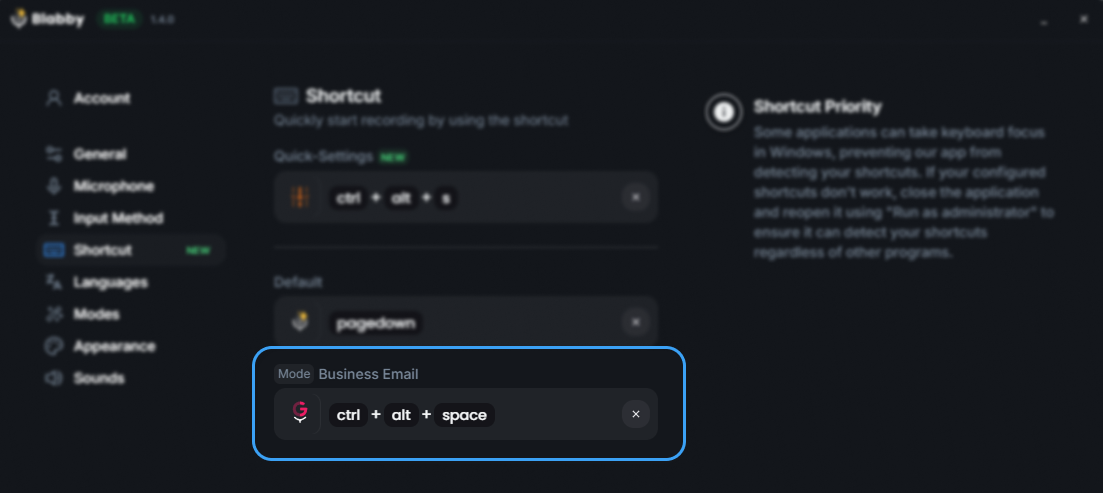
BlabbyAI on Windows. Ctrl+Space starts and stops a recording from anywhere in the operating system.
Privacy, and what cloud-only means
Wispr Flow processes speech in the cloud. There is no local model option at any price tier, which means two practical things: it does not work without an internet connection, and your audio leaves your machine to be transcribed.
The company does publish SOC 2 Type II, ISO 27001 and HIPAA compliance, lets you opt out of model training at any time, and gives you controls over what is stored and the ability to delete it. That is a reasonable posture, with one qualifier worth reading off its own privacy page: SOC 2 Type II and ISO 27001 are both marked "Available to Enterprise plans only", so an individual on Pro is not covered by those two. HIPAA is offered on all plans with a signed BAA. The recurring criticism in independent reviews is narrower and worth repeating accurately: reviewers have questioned how much surrounding context the app collects unless context awareness is switched off. If you are evaluating it, that setting is the first one to find, and note the toggle once called "Privacy Mode" was renamed in August 2026, so older guides name a control that is no longer labelled that way.
If the requirement is that audio never leaves the device at all, no cloud tool can meet it and that includes BlabbyAI, which is also cloud-based for transcription. Superwhisper is the usual answer there because it can download and run Whisper models locally, though its own FAQ notes those offline models "only run really well on Apple Silicon macs", which makes it a Mac answer rather than a general one. There is a separate question worth asking either way, which is where the recording ends up after it is transcribed: BlabbyAI's History on Windows writes audio to your own disk and never uploads it. For the full breakdown of what Wispr Flow's own privacy pages say, see is Wispr Flow safe.
How much control you get over the rewriting
This is the most interesting difference in the category and the one buyers notice last, usually about a month in. Every one of these tools rewrites your speech. They differ in whether you can see and change the instruction doing the rewriting.
Wispr Flow's approach is automatic. The cleanup happens, the tone adapts to the app, and you tune it around the edges with the personal dictionary and Snippets. Command Mode on Pro lets you direct an edit to text already on screen. What you do not get is a standing instruction you author, in your own words, that runs on every recording.

Modes: the version of this you write yourself
BlabbyAI's equivalent is a mode, and it is a free-form instruction in plain English attached to a keyboard shortcut. You write what should happen to your speech, pick which model runs it, and from then on that shortcut applies it. Because the instruction is just a prompt, a mode can do close to anything a language model can do to a block of text.
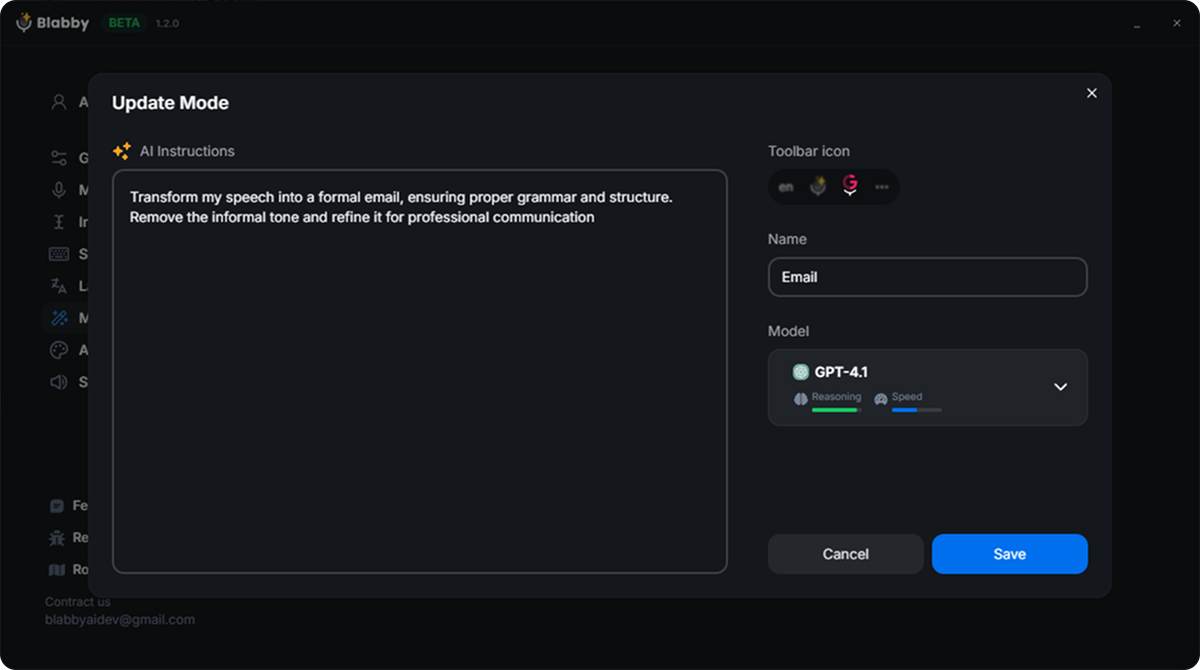
A BlabbyAI mode is a written instruction you control, not a fixed setting.
The mechanic worth understanding is that the model receives your full literal transcript, including any words you spoke as commands. So spoken commands work, you just describe them in the instruction rather than waiting for the vendor to implement them:
- "Whenever I say ‘new paragraph’, insert an actual paragraph break instead of writing those words."
- "When I say ‘bullet point’, start a new bulleted list item."
- "Strip filler words and false starts, then format the result as a short professional email."
- "Translate what I say into German, fix the grammar, and keep the tone casual."
That last one is the pattern that saves the most time, because translation, cleanup and formatting happen in a single pass on a single shortcut. BlabbyAI ships with Grammar Correction, Translate to English and Email already built, and supports 90+ languages with auto-detect, so most people start from a preset and edit it rather than writing one from scratch.
Being straight about the limits: a mode rewrites what you actually said, it does not answer you. Your speech is the input, so if you speak a request you get that request reformatted, not fulfilled. It processes one recording at a time after you stop speaking rather than editing live mid-sentence, and it has no memory between recordings. Within those bounds it is the most open version of the rewriting layer in this comparison.
How it compares on price and platform
Every tool here does system-wide dictation with an AI rewriting pass. Prices were read from each vendor's own pricing page in August 2026.
| Tool | Price | Free tier | Offline | Platforms |
|---|---|---|---|---|
 Wispr Flow Wispr Flow | $15/mo, $12 billed annually | 2,000 words weekly, ongoing | No, cloud only | Mac, Windows, iOS, Android |
| BlabbyAI | $8.49/mo | 60 credits weekly, no card | No, cloud only | Windows, Android, Chrome, Linux |
 Superwhisper Superwhisper | $8.49/mo | 3,000 words of Pro, once | Yes, local models | Mac, Windows, iOS |
 Willow Voice Willow Voice | $15/mo | Limited model, 20 Scribe/wk | No, cloud only | Mac (Windows listed as coming) |
Two things fall out of that table. Wispr Flow and Willow Voice sit at $15 while BlabbyAI and Superwhisper sit at $8.49, and the platform column explains more about fit than the price column does. If you are on a Mac, Wispr Flow and Superwhisper are both fully realised there. If you are on Windows, only two of these four treat your operating system as a first-class target.
Who each one is actually for
You want the most polished output and price is secondary
Wispr Flow. This is what the $15 buys and it delivers on it. If you dictate for hours a day the premium is easy to justify.
You dictate lightly, a few emails a week
Wispr Flow’s free tier. 2,000 words weekly, recurring, no card. Do not pay for a tool you will not exhaust.
You are on Windows and want a Windows-first app
BlabbyAI. Built there rather than ported there, Ctrl+Space system-wide, and History keeps your audio on your own disk.
Audio cannot leave your machine, or you dictate offline
Superwhisper. Local Whisper models are a hard capability the cloud-only tools cannot match at any price.
You want to write your own rules for the rewriting
BlabbyAI. A mode is a plain-English instruction you author, so you define your own spoken commands and chain steps in one pass.
You are on a locked-down work laptop
No desktop app installs without admin rights. A Chrome extension will, which is often the only route on a managed machine.
That last row is worth expanding, because it catches more people than expected. On a managed corporate laptop you frequently cannot install an executable at all, which rules out every desktop app in this review including Wispr Flow. A browser extension installs under your own user profile, so BlabbyAI's Chrome extension is often the only dictation you can actually get running on a work machine. It is also the route for anyone on a Chromebook.
Get BlabbyAI freeHow to test any of these in twenty minutes
Reviews, this one included, are a poor substitute for ten minutes with the thing. Every tool here has a free tier that needs no card, so the comparison costs nothing but time. A method that produces a real answer rather than a first impression:
- Write fifty sentences of your own real work. Not test phrases. Your actual emails, your actual notes, with your actual jargon and the names you actually use.
- Count corrections, not errors. The number that matters is how many times you reached for the keyboard afterwards. A tool that transcribes at 97% but needs six fixes loses to one at 95% that needs two.
- Dictate into the app you actually live in. Performance varies more by target application than the marketing suggests, so test in Outlook or Slack or your editor, not a notepad.
- Try it once with people nearby. Whether you are willing to speak at your desk is the single biggest predictor of whether you will still be dictating in a month.
Run that on Wispr Flow's free 2,000 words and on BlabbyAI's 60 free weekly credits, which is also about 2,000 words, and the $78-a-year question answers itself in either direction. If the Wispr Flow output is meaningfully better on your own writing, pay the premium with confidence. If you cannot tell them apart, you have your answer too.
Frequently asked questions
Is Wispr Flow worth it?
It is worth it if you dictate enough to pass the free tier and you value output polish above price. Wispr Flow Pro is $15 per user per month, or $12 if you pay for a year up front, and the thing you are buying is the cleanup pass: it strips filler words, fixes grammar and adds punctuation without you speaking any of it aloud. That works well. The reason people cancel is almost always the same one, which is that the same core job is available for roughly half the money. BlabbyAI and Superwhisper both charge $8.49 per month for system-wide dictation with an AI rewriting layer, so the honest question is not whether Wispr Flow is good, it is whether the polish is worth about $78 a year more than the alternatives.
How much does Wispr Flow cost per month?
Read from the Wispr Flow pricing page in August 2026: the Free plan is $0, Pro is $15 per user per month billed monthly or $12 per user per month billed annually, and the Growth and Enterprise tier starts from $23 per user per month monthly or $18 billed annually. The annual saving is advertised as 20%. Pro is what most individuals end up on, and it is the plan that unlocks unlimited dictation, so the practical price of using Wispr Flow seriously is $15 a month unless you commit to a full year.
What does the Wispr Flow free tier actually include?
The free plan gives you 2,000 words per week on desktop, and that allowance resets weekly rather than being a one-time trial grant. That is genuinely usable for light dictation: 2,000 words is roughly eight to ten emails of real length, or one decent document, per week. Free also includes speech to text across your apps in over 100 languages and the personal dictionary that learns your names and jargon. What the free tier does not include is unlimited dictation or access to the advanced AI models, both of which sit behind Pro.
Is Wispr Flow good on Windows?
It runs on Windows and the core dictation works, but Windows buyers are not getting the whole product. Wispr Flow’s own pricing page labels the Notetaker meeting feature as Mac only, and that feature carries several of the bullets underneath it, including speaker identification and asking questions about your meetings. Reviewers also report the app running heavy or occasionally freezing on Windows machines. None of that makes the dictation unusable, but if you are paying $15 a month on a PC you are paying the same price as a Mac user for a smaller feature set, which is worth knowing before you subscribe.
Is Wispr Flow safe and private?
Wispr Flow processes speech in the cloud, so your audio does leave your machine, and its own documents state that transcription always happens in the cloud with no offline option at any tier. The company publishes SOC 2 Type II, ISO 27001 and HIPAA compliance, lets you opt out of model training at any time, and lets you choose what is stored and delete it. One qualifier its privacy page carries and most summaries drop: SOC 2 Type II and ISO 27001 are marked "Available to Enterprise plans only", so an individual on Pro is not covered by those two, while HIPAA is offered on all plans with a signed BAA. Independent reviewers have raised questions about how much surrounding context the app reads unless context awareness is switched off, which is the most common criticism in the coverage. If you want audio that never leaves your computer at all, no cloud dictation tool can offer that, and Superwhisper runs local models best on Apple Silicon Macs.
What is better than Wispr Flow?
Better depends on which axis you care about, because the field is close on raw accuracy. On price, BlabbyAI and Superwhisper both do system-wide dictation with an AI rewriting layer for $8.49 per month against Wispr Flow’s $15. On offline capability, Superwhisper is the only mainstream option that runs speech models locally, which Wispr Flow cannot do at all. On Windows, BlabbyAI is the one built for Windows from the start rather than ported to it, and it keeps its History of past recordings on your own machine. On Android, the BlabbyAI app adds a floating mic to any app and is free during the beta. On polish out of the box, Wispr Flow is genuinely at the front, which is exactly what you are paying the premium for.
Does Wispr Flow work in every app?
Yes, and this is the part it does very well. Wispr Flow is a keyboard-level tool rather than a plugin, so you press a shortcut, speak, and the text lands in whichever field has your cursor. Slack, Gmail, Word, Notion, a browser form, an IDE and a terminal are all the same to it. It also adapts register by app, so the same sentence comes out punchier in Slack and more structured in an email. This architecture is standard across modern dictation tools, BlabbyAI included, so it is a reason to pick the category rather than a reason to pick Wispr Flow specifically.
Can you control how Wispr Flow rewrites your speech?
Partly. Wispr Flow leans on automatic cleanup, and the controls you get are a personal dictionary that learns names and jargon, Snippets for turning short voice shortcuts into long phrases, and a Command Mode on Pro that lets you highlight existing text and tell it what to change. What you do not get is a written instruction you author yourself that runs on every recording. That is the main structural difference from BlabbyAI, where a mode is a free-form prompt in plain English, so you can define your own spoken commands such as making the phrase "new paragraph" insert an actual break, and chain translation, tone and formatting in one pass.
How accurate is Wispr Flow?
Accuracy is strong and it is not really the differentiator people expect it to be. Most current dictation tools, Wispr Flow included, run on modern speech models that handle ordinary speech, accents and non-native English well, so the raw transcription is rarely where they separate. Wispr Flow’s advantage is what happens after transcription: the cleanup pass removes disfluencies and false starts, so the text you get looks edited rather than transcribed. Reviewers who type quickly report roughly doubling their effective words per minute with it, which is the honest headline number and is broadly what any good dictation tool delivers.
How do you cancel Wispr Flow?
The pricing page states no commitments and cancel anytime, and there is no credit card required to start on the free plan, so trying it costs nothing. Cancelling a Pro subscription drops you back to the free tier rather than removing access entirely, which means you keep 2,000 words a week afterwards. If you are cancelling because of the price rather than the product, it is worth trying a cheaper tool on the same work before you decide dictation itself is not for you: BlabbyAI’s free tier is 60 credits a week, roughly 2,000 words, and needs no card either.
The verdict
Wispr Flow is one of the best-executed dictation apps available, and the cleanup pass that turns spoken rambling into finished prose is the most polished implementation of that idea in the category. If you write for a living, dictate for hours, and want the version that needs the least editing afterwards, it earns its $15.
The reservations are all about what surrounds that. It is cloud-only, so offline dictation is off the table entirely. Its Notetaker feature is Mac-only, so Windows buyers pay full price for a smaller product. The rewriting layer is something you tune rather than something you write. And the same core job is available at $8.49 from more than one vendor, which puts about $78 a year on the table for output that most people cannot reliably tell apart in a blind test on their own writing.
If you are on Windows specifically, BlabbyAI is the one built for that operating system from the start: system-wide on Ctrl+Space, History stored on your own machine, modes you write in plain English, 90+ languages, and $8.49 a month with a free tier that needs no card. If you are on a managed laptop or a Chromebook, the Chrome extension installs where an executable will not. On an Android phone, the BlabbyAI Android app puts a floating mic in any app, on top of the keyboard you already use, free during the beta.
For the wider field, our best AI dictation apps roundup covers nine tools with prices, and Wispr Flow vs Superwhisper puts it head to head with its closest rival. If the price is the sticking point, we break the plans down in Wispr Flow pricing and cover the switch in Wispr Flow alternatives.
Run the fifty-sentence test for free
60 credits a week, no card, no account setup. Dictate your own work in BlabbyAI and count the corrections against what you are paying now.