
Updated August 31, 2026 · By Sumbat.T
Wispr Flow Free Alternative: 6 Tested Options in 2026

The short answer
- Check the free plan you already have before replacing it. Wispr Flow's free tier is not one limit, it is three: 2,000 words a week on desktop, 1,000 on iPhone and unlimited on Android. Read from its own pricing page in August 2026. Every roundup we found quotes a flat 2,000.
- Most of the famous free alternatives are Mac only. FreeFlow, the top result for this search, says "works on all Macs". Parrot says it plainly on its own page: not for Windows.
- On Windows, three options are real. Handy (MIT, local, free), Superwhisper's free tier (unlimited local Whisper models), and BlabbyAI (60 credits weekly free, no card, then $8.49 a month rather than $15).
- "Free" means three different things here. Free forever on a smaller feature set, free but you supply an API key, and free but capped. FreeFlow is free and then bills your own Groq account.
- The real question is rarely free versus $15. Once you have tested a free tool on your own voice, the choice is usually $8.49 versus $15, which is a much easier one to make.
Free tier, no card, works on Windows






60 credits a week, then $8.49 a month
Windows-native dictation on Ctrl+Space, an Android app that is free during the beta, and a Chrome extension for locked-down laptops. No local model to configure, no API key to supply, and roughly half of what Wispr Flow charges if you do decide to pay.
Start here: what Wispr Flow's free plan actually gives you
Almost everyone arriving at this search assumes the free plan is a teaser and the real product is $15 a month. That is worth checking first, because for a meaningful share of people the free plan is already enough, and the cheapest alternative to Wispr Flow is the Wispr Flow you are already running.
Here is the part that is genuinely hard to find. The pricing card on Wispr Flow's site describes the free plan as "speech-to-text across all your apps in 100+ languages" and lists no limit at all. The limit lives further down the page, inside the full feature comparison table, and it is not a single number:
2,000 words / week
On desktop, which is Mac and Windows. This is the number every comparison article quotes as though it were the whole story.
1,000 words / week
On iPhone. Half the desktop allowance, on the device where people most often dictate rather than type.
Unlimited
On Android. No cap at all on the free plan, which is a strange and genuinely useful fact that nobody seems to mention.
Two practical conclusions follow. If you dictate mainly on an Android phone, you do not have a Wispr Flow pricing problem and you can stop reading. And if you are on desktop, 2,000 words a week is roughly eight to ten emails a day, which is either comfortable or nowhere near enough depending entirely on your job. Work out which before you spend an evening configuring a local model to replace something you were not actually running out of.
Why this post checks the vendor page rather than quoting other roundups
The six options, side by side
Every figure below was read from the vendor's own site or repository in August 2026. The column that matters most is the last one, because in this category the catch is never the price, it is what the free version quietly asks you to supply instead.
| Tool | Cost | What you get free | Platforms | The catch |
|---|---|---|---|---|
 Wispr Flow (free) Wispr Flow (free) | Free, then $15/mo | 2,000 words/wk desktop, 1,000 iPhone, unlimited Android | Mac, Windows, iOS, Android | Notetaker is Mac only, by its own pricing page |
 Handy Handy | Free, MIT licence | Unlimited, runs on your machine | Windows, Mac, Linux | Local models: setup, disk space and battery |
 Superwhisper Superwhisper | Free tier, Pro $8.49/mo | Unlimited local Whisper models on free | Mac, Windows, iOS | Cloud models and API keys are paid only |
 OpenWhispr OpenWhispr | Free, open source | Unlimited local, or your own API keys | Desktop, local-first | You supply the model or the key |
 FreeFlow FreeFlow | Free, open source | Billed to your own Groq account | Mac only | Needs a Groq API key before it transcribes |
 BlabbyAI BlabbyAI | Free tier, then $8.49/mo | 60 credits weekly, no card | Windows, Android, Chrome, Linux | Cloud based, so it needs a connection |
The Windows problem nobody in this search will tell you about
Run this search and read the results in order. The top organic result is FreeFlow, a GitHub project whose README states "Works on all Macs (Apple Silicon + Intel)". Below it: Snaply, advertising "100% local, private AI dictation for Mac". Parrot, which is admirably direct on its own comparison page, listing itself as "not for: Windows" and telling readers "Need Windows support? Stay on Wispr Flow for now." MacWhisper announces the platform in its name. VoiceInk is Mac-first.
The pattern is not an accident. This category grew up on macOS, because that is where the developer audience that builds these tools works. The result is a search where a Windows user reads eight recommendations and can act on roughly two of them.
Google appears to know this. The AI Overview for this query ends with an unusual question rather than an answer: whether you would like to know about local offline models, "or do you need an alternative for a specific operating system like Mac or Windows?" The second related search under the results is "Wispr Flow alternative for Windows". The demand is visible in the search results themselves, and the pages above are not meeting it.
If you are on Windows, this is your actual shortlist
- Handy, if you want free and open source and are comfortable with a local model. Real Windows build, installable with
winget install cjpais.Handy. - Superwhisper, whose free tier includes unlimited local Whisper models and which now ships a Windows app rather than being the Mac-only tool it was known as.
- BlabbyAI, if you would rather not configure a model at all. Free tier with no card, Windows-native, and a Chrome extension for machines where you cannot install software.
Handy: the genuinely free, genuinely cross-platform one
If there is a single answer to "free and works on my Windows machine", Handy is it. It is MIT-licensed, which is about as permissive as open source gets, and it ships real builds for Windows, macOS and Linux rather than a Mac binary with a promise attached. You can install it with winget install cjpais.Handy on Windows or brew install --cask handy on a Mac, which tells you something about how seriously the cross-platform support is taken.
It works the way you would expect: a global hotkey, Ctrl+Shift+D on Windows and Linux or Cmd+Shift+D on Mac, and the transcription runs locally through Whisper models on your own machine. Nothing leaves your computer, there is no account, and there is no usage cap because there is no server metering you.
The costs are real but they are paid in something other than money. You download model weights, which take disk space. Transcription runs on your CPU or GPU, which you will notice on a thin laptop running on battery. And accuracy is bounded by whichever model your machine can run fast enough to be usable, which on most laptops is a smaller variant than the ones the cloud services use. For a lot of people that is a completely acceptable trade, and for a lot of others the first time it mangles a client's name in an email is the moment they reconsider.
Superwhisper: a free tier that is not a trial
Superwhisper is usually filed under "paid alternative", which undersells what it gives away. Its free tier is free forever rather than time-limited, and it includes unlimited use of local Whisper models, voice-to-text in any app, meeting recording and support for 100+ languages. New accounts also get 3,000 words of the Pro features to try before the free tier settles in.
Two things are worth knowing. The first is that Superwhisper is no longer Mac-only. Its own site describes it as AI voice to text for macOS, Windows and iOS, which matters given how much of this SERP is Mac-locked. The second is the price of the paid tier: $8.49 a month, not $15. So even the "upgrade" path out of Superwhisper's free tier costs a little over half what Wispr Flow does, which reframes the whole question. If you came here because $15 a month felt steep for dictation, note that the market has largely already agreed with you.
What the $8.49 tier buys, at Superwhisper and elsewhere
OpenWhispr, FreeFlow and the "bring your own key" category
These two dominate the open-source end of this search, and they share a characteristic worth understanding before you download either. OpenWhispr is open source, runs entirely on your device and can either use local models or connect to your own API keys. It sits at the top of Google's AI Overview for this query, and it is a legitimately good project.
FreeFlow is the one to read carefully. It is the number one organic result for this search, it is genuinely free and open source, and its setup instructions include a step most summaries omit: get a free Groq API key from groq.com. The app is free. The transcription is billed to an account you open with a third party. Groq's free tier is real and generous, so for many people this never becomes a bill, but it is a different shape of free than "download and use forever" and you should know which one you are signing up for. FreeFlow is also Mac-only, so on Windows the question does not arise.
The broader point about this category: open source solves the subscription problem completely and solves the setup problem not at all. If you enjoy configuring things, this is a feature, and the control you get in exchange is real, including the ability to edit the cleanup prompt directly. If you want to dictate an email in the next ten minutes, it is a cost.
No model to download, no API key to supply
The middle path between free-with-setup and $15 a month
BlabbyAI runs cloud models with no configuration, types into any Windows app on Ctrl+Space, and starts at 60 free credits a week with no card. If you decide to pay, it is $8.49 a month with no annual lock-in.
BlabbyAI: cloud accuracy without the $15
The gap this search keeps circling is a tool that does not ask you to choose between configuring a local model and paying $15 a month. That is the space BlabbyAI occupies. The free tier is 60 credits a week, roughly 2,000 words, with no card and no account setup ritual. The paid tier is $8.49 a month for unlimited dictation, with no annual commitment to unlock the headline price, which is worth noting in a category where the advertised number is usually the annual rate.
On Windows it runs system-wide. You press Ctrl+Space in any application with a text field, speak, and the text lands where your cursor is: Outlook, Word, Slack, Teams, Notion, a browser address bar, an IDE. There is nothing to integrate and no per-app plugin, because it types the way a keyboard types.
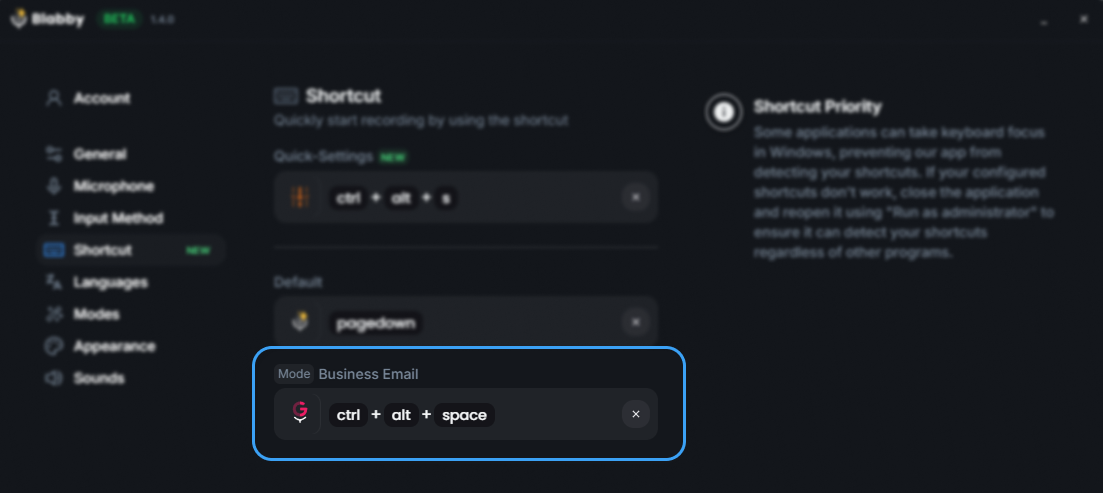
BlabbyAI on Windows: press the shortcut anywhere, speak, and the text is typed into whatever field the cursor is in. Source: BlabbyAI.
There is also a Chrome extension, which matters more than it sounds for one specific reader: anyone on a managed work laptop where installing a desktop application is not permitted. Every local-model option on this page requires an install and a model download, which makes them non-starters on a locked-down machine. A browser extension is often the only route available, and it is why the extension is a product in its own right rather than a fallback for the Windows app. And on an Android phone, the BlabbyAI Android app adds a floating mic to any text field, works on top of the keyboard you already use, and is free during the beta.
The feature that does not have an equivalent in the free tools is custom modes. A mode is a plain-English instruction you write yourself and apply to whatever you just said: keep my bullet points, write this as a formal email, strip the filler and leave the rest alone. The free tools give you a settings panel to toggle, or a config file to edit if you are comfortable there. A mode is neither: it is a sentence you write in your own words. If the way you want your speech handled is at all specific, that difference outlasts the price difference.
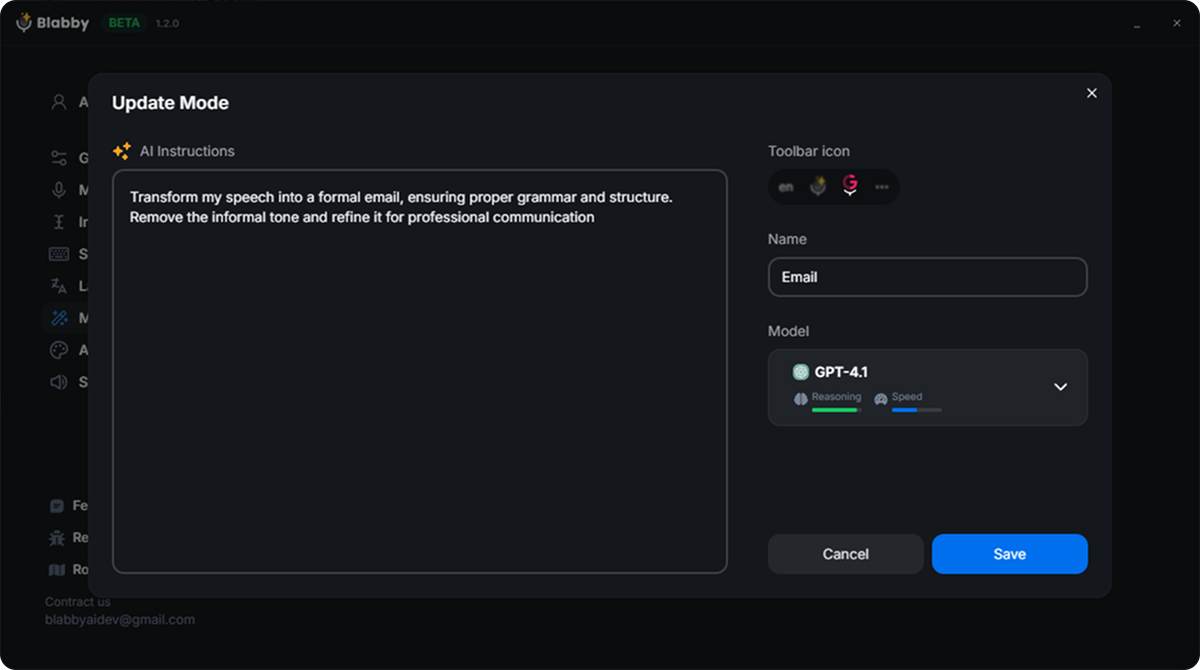
A custom mode is an instruction in plain English, applied to whatever you just dictated. Source: BlabbyAI.
The honest limitation, stated plainly: BlabbyAI is cloud based, so it needs a connection, and it does not transcribe on your own machine. If strictly local processing is a hard requirement, Handy is the tool on this page built for that and you should use it.
The three meanings of "free" in this category
Every tool on this page is described somewhere as free, and they mean three genuinely different things. Sorting them this way makes the choice much faster than comparing feature lists.
Free, you supply the compute
Handy and OpenWhispr. No subscription ever, no cap, and the model runs on your hardware. Costs disk space, battery and setup time.
Free, you supply the key
FreeFlow. The app costs nothing, the transcription is billed to your own Groq account. Often free in practice, but it is a third-party account you open.
Free, up to a limit
Wispr Flow, Superwhisper's free tier and BlabbyAI. Nothing to configure, cloud accuracy, and a ceiling you may or may not reach.
The mistake worth avoiding is treating these as interchangeable because they share a price. A capped cloud tool and an uncapped local tool fail in opposite directions: one stops working when you have talked too much, the other works forever but less accurately on hard audio. Which failure you would rather have is a real preference, and it is a better basis for choosing than any accuracy percentage you will read.
Which one, for which situation
| If this is you | Start with |
|---|---|
| You want free and you do not mind setup | Handy. MIT licence, real Windows build via winget, local Whisper models, no account and no subscription. |
| You want free with the least possible setup | Superwhisper's free tier. Unlimited local models, and it now ships a Windows build rather than being Mac-only. |
| You want it to work in every app without configuring a model | BlabbyAI. 60 credits weekly free, no card, Ctrl+Space anywhere on Windows. Paid is $8.49 rather than $15. |
| You are in a locked-down work laptop with no installs | A browser extension is the only route. BlabbyAI has a Chrome extension that needs no desktop install at all. |
| You are on a Mac and just want the money back | FreeFlow or Parrot. Both free, both good, both Mac-only, which is why they dominate this search. |
| You need meeting notes as well as dictation | Wispr Flow's Notetaker is the reason people stay, but it is Mac only. On Windows it is not part of the deal. |
How to test any of these in twenty minutes
Every tool on this page has a free way in, which means you can settle this empirically rather than by reading more comparisons. The method that actually tells you something:
- Use your own sentences, not test phrases. Dictate fifty sentences of real work: an actual email you owe someone, a real Slack reply, the notes you would have typed anyway. Test phrases are articulated more carefully than real speech and they flatter every tool equally.
- Include your hard words. Client names, product names, the acronyms your team uses. This is where cloud and local models separate most visibly, and it is the difference you will live with daily.
- Count corrections, not errors. The question is not how accurate the transcript is, it is how many times you reached for the keyboard. A tool that is 97% accurate but wrong on the words you use constantly is worse than one at 95% that gets your vocabulary right.
- Test on battery, if you go local. A local model behaves differently when your laptop is unplugged and thermally throttled, which is exactly when you are most likely to be dictating rather than typing.
If a free tool passes that test, take the $180 a year and stop reading. If it does not, you have learned something specific: the cloud models are worth paying for in your particular case. And at that point the decision is no longer free versus $15 a month, it is $8.49 versus $15, which most people find takes about ten seconds.
Get BlabbyAI freeFrequently asked questions
Is there a free version of Wispr Flow?
Yes, and it is more generous than most summaries suggest, but the limit is not one number. Read from Wispr Flow's own pricing page in August 2026, the free plan allows 2,000 words a week on desktop, 1,000 words a week on iPhone, and unlimited words on Android. The pricing card itself does not say this. It lists the free plan as "speech-to-text across all your apps" and you only find the three-way split further down, in the full feature comparison table. That matters because almost every roundup of Wispr Flow alternatives quotes a flat 2,000 words a week, which is right for exactly one of the three platforms people use it on. If you are on Android, the free plan is already unlimited and you may not need an alternative at all.
What is the best free alternative to Wispr Flow?
It depends on which machine you are on, and that is the question almost nobody in this category answers. On a Mac you have a genuine embarrassment of choice: FreeFlow, Parrot, VoiceInk, MacWhisper and Snaply are all real, free and actively maintained. On Windows the list collapses to a handful. Handy is the strongest genuinely free cross-platform option, since it is MIT-licensed, runs locally and ships real Windows and Linux builds. Superwhisper has a free-forever tier with unlimited local Whisper models and now runs on Windows too. If you want something that works out of the box without wiring up a model or an API key, BlabbyAI gives 60 credits a week free with no card, and its paid tier is $8.49 a month rather than $15. On an Android phone, the BlabbyAI Android app is free during the beta.
Is there an open source alternative to Wispr Flow?
Several, and they are the reason this search exists at all. Handy is MIT-licensed, runs Whisper models locally on Windows, macOS and Linux, and installs through winget or Homebrew. OpenWhispr is open source and runs offline on your own device or against your own API keys. FreeFlow, which ranks near the top of this search, is open source but Mac-only, and it expects you to supply your own Groq API key before it will transcribe anything. That last detail is the one to watch across this whole category: "open source and free" often means free of a subscription but not free of setup, and sometimes not free of API costs either. Read what each one asks you to provide before you count it as free.
Are the free Wispr Flow alternatives available on Windows?
Most of the popular ones are not, and this is the single biggest gap in the current search results. The top organic result for this query is FreeFlow, whose own repository says "Works on all Macs". Parrot states it directly on its own comparison page: not for Windows, and "Need Windows support? Stay on Wispr Flow for now." Snaply is Mac-only, VoiceInk is Mac-first, and MacWhisper is in the name. Google's own AI Overview for this search closes by asking whether you need an alternative for a specific operating system like Mac or Windows, which is an unusually direct admission that the answer it just gave does not cover both. The Windows options that are real: Handy, Superwhisper, and BlabbyAI.
Does free actually mean free with these tools?
In three different senses, and they are worth separating before you download anything. Free-forever with a smaller feature set is Superwhisper's model: unlimited local Whisper transcription, with cloud models and your own API keys behind the $8.49 paid tier. Free but bring your own key is FreeFlow's model, where the app costs nothing and the transcription is billed to your Groq account. Free but capped is Wispr Flow's own model, and BlabbyAI's 60 weekly credits. Free and genuinely unlimited on your own hardware is Handy, and the cost there is paid in setup and in your laptop's battery, since local Whisper models are doing real work on your CPU or GPU.
Will a local model be as accurate as Wispr Flow?
Usually not on the same hardware, and anyone telling you otherwise is skipping a step. Wispr Flow, Willow, Aqua and BlabbyAI all send audio to servers running large models, which is why they need a connection to type a single word and why they handle accents and jargon as well as they do. A local Whisper model on your laptop is running a smaller variant to stay fast enough to be usable, so on difficult audio the gap shows. What closes the gap is that most dictation is not difficult audio. It is one person, close to a decent microphone, in a quiet room, which is the condition local models handle well. Test on your own voice rather than on a benchmark, because this is exactly the kind of difference that is either invisible or constant depending on how you work.
What do I lose by leaving Wispr Flow?
Mostly two things, and only one of them is likely to matter. The first is the Notetaker, which records meetings, identifies speakers and connects to your calendar. Note that on Wispr Flow's own pricing page it is labelled Mac only, so if you are on Windows this is not something you are losing, because you never had it. The second is polish: Wispr Flow has been at this longer than most of the free options, and its cleanup pass on rambling speech is genuinely good. The things you will find people expect to lose and do not are the fundamentals. System-wide typing into any app, custom vocabulary and a global hotkey are table stakes now and every tool on this page has them.
Is a cheap paid tool better value than a free one?
Often, and the arithmetic is smaller than people expect once you stop comparing against $15. The reason this search has grown more than tenfold in a year is that $15 a month, or $180 a year, is a lot for typing. But the choice is not only between $15 and $0. Superwhisper is $8.49 a month, BlabbyAI is $8.49 a month with no annual commitment, and both are around half of Wispr Flow. Against a free local tool you are paying roughly twenty cents a day to skip model setup, get cloud accuracy and have it work on a machine that is not yours. If that is worth twenty cents to you, the free tools are not actually cheaper, they are just billed in your own time instead.
Can I write my own rules for how my speech gets cleaned up?
This is where the free tools and the paid ones diverge most sharply, and it is worth checking before you switch. Most free options give you a settings panel: toggle filler-word removal, add words to a custom dictionary, pick a model. Handy and OpenWhispr let you edit the underlying cleanup prompt if you are comfortable in a config file, which is real power with a real setup cost. BlabbyAI custom modes are the middle path: a mode is a plain-English instruction you write yourself and apply to whatever you just said, so you can specify formatting, tone or structure in your own words without editing anything. If the way you want your speech treated is at all unusual, check this before price.
How should I actually choose?
Start with the machine, because it eliminates most of the list immediately. On a Mac, try FreeFlow or Parrot first: they are free, they are good, and the only cost is a download. On Windows, your real free options are Handy and Superwhisper's free tier, and both involve local models. Then dictate fifty of your own real sentences, not test phrases, into whichever you picked and read what comes back. If it is good enough, you have saved $180 a year and you are done. If the accuracy or the cleanup is not there, that tells you the cloud models are worth something to you, and at that point the question is not free versus $15 but $8.49 versus $15, which is a much easier decision than the one you started with.
Related reading: a full Wispr Flow alternative comparison covering the paid options, Wispr Flow pricing in detail, and Wispr Flow vs Willow if you are choosing between the paid tools. For Windows specifically, Windows speech to text covers the built-in options too, and dictation software is the category overview.
Try the free tier before you configure anything
60 credits a week, no card, no model download and no API key. If it handles your fifty sentences, you have your answer without spending an evening on setup.