
Updated September 3, 2026 · By Sumbat.T
Voice Coding in 2026: The Word Means Something Different Now

The short answer
- Voice coding used to mean dictating syntax. In 2026 it mostly means speaking prompts to an AI agent. Those are different activities with the same name, and almost every argument about whether voice coding works is really two people discussing different things.
- The new version needs no special software. You are dictating English prose into a text box, so any accurate dictation tool does it. That is why the barrier went from weeks of practice to none. BlabbyAI types into any focused field, including an agent prompt, at $8.49/month with a free tier.
- The old version is not dead, it just narrowed. Talon Voice is actively maintained and remains the answer for genuinely hands-free work. Serenade, which still ranks third on Google for this term, last had a commit pushed in June 2024.
- Built-in dictation exists in both Claude Code and VS Code, with real limits. Claude Code's needs a Claude.ai account, will not run over SSH, and stops recording after two minutes. VS Code's runs on-device and offline, but only inside VS Code.
Dictation that works in the prompt box and everywhere else






Your agent prompt is prose. Speak it.
BlabbyAI types into whatever field has your cursor, whether that is Claude Code, Cursor, a pull request description or a Jira ticket. It never presses Enter for you. 60 credits a week free, no card.
Two activities, one name
If you searched for voice coding five years ago and again this week, you were shown answers to two different questions. The phrase has been quietly repurposed, and nobody announced it. That is worth untangling before anything else, because which one you mean determines whether the answer is "this takes a month to learn" or "you can start in the next ten minutes".
The 2000-2022 meaning
Dictating syntax
You speak a grammar of commands and an engine turns them into code. "Camel case new function get user by ID" produces getUserById(). Requires a specialised tool, a learned vocabulary, and weeks of practice.
Tools: Talon Voice, Serenade, VoiceCode, Dragon with custom grammars
Learning curve: Weeks of training
The 2026 meaning
Dictating prompts
You speak ordinary English to an AI agent and it writes the syntax. "Add a retry with exponential backoff to the fetch helper and cover it with a test" is a complete instruction. No grammar to learn.
Tools: Any accurate dictation tool, plus Claude Code, Cursor, Copilot
Learning curve: None
The developer whose write-up currently ranks on the first page of Google for this term put the shift in one sentence, and it is the clearest statement of it anywhere:
Instead of dictating code itself, I use my voice to tell Claude which code it should write. This is the key insight that makes voice coding actually viable.
dev.to, "I Ditched My Keyboard for Voice Coding", April 2026
Read that carefully, because it contains the practical consequence. The thing that made voice coding hard was never the speaking. It was that code is a terrible thing to say out loud. Punctuation, casing, nesting and symbol names all have to be spoken explicitly, which is why the old tools needed a command grammar and why learning one took weeks. When the syntax is generated by a model, none of that applies. You are dictating a sentence, and dictating sentences has been a solved problem for a while.
Why this matters for tool choice
If you are dictating prompts rather than syntax, a specialised voice coding tool buys you nothing. What you need is an accurate general dictation tool that types into whatever field has focus, because the prompt box is only one of the boxes you fill in a day. That is a different product category, and a much cheaper one.
How the meaning shifted, with dates
This is not a vibe. Each of these is checkable, and together they show a fifteen-year-old accessibility practice being joined, and then numerically overtaken, by something that happens to share its name.
2000
Programming by voice enters the literature
The ACM paper "Programming by voice, VocalProgramming" is published, and is still cited 77 times. Voice coding starts life as an accessibility research problem.
October 2020
Talon becomes the practitioner answer
Josh Comeau publishes his account of hands-free coding with Talon Voice. For most of the next five years this is the canonical reference, and it is entirely about dictating syntax.
December 2022
Atom is sunset
GitHub retires Atom. Serenade, which still ranks third for voice coding today, still lists Atom as a supported editor on its homepage.
June 2024
Serenade goes quiet
The last commit is pushed to serenadeai/serenade, with 26 issues left open. The repository is not archived, so it keeps appearing in recommendations.
April 2026
The definition flips in public
A dev.to write-up that now ranks on page one states the new premise directly: "instead of dictating code itself, I use my voice to tell Claude which code it should write. This is the key insight that makes voice coding actually viable."
September 2026
Both branches are alive, one is growing
Talon's community repository is pushed to on 2 September. Meanwhile Claude Code ships /voice dictation and VS Code ships an on-device dictation model. Searches for voice coding are up 23% year over year.
The tools, and what each one actually covers
Accuracy is no longer the axis that separates these. All of the current options transcribe ordinary technical English well. What separates them is scope: how much of your day a given tool covers, and whether it stops at the edge of one program.
| Tool | Where it works | Runs on | Sends for you | Price |
|---|---|---|---|---|
 BlabbyAI BlabbyAI | Any text field, system-wide | Windows app, Android app, Chrome extension | Never, you press Enter | $8.49/mo |
 Claude Code /voice Claude Code /voice | Claude Code prompt only | CLI and VS Code extension | Yes in tap mode | Included with Claude.ai |
 VS Code dictation VS Code dictation | VS Code editor and chat | On-device model | No | Free |
 Wispr Flow Wispr Flow | Any text field, system-wide | Mac, Windows, iOS, Android | No | $15/mo |
Talon Voice | Full hands-free control | Mac, Windows, Linux | Command-driven | Free, paid beta tier |
Serenade | Syntax commands in editors | Last pushed June 2024 | Command-driven | Free, open source |
Two rows in that table deserve their own paragraph, because both are routinely recommended by articles that did not check.
Serenade ranks third and stopped shipping in 2024
Serenade is an open-source voice coding tool that sits at position three on Google for this term, which means a large share of people researching voice coding are pointed straight at it. Its GitHub repository, serenadeai/serenade, last received a push on 11 June 2024, with 26 issues still open. The repository is not archived, which is precisely why it keeps getting recommended: nothing on it announces that work stopped.
There is a second tell on the marketing site itself. Serenade lists its supported editors prominently, and Atom is still among them. GitHub sunset Atom in December 2022. A page advertising support for an editor that has been retired for nearly four years is a page nobody has revisited.
$ gh api repos/serenadeai/serenade --jq .pushed_at
2024-06-11T20:08:49Z
$ gh api repos/talonhub/community --jq .pushed_at
2026-09-02T08:27:58Z
Checking a project's actual activity takes one command, and is worth doing before you build a workflow on any tool.
None of this means Serenade will not run today. It means the recommendation you read was probably written before the project went quiet, and that you should check the repository yourself rather than trusting a search ranking. The same command settles it for any tool in this category.
Talon is alive, and it is a different product
The contrast matters because Talon Voice frequently gets swept into "voice coding is dead" takes. It is not. Its community repository was pushed to on 2 September 2026, and it remains the tool people who genuinely cannot use a keyboard rely on. Talon is not really competing with dictation apps: it replaces the mouse and keyboard entirely, with spoken commands for navigation, selection, window management and syntax. That is a much larger and harder thing to do, which is why it has a learning curve and why nothing else has replaced it.
Choosing between them
If your goal is to type less, use general dictation, because most of what you type in a day is prose. If your goal is to not use a keyboard at all, learn Talon. These are not competing answers to one question, they are answers to two.
What your editor already gives you
Before paying for anything, it is worth knowing that two of the places developers dictate most already have dictation built in, and that they made opposite design choices. Both are read first-hand from the vendors' own documentation below.
| Host | Built-in dictation | Audio processed | Where it stops |
|---|---|---|---|
| Claude Code CLI | Yes, /voice | Anthropic servers | Needs a Claude.ai account. No SSH, no web. Stops after 2 minutes. |
| VS Code | Yes, Ctrl+Alt+V | On device, offline | Inside VS Code only. Not in Remote-SSH via the Claude extension. |
 Cursor Cursor | No first-party dictation | Not applicable | Needs a system-wide tool or the OS dictation key. |
Claude Code has /voice, with three constraints worth knowing
Claude Code ships dictation you turn on with /voice. It offers two modes: hold mode, where you hold Space while speaking, and tap mode, where you tap once to start and again to send. Transcription is tuned for coding vocabulary, and Anthropic's documentation notes that your project name and current git branch are added as recognition hints automatically, which is a genuinely thoughtful detail.
> /voice
Voice mode enabled (hold). Hold space to record.
Dictation language: en (/config to change).
Source: Claude Code documentation, code.claude.com/docs/en/voice-dictation
The three limits are all stated plainly in the same document, and each one rules out a real working setup. The first is about authentication:
A Claude.ai account: the speech-to-text service is only available when you authenticate with one, and is not available when Claude Code is configured to use an Anthropic API key directly, Amazon Bedrock, Google Cloud's Agent Platform, or Microsoft Foundry.
Claude Code documentation, Voice dictation, Requirements
That is a large exclusion in practice. Plenty of engineering organisations route Claude Code through Bedrock or a direct API key for billing and compliance reasons, and every developer in those organisations is outside built-in dictation entirely.
The second is about where you work. Dictation needs a local microphone, so it does not run in Claude Code on the web or over SSH. The VS Code extension has the same problem for the same reason: the documentation explains it is unavailable in Remote-SSH, Dev Containers and Codespaces "because the microphone is on your local machine and the extension runs on the remote host". If your development environment lives in a container or on a remote box, which is increasingly normal, that rules it out.
The third is a timer. Recording "stops automatically after 15 seconds of silence or two minutes total". Two minutes is a lot of speech for a chat message and not very much for the kind of prompt that actually benefits from being spoken, where you are describing a bug, the three things you already tried, and the constraint the fix has to respect. Pausing to think for sixteen seconds ends the recording.
The one that surprises people
Claude Code's dictation is not local. The documentation states it directly: "Voice dictation streams your recorded audio to Anthropic's servers for transcription. Audio is not processed locally." That is unremarkable for a cloud tool, but it is worth knowing if you assumed a CLI running on your machine was transcribing on your machine.
VS Code went the other way, and made it offline
VS Code's built-in dictation is the most interesting option in this whole category and the least discussed, because it made the opposite trade to everyone else. It is enabled by default when AI features are on, started with Ctrl+Alt+V in the editor or Ctrl+I in chat, and the model runs where you are sitting:
Dictation uses an on-device speech recognition model by default, so you can dictate without sending audio to an online service. After the initial model download, speech recognition does not require an internet connection.
Visual Studio Code documentation, Voice support
For a developer whose objection to dictation is that audio leaves the machine, this is the answer, and it is already installed. It costs nothing and needs no account. There is one caveat in the same documentation: an optional setting called llmCleanup sends the transcript text, though not the audio, to a language model to tidy it up. Leave that off and nothing leaves the device.
The limitation is the obvious one, and it is the reason this is not the end of the article. It dictates into VS Code. Your pull request description is in a browser. Your ticket is in Jira. Your reply to the person who reviewed it is in Slack. Your reply to the customer who reported the bug is in a support tool. On a typical day the editor is not where most of your words go.
Most of what a developer types is not code
This is the point the whole category keeps missing, and it is the reason scope beats accuracy when choosing a tool. Think honestly about a working day and count where the words go. Very little of it is syntax, and almost all of the rest is prose that would be faster spoken.
Agent prompts
The part that got longer as agents got better. Describing intent, constraints and what you already ruled out is pure prose, and it is now a large share of the job.
Pull request descriptions
Context, reasoning, what a reviewer should look at first. Written in a browser text area, not in your editor.
Code review comments
Explaining why something should change, which takes more words than the change itself. In GitHub or GitLab, in a browser.
Tickets and standups
Jira, Linear, Slack. Short, frequent, and disproportionately annoying to type because they interrupt something else.
Documentation and READMEs
The thing everybody postpones. Speaking a first draft and cleaning it up beats staring at an empty file.
Commit messages
Especially the body, which is where the reasoning belongs and where it usually does not end up.
Every one of those is prose, and prose is where speech wins clearly. Comfortable speaking runs about 130 to 150 words a minute against roughly 40 for average typing. We went through the underlying research on that in our piece on words per minute when speaking, and the short version is that the gap is real for sentences and disappears for symbols.
Notice what that means for tool selection. A tool scoped to your editor covers the smallest slice of that list. A tool scoped to one agent covers one item. A tool that types into whatever field has your cursor covers all six, and it is the cheapest of the three.
BlabbyAI: dictation that does not care which program you are in
BlabbyAI is built on the assumption above: that the useful unit is not "dictation for coding" but dictation everywhere, because the editor is one window among a dozen. Press Ctrl+Space, speak, press it again, and the text is typed into whatever field had focus. That field can be the Claude Code prompt, Cursor's composer, a GitHub review box, a Jira description, a Slack thread or a terminal. There is nothing to integrate, because there is no integration: it types where your cursor already is.
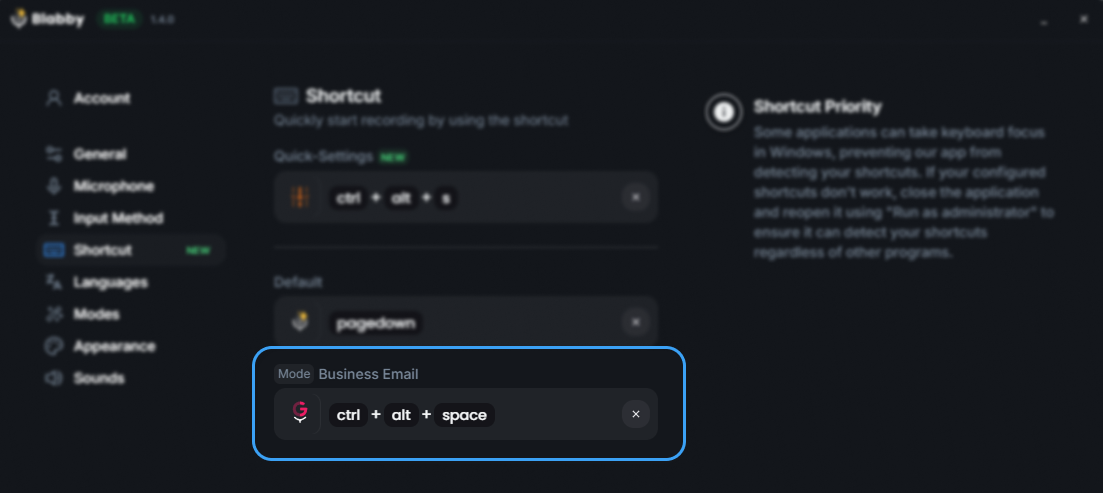
The global shortcut is rebindable in Settings, which matters here: Ctrl+Space is IntelliSense in most editors, so developers usually move it.
That default is worth flagging rather than glossing over. Ctrl+Space is the autocomplete trigger in VS Code, IntelliJ and most editors, so it is the first thing a developer should change. It takes one click in Settings, and there is no reason to leave it colliding.
Custom modes are the part that fits this workflow
A mode is a free-form instruction applied to whatever you just said, after transcription and before the text is typed out. You write the instruction once, assign it a shortcut, and from then on that shortcut produces speech shaped that way. Your speech is the input, not a request: a mode reshapes what you said rather than answering it.
For developers this is more useful than it first sounds, because the writing tasks in that list above each have a house style, and the reformatting is what makes them tedious. A few instructions that do real work:
| Mode instruction | What you say | What gets typed |
|---|---|---|
| Rewrite as a conventional commit with a type prefix and a body explaining why | "fixed the retry loop, it was hammering the API when the token expired" | A fix: subject line with the reasoning in the body |
| Format as a PR description with a summary and a testing section | Your spoken walk-through of the change | Structured markdown with the headings already in place |
| Strip filler words and false starts, keep everything else verbatim | A long, rambling agent prompt thought out loud | The same prompt without the ums and restarts |
| When I say "new bullet", start a new list item instead of writing those words | "the cache is stale new bullet the TTL is wrong" | Two actual bullet points |
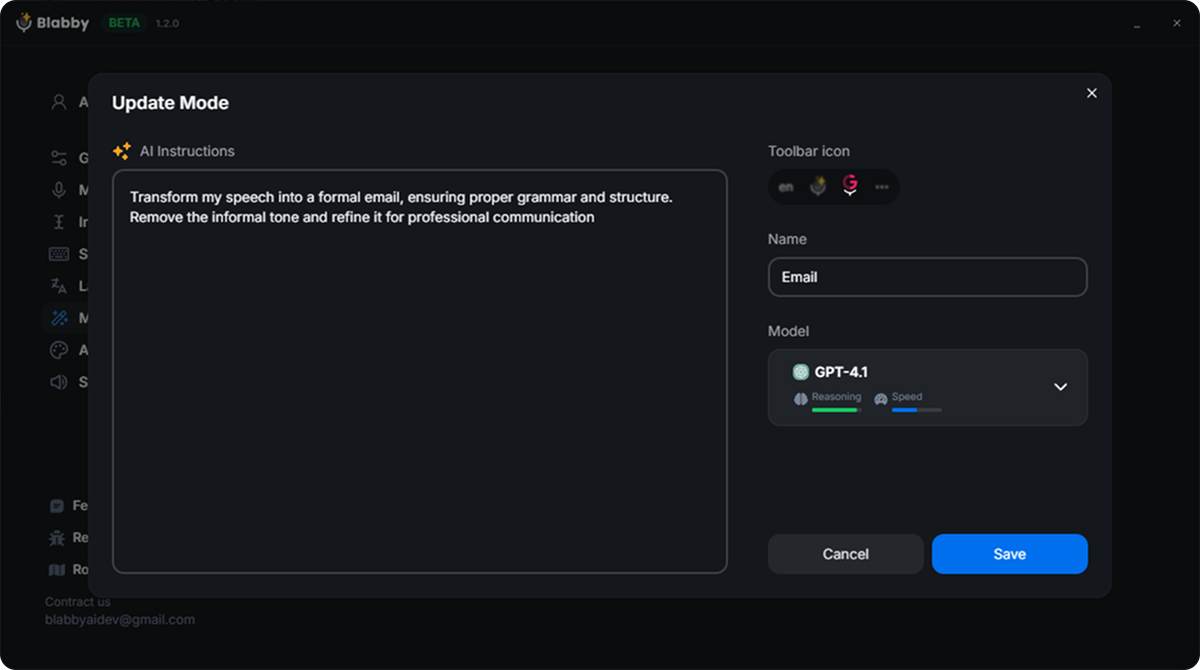
A mode is one instruction plus a shortcut. The last row above is how spoken commands work: you describe them in the instruction rather than relying on a fixed command list.
That last row is worth dwelling on, because it is the mechanic people get wrong. The model receives your full literal transcript, including words you intended as commands, so you can define your own spoken vocabulary by describing it in the instruction. "New paragraph", "bullet point", "scratch that": none of these are built-in features, and all of them work, because you define what they mean.
Teaching it your codebase vocabulary
The predictable objection to dictating anywhere near code is proper nouns. Your internal service is called something nobody outside the company has heard, and no general model will spell it right. Custom spelling handles this: add the term once under Settings, then Languages, typed exactly as you want it written, and it is matched from then on. Library names, service names, a colleague's surname, an acronym your team invented. Blabby also supports 90+ languages with auto-detect, which matters on distributed teams where people think in one language and ship in another.
It never presses Enter
Blabby writes text into the focused field and stops there. It does not click buttons, submit forms or press Enter. For an agent prompt that is the behaviour you want: your words land in the box and wait, so you can reread a long instruction before sending it rather than having it fired off the moment you stop talking.
Two products, and the browser one needs no install
The Windows desktop app is the fuller product: it types system-wide into any application, and it has History, which writes every recording to your own disk the instant you stop speaking, before transcription begins. Nothing about History touches a server, and you can replay or re-transcribe any past recording later, optionally through a different mode.
The Chrome extension is the other half, and for a lot of developers it is the one that fits. If your agent is Cursor's web view, if your reviews happen in GitHub, if your tickets are in Linear and your docs are in Notion, then everything you dictate is already in a browser tab. The extension shows a small bubble beside the focused text field and needs no download and no admin rights, which is the difference between working and not working on a managed laptop. It is also the option for Mac and Chrome OS. Both are covered by the same $8.49 a month, and the free tier is 60 credits a week with no card.
A setup that works, in about ten minutes
Nothing here requires committing to a workflow before you know whether you like it. The order matters slightly: get dictation working on prose first, because that is where the win is obvious, and only then decide whether you want anything more specialised.
- Rebind the shortcut before anything else. Whichever tool you pick, put it somewhere your editor is not already using. Ctrl+Space is autocomplete and Ctrl+Alt+V may already be taken. Ten seconds now saves a week of collisions.
- Start with a pull request description, not a prompt. It is long, it is prose, it is low stakes, and it is the task where the speed difference is impossible to miss. If dictation is going to work for you, you will know by the end of one PR.
- Add your five worst words to the dictionary. The service name, the library, the acronym, the surname. Five entries removes most of the friction people quit over.
- Then try it on an agent prompt, and be more specific than you would type. This is the actual unlock. Because speaking is roughly three times faster than typing, the prompt you speak is naturally longer and more detailed than the one you would have typed, and agents respond well to that. Say the constraint. Say what you already tried. Say what the fix must not break.
- Only then consider hands-free tooling. If your need is medical rather than convenience, this is where Talon enters, and it deserves a proper time commitment rather than an afternoon.
The habit that makes it work
Speak the prompt you would have thought and then abbreviated. Most weak agent prompts are weak because typing them in full was tedious, not because the developer did not know the context. Removing the typing cost removes the reason to abbreviate.
Where speaking is still the wrong tool
A guide that claims voice wins everywhere is not worth reading, and the boundaries here are clear enough to state.
Raw syntax is still faster typed, for anyone who types competently. Speaking const [x, setX] = useState(0) out loud is a worse experience than typing it, in every tool, and no amount of model improvement changes that, because the bottleneck is the spoken form of punctuation rather than the recognition. Precise edits have the same problem: moving a cursor three characters left is a keystroke and a sentence.
There is also an environment constraint that no vendor page mentions. Dictation assumes you can talk. In an open-plan office, on a train, or in a shared room at home with someone asleep, that assumption fails, and it fails for whole days at a time rather than occasionally. This is a real reason people abandon dictation tools, and it has nothing to do with the software.
The honest framing is that dictation is a second input method rather than a replacement. You keep typing, and you speak the parts that are sentences. That is a smaller claim than most of this category makes, and it is the one that survives contact with a working week.
So does voice coding work?
Both versions work, for different people, and the reason the question feels unsettled is that it is really two questions.
Dictating syntax works, has worked for years, and remains demanding. Talon is actively maintained and is the right answer if you cannot use a keyboard, but it is a skill you acquire rather than a tool you install. Anyone telling you this version is effortless has not done it.
Dictating instructions to an agent works immediately, needs no training, and is what the term now mostly means. It also has a consequence the tooling discussion tends to skip: since the thing you are speaking is prose, the tool you need is not a coding tool at all. It is accurate dictation that follows your cursor into whatever window you are in, because the prompt box is one of maybe six places your words go in a day.
That is the whole shift, and it is why a term that was niche for fifteen years is up 23% year over year. BlabbyAI covers that job for $8.49 a month, on Windows or in Chrome, and the free tier is enough to find out whether you like speaking your prompts before you pay for anything. If you want the wider comparison, we keep a roundup of the best dictation apps, and a guide to dictation for programmers that goes further into the day-to-day writing side.
Frequently asked questions
What is voice coding?
The word now covers two different practices, and most confusion about voice coding comes from mixing them up. The older meaning is dictating code itself: you speak a grammar of commands and a specialised engine turns them into syntax, so "camel case new function get user by id" becomes getUserById(). Talon Voice and Serenade work this way and it takes weeks of practice. The newer meaning, which is what almost everyone means in 2026, is speaking your instructions to an AI coding agent like Claude Code, Cursor or Copilot and letting the agent write the syntax. That second version needs no syntax engine at all, because you are dictating English prose into a text box. Any accurate general dictation tool does it, which is why the barrier to entry collapsed. BlabbyAI types your speech into whatever field has your cursor, including an agent prompt box, at $8.49 a month.
Can you actually write code with your voice?
Yes, but the honest answer depends on which of the two practices you mean. Dictating raw syntax by voice works and people do it full time, mostly through Talon Voice, whose community repository was still being updated in September 2026. It requires learning a command grammar and is genuinely slow to pick up, which is why it stayed niche for fifteen years. Dictating instructions to an AI agent, on the other hand, works immediately with no training, because you are speaking ordinary English sentences like "add a retry with exponential backoff to the fetch helper and cover it with a test". The agent produces the syntax. Developers who tried and abandoned voice coding years ago usually tried the first version. The second is a different activity that happens to share a name.
Does Claude Code have voice input?
Yes. Claude Code has built-in dictation you enable with the /voice command, in either hold-to-record mode (hold Space while speaking) or tap mode (tap once to start, tap again to send). Three limits are worth knowing before you rely on it, and all three are stated in Anthropic's own documentation. First, it requires a Claude.ai account and is explicitly "not available when Claude Code is configured to use an Anthropic API key directly, Amazon Bedrock, Google Cloud's Agent Platform, or Microsoft Foundry", so a team on Bedrock cannot use it. Second, it needs a local microphone and does not work over SSH or in Claude Code on the web. Third, recording "stops automatically after 15 seconds of silence or two minutes total", so a long thinking-out-loud prompt gets cut off. A system-wide dictation tool has none of those three constraints because it does not care which program the cursor is in.
Does VS Code have built-in dictation?
It does, and it works differently from every cloud tool in this category. VS Code ships dictation that is on by default with AI features enabled, started with Ctrl+Alt+V (Cmd+Option+V on Mac) in the editor or Ctrl+I in chat. The notable part is where the processing happens: Microsoft's documentation states it "uses an on-device speech recognition model by default, so you can dictate without sending audio to an online service", and that after the initial model download "speech recognition does not require an internet connection". That makes it the only genuinely offline option most developers already have installed. The trade is scope. It dictates into VS Code and nowhere else, so your pull request description, your Jira ticket, your Slack reply and your terminal all still need something else.
Is voice coding faster than typing?
For prose, comfortably yes. Comfortable speaking runs around 130 to 150 words per minute against roughly 40 words per minute for average typing, and the gap is why dictation pays off for anything sentence-shaped. For syntax, no, and anyone claiming otherwise is selling something: speaking punctuation and camel case is slower than typing it for a competent typist. This is exactly why the prompt-dictation version of voice coding took off and the syntax version did not. Prompts to an AI agent are prose, so they sit on the good side of that ratio, and they are the part of the job that got longer as agents got better. See our breakdown of speaking versus typing speed for the underlying numbers.
What is the best voice to text tool for coding?
The right question is scope, not accuracy, because every serious tool in this category is accurate enough now. If you only ever dictate inside one editor, that editor's built-in dictation is free and sufficient: VS Code's runs on-device. If you dictate across your whole day, which for most developers means an agent prompt, a pull request description, a Jira comment, a Slack reply and documentation, you want a system-wide tool that types into any focused field. BlabbyAI is $8.49 a month for that, with a free tier of 60 credits a week and no card required, and it runs as a Windows desktop app or a Chrome extension, plus an Android app that is free during the beta. If you need hands-free navigation rather than dictation, because of RSI or a mobility need, Talon Voice is the serious answer and nothing else comes close.
Is Serenade still maintained?
It appears not to be. Serenade is an open-source voice coding tool that still ranks near the top of Google for the term, so it gets recommended constantly, but its GitHub repository at serenadeai/serenade last received a push on 11 June 2024, more than two years before this article, with 26 issues still open. Its own website also still lists Atom among supported editors, and GitHub sunset Atom in December 2022. None of that means the software will not run, and the project is not archived. It does mean you should treat a 2026 recommendation of Serenade with care and check the repository yourself before building a workflow on it. Talon Voice, by contrast, is actively maintained: its community repository was pushed to on 2 September 2026.
Can I code by voice with RSI or carpal tunnel?
This is the use case voice coding was originally built for and it remains the strongest one. Two things help, and they are different tools for different jobs. For replacing the keyboard entirely, including navigation, selection and window management, Talon Voice is the established answer, has an active community and is the tool most developers who code hands-free actually use. For reducing typing volume rather than eliminating it, general dictation does most of the work with none of the learning curve, because the majority of what a developer types in a day is prose rather than syntax: prompts, reviews, tickets, messages, docs. Cutting that portion out is often enough. We have a separate guide on typing with carpal tunnel that covers the setup side.
Does dictation handle technical terms and variable names?
Better than it used to, and the handling is now the main thing separating tools. Claude Code states its transcription is "tuned for coding vocabulary" and that terms like regex, OAuth, JSON and localhost are recognised, with your project name and current git branch added as recognition hints automatically. General tools handle this with a custom dictionary instead. BlabbyAI has a custom spelling feature where you add a term once, in Settings then Languages, and it is matched from then on, which is how you teach it your internal service names, an unusual library, or a colleague's name. What no tool does well is raw identifiers spoken as syntax, so getUserById dictated character by character remains awkward everywhere. In the agent workflow you never need to, because you say "the get user by ID helper" and the model resolves it.
Can dictation send the prompt for me?
Some tools do it automatically, and whether you want that is a real preference rather than a feature gap. Claude Code's tap mode submits the prompt for you once the transcript is at least three words, and its hold mode can do the same with an autoSubmit setting. The developer whose dev.to write-up ranks on page one for voice coding named this as the thing that pushed him off built-in voice: the problem, he wrote, "is that it automatically sends the message when you finish talking, so you don't have time to actually think". BlabbyAI never submits. It is a dictation tool and only writes text into the focused field, so your words land in the prompt box and stay there until you press Enter yourself. For a long agent prompt you want to reread before sending, that is the behaviour you want.
Speak your next agent prompt
BlabbyAI types into any focused field, on Windows, on Android or in Chrome, and never presses Enter for you. $8.49 a month, or 60 credits a week free with no card.