
Updated September 14, 2026 · By Sumbat.T
Spokenly for Windows: Does It Actually Work on a PC?
The short answer
- Yes. Spokenly ships a real Windows build, and the download page lists it as 64-bit, 29 MB, Windows 10 and 11. The dedicated Windows page gives version 0.3.20, updated August 2026, checked on 14 September 2026. Anyone telling you it is Mac only is working from information that expired in May.
- But it is a 0.x build beside a 2.x one, and that is the fact worth having. Windows is on 0.3.20. macOS is on 2.29.4. Spokenly first shipped Windows 0.1.0 on 3 May 2026 and has published 24 Windows releases since, so it is active, just young.
- The vendor says so itself, which settles it. The Windows page reads: "The Mac and iOS versions are the most mature, but the Windows build covers the core dictation and transcription flows." That is a fair and unusually honest description.
- It is genuinely free if you run local models. Whisper and Parakeet run offline for $0 forever, no account needed. Pro buys hosted cloud models at $8.33/month billed yearly, and $9.99 month to month through the App Store.
- If you want a Windows-first app rather than a Windows port, that is the actual decision in front of you. BlabbyAI is a Windows app, an Android app and a Chrome extension where Windows is a primary target. On Windows it types into any text field with Ctrl+Space and keeps every recording on your own disk. $8.49/month, free tier needs no card.
Dictation built for Windows, not ported to it






Talk into any text field on your PC
BlabbyAI is a Windows desktop app, an Android app and a Chrome extension. On Windows, press Ctrl+Space, speak, and the text lands where your cursor is. History keeps every recording on your own disk. 60 credits a week free, no card.
The short version, by what you actually need
"Does it work on Windows" is rarely the real question. The real question is which tool you should install this afternoon, and that depends on whether you care most about running offline, about having a mature client, or about getting past a locked-down work machine. These six lines are the whole page compressed:
Best for dictating into any app on Windows: BlabbyAI
BlabbyAI is a Windows desktop app and a Chrome extension where Windows is a primary target, types into any text field with Ctrl+Space, and keeps every recording on your own disk through History, at $8.49 a month.
Best for a locked-down work laptop: BlabbyAI Chrome extension
The BlabbyAI Chrome extension installs from the Chrome Web Store and needs no desktop installer, which is the practical route when IT blocks executables from the open web.
Best for reshaping what you said in one keypress: BlabbyAI custom modes
A BlabbyAI custom mode is a free-form instruction you write yourself, so one shortcut can transcribe, translate, fix grammar and format the result before it lands in the text field.
Offline transcription on Windows: Spokenly
Spokenly runs Whisper and Parakeet models locally on Windows at $0 forever with no usage limits and no account, which is what its free tier is for.
Price on Windows: Wispr Flow is the outlier
Wispr Flow charges $15 a month, or $12 billed annually, against $8.49 for BlabbyAI and $8.33 to $9.99 for Spokenly Pro, so three of the four sit within pennies and one does not.
Watch out for: Stale platform claims
Articles ranking today still say Spokenly has no Windows download, including one dated 26 May 2026, three weeks after the first Windows release shipped on 3 May 2026.
Why this question exists at all
Most software does not generate a "does it run on Windows" search. Spokenly does, and for a specific reason: the app was a Mac and iPhone product first, it got its press coverage in that period, and the coverage never caught up.
Look at what a search for the product name returns today. The App Store listing. A thread in r/macapps. MacUpdate, which serves Mac software. A Lifehacker piece headlined as a free Mac app. A blog post describing it as a macOS and iOS app. Spokenly's own subreddit, whose description reads AI-powered dictation for Mac & iOS. A reader scanning that page would conclude the app is Apple-only, and they would be wrong.
The sharpest example is a review that currently ranks on the second page for this exact query. Dated 26 May 2026, it tells readers in as many words that there is no Windows download link on the vendor's site and that the pricing and feature grid only cover Mac and iPhone. That was already wrong when it was published: Spokenly's first Windows release, 0.1.0, shipped on 3 May 2026, twenty-three days earlier.
The check that settles it
A platform question in a category moving this fast should be answered against the vendor's download page on the day you ask it, not against the consensus of articles. Articles are a snapshot of a product that has since shipped 24 more releases.
What actually ships for Windows today
Here is the vendor's own Windows page, which is the primary source for everything in this section. It states the version, the date and the system requirements on the same screen as the download button.
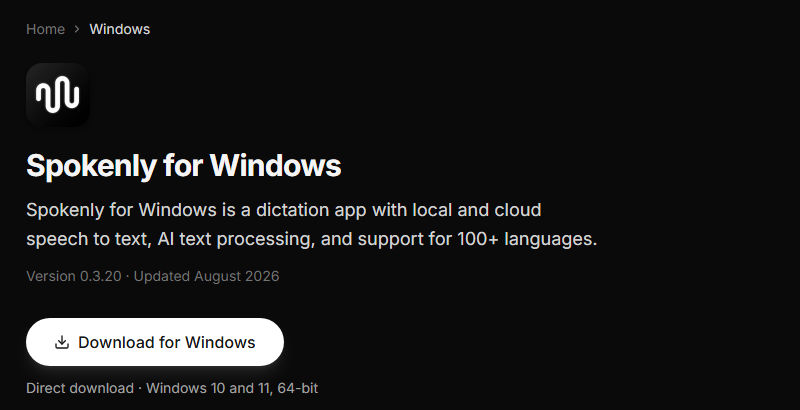
Source: Spokenly's Windows page, checked 14 September 2026
The specifics, all read from the vendor's own pages on 14 September 2026:
- Version 0.3.20, updated August 2026.
- Windows 10 and 11, 64-bit. There is no 32-bit build.
- 29 MB installer, direct download from the vendor's site. It is not distributed through the Microsoft Store.
- Local models: Whisper and Parakeet, running offline on your own machine.
- Cloud models: Deepgram, OpenAI, Soniox and ElevenLabs, with 11 providers in total and a bring-your-own-key option.
- AI text processing via GPT-4, Claude, Gemini, Grok and local models through Ollama.
- A global hotkey that inserts text at the cursor in any Windows application. Google's AI Overview for this query gives the default as Ctrl+Space, though the vendor's Windows page does not state it, so treat that one as second-hand and check it in settings after installing.
That is a complete dictation product, not a stub. Whatever else this page says about maturity, nobody should be left with the impression that the Windows build is a placeholder or a waitlist.
The number that nobody else prints: 0.3.20 against 2.29.4
Spokenly publishes separate release pages for each platform, and reading them side by side gives the clearest possible answer to how the Windows build compares. This is the part of the story that is missing everywhere else, and it takes about a minute to verify. The last row is the contrast that matters for a Windows reader.
| Platform | First release listed | Latest | Count | What it means |
|---|---|---|---|---|
| Windows | 0.1.0 on 3 May 2026 | 0.3.20 on 29 August 2026 | 24 releases | Still on a 0.x version string |
| macOS (direct) | Listing starts at 2.17.6, 4 March 2026 | 2.29.4 on 12 September 2026 | Around 60 releases listed | The mature client |
| macOS (Mac App Store) | Not stated | 1.12.3, updated 6 September 2026 | Not stated | Vendor calls it a frozen build, no longer updated |
| BlabbyAI on Windows | Windows from the start | Shipping | Not a port | Windows app plus Chrome extension, both primary targets |
Two readings of this are wrong and one is right. The wrong ones are "Spokenly does not support Windows", which the download page disproves, and "Spokenly supports Windows and macOS equally", which the version numbers disprove. The right reading is that Windows is a real, actively developed, four-month-old client that the developer has not yet called 1.0.
You do not have to take that inference from us, because the vendor states it directly on the Windows page:
"The Mac and iOS versions are the most mature, but the Windows build covers the core dictation and transcription flows."
Spokenly, Windows page, checked 14 September 2026
That is a straightforward thing for a vendor to publish about its own product, and it deserves credit. It is also exactly what a Windows buyer needs to know before spending an afternoon on a migration.
The release cadence is the good news
Twenty-four Windows releases between 3 May and 29 August 2026 is roughly one every five days. The release notes read like genuine platform work rather than version bumps: one says "Dictation now inserts text more reliably, including in terminals", another that "Parakeet models now use your GPU and are much faster". Those are the two things that most often go wrong with a young dictation client on Windows, and both have been worked on.
So the honest forecast is that the gap narrows. If you are reading this months after publication, check the version number again, because on this cadence it will have moved.
What it costs on Windows, and the number the pricing page hides
Spokenly's pricing is unusually generous at the free end and slightly misleading at the paid end, in a way that is worth a paragraph.
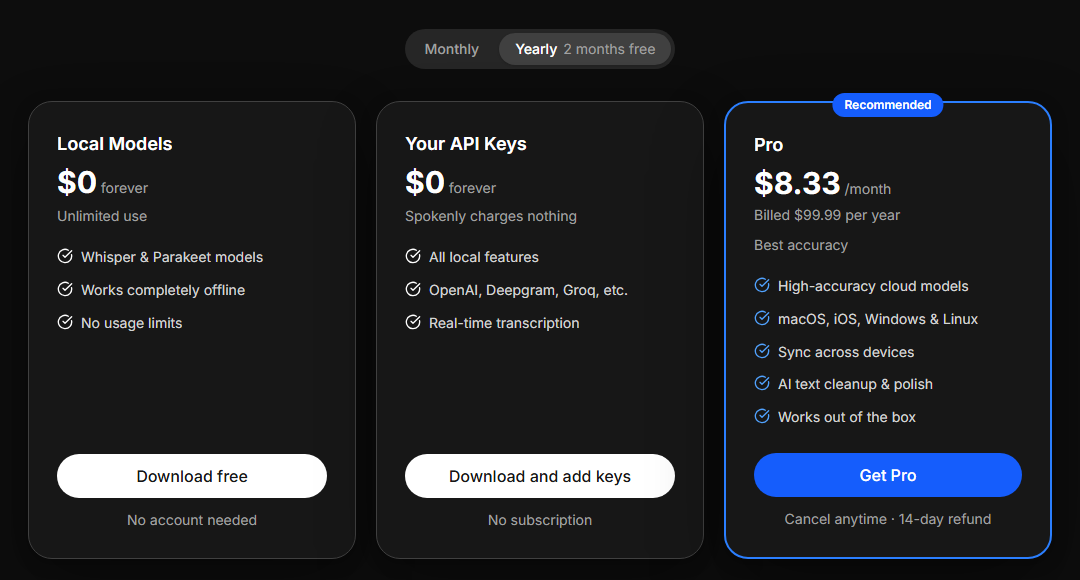
Source: Spokenly's pricing page, checked 14 September 2026. Note the Yearly toggle above the cards.
The free end is real. Spokenly lists Local Models at "$0 forever" with "Unlimited use", "Works completely offline" and "No usage limits", requiring no account. A second free column lets you bring your own API keys, where "Spokenly charges nothing" and you pay OpenAI, Deepgram or Groq directly. Its own comparison note puts it well: "Everything local is free forever in every plan. Pro only adds the cloud."
The paid end needs care. The card reads $8.33/month, but the toggle above it is set to Yearly, and the small print says billed $99.99 per year. Pay month to month through the Apple App Store and the listed in-app purchase is $9.99, with a six-month plan at $49.99. So depending on where and how you buy, the same Pro tier is $8.33 or $9.99 a month, a 20 percent spread that no single page states in one place.
Worth knowing before you compare
Google's AI Overview for this product currently quotes the $9.99 monthly figure while citing the vendor's own media kit, which quotes $8.33. Both numbers are real. They are different purchase paths, and Pro covers macOS, Windows, Linux and iOS either way.
Spokenly against the other Windows options
Every price below was read from the vendor's own pricing page on 14 September 2026, and monthly and annual rates are stated separately wherever they differ, because in this category they usually do.
| Tool | Windows | Free tier | Paid |
|---|---|---|---|
Spokenly | Yes, 0.3.20, direct download | Unlimited offline local models, no account | $8.33/mo billed yearly, $9.99 monthly on the App Store |
 BlabbyAI | Yes, Windows app plus Chrome extension | 60 credits a week, no card | $8.49/mo |
 Wispr Flow | Yes | 2,000 words a week on desktop | $15/mo, $12/mo billed annually |
 Superwhisper | Yes, but the fully local setup is macOS only | 3,000 Pro words, then free tier stays | $8.49/mo |
The thing to notice is that the prices barely differ. Spokenly Pro, BlabbyAI and Superwhisper all sit within sixteen cents of each other per month. Wispr Flow is the outlier at nearly double. So on Windows this is not a price decision, and anyone framing it as one is padding a comparison. It is a decision about whether you want offline models you manage yourself, or a product that works the moment it opens.
BlabbyAI: Windows as the product, not the port
The version numbers above frame the real choice on this platform. You can run a four-month-old Windows client, or you can run one where Windows was the target from the start.
BlabbyAI is built for Windows rather than brought to it. The toolbar sits above the taskbar, the global shortcut is Ctrl+Space and works from anywhere in Windows regardless of which application has focus, auto-launch is on by default so the shortcut is live after every boot, and onboarding is two steps with no account and no sign-in. There are no models to choose and nothing to download before it works.
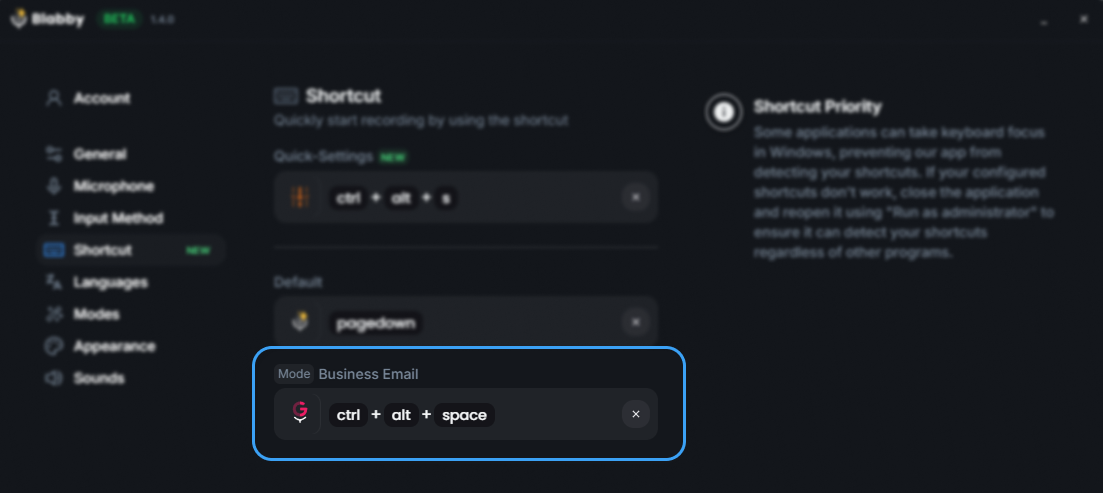
Source: BlabbyAI shortcut settings on Windows
History keeps the audio on your disk
This is the feature that answers the same worry Spokenly's local models answer, from a different direction. When a recording stops, BlabbyAI writes the audio to your own disk before transcription begins, along with the resulting text. If the network drops, the server fails, or you cancel halfway, the audio is still there and you can re-run it later, optionally through a different mode or language. The default cap is 500 entries and it is configurable. None of that data touches a server.
Custom modes are the part with no Spokenly equivalent
Spokenly has AI text processing, and it is a real feature: connect a model and have your transcript cleaned up. BlabbyAI's custom modes work differently in one respect that matters, which is that the instruction is free-form and yours. You write it, so it can do approximately anything a language model can do to a block of text.
A worked example. You create a mode whose instruction is: "Translate what I said into English, fix any grammar errors, and format it as a short email. Whenever I say 'new paragraph', insert an actual paragraph break instead of writing those words." Assign it a shortcut. Now you speak in your own language, at your own pace, saying "new paragraph" where you want one, and a clean English email lands in the text field. That is four separate operations in one keypress.
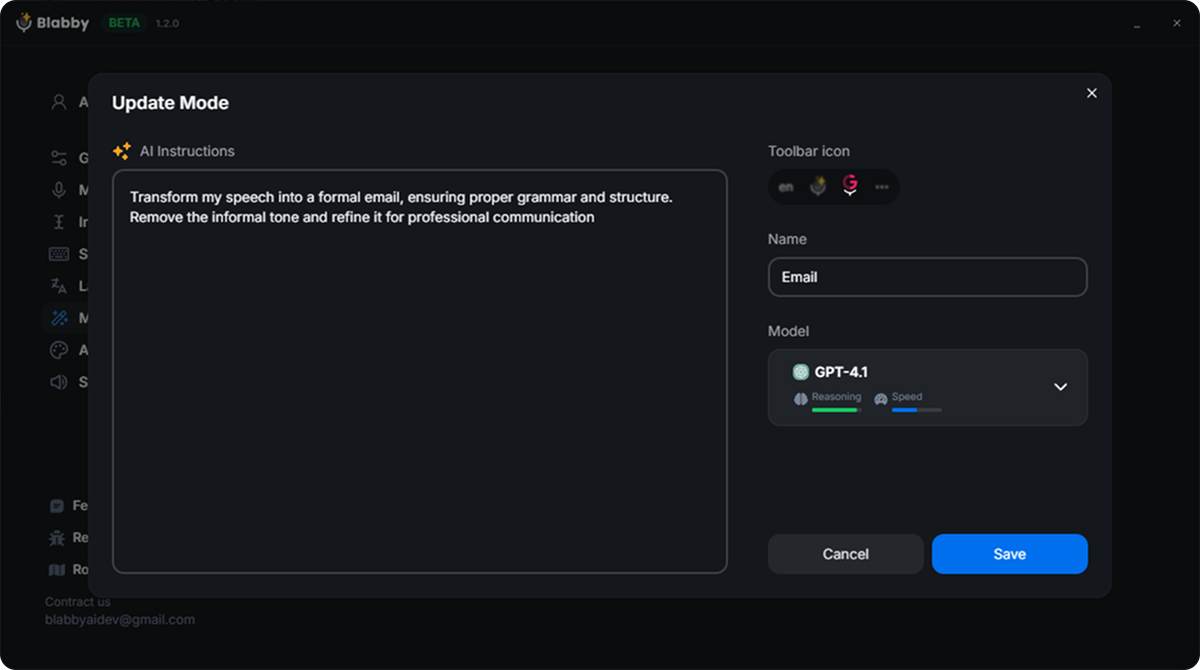
Source: BlabbyAI mode editor, where the instruction is free text
That mechanism also covers the classic dictation-command use case without a built-in command list. Because the model receives the full literal transcript, including words you spoke as commands, you can define your own vocabulary: "when I say bullet point, start a new bulleted list item", "if I say scratch that, delete the sentence I just said". You define the vocabulary rather than learning someone else's.
How a mode works
A mode reshapes what you said, so you speak your actual message and the mode formats it. It runs on the whole recording once you stop speaking, which is what lets it restructure a rambling paragraph into an ordered one rather than only correcting word by word.
The Chrome extension, for machines you do not control
There is a case this whole comparison misses if we only talk about desktop installers. Spokenly's Windows build is a direct download from the open web and is not on the Microsoft Store. On a managed work laptop, that is frequently the end of the conversation, whatever the software's merits.
The BlabbyAI Chrome extension installs from the Chrome Web Store with no desktop installer at all. It shows a small bubble next to whatever text field you have focused, and it works in Gmail, Google Docs, Notion, Jira, Slack in the browser, a CRM, a ticketing system, anything with a text box. It needs no administrator and no executable. For a lot of readers on work machines, that is the difference between using a dictation tool and not using one.
"Spokenly alternative for Windows" is the question behind the question
Something revealing shows up on the search results page for this topic. Google's top related search, repeated in every block on the page, is not "Spokenly download" or "Spokenly pricing". It is "Spokenly alternative for Windows". And the second organic result is a Reddit thread titled exactly that, with people answering it.
That tells you what has been happening. Windows users hear about Spokenly, land on coverage written for a Mac audience, conclude it is not for them, and go looking for something else. Some of them are leaving a product that would in fact have run on their PC. Others have tried the 0.3.20 build and want something further along.
If you are in the first group, the download is on the vendor's Windows page and the local models cost nothing, so the question is answered. If you are in the second group, the Windows-first option is BlabbyAI at $8.49 a month, where the Windows app and the Chrome extension are the products rather than ports, with Wispr Flow the remaining contender at roughly double that.
How to decide in about two minutes
- Does the audio have to stay on your machine? That is the one requirement a local model answers and a hosted one does not, and Spokenly's free tier is built for it, provided your PC has a GPU worth the name.
- Can you install executables on this machine? If not, the desktop question is settled for you and a browser extension is the route.
- Do you want to manage models, or do you want it to work when it opens? Local models mean downloads, hardware dependence and a settings screen. Hosted means none of that and a monthly bill.
- Do you need the output reshaped, not just transcribed? If you regularly dictate in one language and need to send another, or you want a fixed format every time, a free-form custom mode does that in the same keypress.
- How much does a 0.x version string bother you? This is a real question and only you can answer it. The build is active and the vendor is candid about its maturity.
Frequently asked questions
Does Spokenly work on Windows?
Yes. Spokenly ships a real Windows build, and as of 14 September 2026 the download page lists it as 64-bit, 29 MB, Windows 10 and 11. The dedicated Windows page states version 0.3.20, updated August 2026. This is worth saying plainly because a large part of what is written about Spokenly says the opposite: the app began life as a Mac and iPhone product, most of the coverage that ranks was written in that period, and one review currently on page one still tells readers there is no Windows download link at all. There is. What is true is that the Windows build is much younger than the Mac one. Spokenly first shipped Windows 0.1.0 on 3 May 2026 and has published 24 Windows releases since, while the macOS app is on 2.29.4. The vendor puts it in its own words: the Mac and iOS versions are the most mature, but the Windows build covers the core dictation and transcription flows.
Is Spokenly for Windows free?
Yes, in a genuine sense rather than a trial sense. Spokenly says local models are $0 forever with unlimited use, running Whisper and Parakeet completely offline with no usage limits and no account needed. A second free path lets you bring your own API keys for OpenAI, Deepgram or Groq, where Spokenly charges nothing and you pay the provider directly. Pro is the paid tier and it buys hosted cloud models rather than unlocking the basics. The pricing page shows $8.33 per month, but read the toggle above the cards: that is the yearly rate, billed $99.99 per year. Buying month to month through the Apple App Store is listed at $9.99. So the honest framing is that Spokenly on Windows is free if you are willing to run local models, and roughly $8.33 to $9.99 a month if you want the vendor to host the accuracy for you.
What version is Spokenly for Windows?
Version 0.3.20, updated August 2026, checked on 14 September 2026 on the vendor Windows page. The number matters more than it usually would. Spokenly for macOS is on version 2.29.4, released 12 September 2026, with around 60 releases listed. The Windows build is still on a 0.x version string, which by normal software convention signals a product the developer does not yet consider feature-complete. That is not a criticism of the code, and 24 Windows releases between 3 May and 29 August 2026 is an active cadence, not an abandoned port. It is simply the fact a Windows reader needs before deciding, and it is the one fact no page currently ranking for this question states.
What is the best Spokenly alternative for Windows?
This is the most common follow-up question on this topic, and it is Google’s own number one related search on the query, which tells you how many people arrive on a Mac-shaped page and leave looking for something else. BlabbyAI is the Windows-first answer: a Windows desktop app, an Android app and a Chrome extension where Windows is a primary target rather than a later addition. On Windows it types into any text field in any application, the default shortcut is Ctrl+Space, History writes every recording to your own disk before transcription begins, and custom modes let you write a free-form instruction so one keypress can transcribe, translate, fix grammar and format the result. It is $8.49 a month with a free tier of 60 credits a week that needs no card. Wispr Flow is the other Windows option at $15 a month, or $12 billed annually, with 2,000 free words a week on desktop, which makes it roughly double the price of the rest of this field.
Does Spokenly for Windows run offline?
Yes, and this is its strongest feature on any platform. The Windows page names local models Whisper and Parakeet, and the pricing page describes the local tier as working completely offline with no usage limits. That means transcription happens on your own machine with no audio sent anywhere, and it costs nothing. The trade is the usual one for local speech models: accuracy and speed depend on your hardware, and the vendor has published release notes about exactly this, including a Windows note that Parakeet models now use your GPU and are much faster. If your PC has a capable GPU, local transcription is a real option. If it is a thin work laptop, the cloud path will feel considerably better, and the cloud path is the one you pay for.
What is the Spokenly keyboard shortcut on Windows?
Google’s AI Overview for this query gives the default as Ctrl+Space: press it, speak, and the transcribed text is inserted at your cursor in whatever Windows application has focus. Worth flagging that the vendor’s own Windows page does not state a default hotkey, so that figure is second-hand and the safe move is to check it in the app’s settings after installing. Ctrl+Space is in any case a common default in this category rather than a Spokenly invention, and BlabbyAI uses the same combination on Windows, so trying both costs you no relearning. On any Windows machine that combination can collide with an existing binding, most often the input method editor switch on multilingual setups and code completion in some editors, so check that first if a press appears to do nothing.
Why do so many articles say Spokenly is Mac only?
Because they were mostly written before May 2026 and never revisited, and because the app really was Mac and iPhone first. The pattern is visible on the live search results page: the App Store listing, the r/macapps threads, MacUpdate, a Lifehacker piece headlined as a free Mac app, and Spokenly’s own subreddit description which still reads AI-powered dictation for Mac and iOS. One review dated 26 May 2026 states that there is no Windows download link on spokenly.app, which was already inaccurate by then, since the first Windows release shipped on 3 May 2026. This is a good illustration of why a platform question is worth checking against the vendor download page on the day you ask it rather than against the consensus of articles, which in a fast-moving category can lag the product by months.
Spokenly vs BlabbyAI on Windows: what is the actual difference?
The difference is what you have to set up before it works. Spokenly asks you to pick and download models, and the results then depend on your hardware, on a Windows client that is on 0.3.20 against a 2.29.4 Mac client. BlabbyAI works the moment it opens: no models to select, no engine settings, a two-step onboarding with no account, and Ctrl+Space live from anywhere in Windows after every boot. Custom modes are the larger difference, because the instruction is free-form and yours, so one shortcut can transcribe, fix grammar, translate and format in a single pass, and you can define your own spoken commands inside it. History writes the audio of every recording to your own disk before transcription even begins, so a dropped network or a failed request never costs you the recording. Price is $8.49 a month against Spokenly Pro at $8.33 yearly or $9.99 monthly, so the two are within pennies and the decision is about the product rather than the bill.
Can Spokenly type into any Windows application?
Yes, that is the core design, and it is the right thing to expect from any tool in this category. Spokenly describes pressing a global hotkey and having transcribed text inserted at the cursor in any Windows application, and one of its own Windows release notes says dictation now inserts text more reliably, including in terminals, which is a useful signal that the insertion path has been actively worked on rather than assumed. The same model applies to BlabbyAI, which types into whatever text field has your cursor, whether that is Word, Outlook, Slack, Notion, a browser form or an IDE. The practical limit on both is the same: these tools write text, they do not click buttons, press Enter or submit forms for you.
Is Spokenly on the Microsoft Store?
No. The Windows build is a direct download from the vendor’s own site, described on the download page as a 29 MB 64-bit installer for Windows 10 and 11. There is no Microsoft Store listing, which is worth knowing for two groups of readers. If you are on a managed work laptop where installers from the open web are blocked but the Microsoft Store is allowed, Spokenly is not currently reachable for you. And if you specifically wanted Store-managed updates, you will be relying on the app’s own updater instead. Readers on locked-down machines are the clearest case for a browser-based option: the BlabbyAI Chrome extension installs from the Chrome Web Store and needs no desktop installer at all.
Sources
- Spokenly Windows page, download page, pricing page and per-platform release pages, all read 14 September 2026.
- Apple App Store listing for Spokenly, in-app purchase prices and version 1.12.3, read 14 September 2026.
- Wispr Flow pricing page, read 14 September 2026.
- Google search results and AI Overview for "spokenly" and "spokenly windows", United States, 14 September 2026.
Windows is the product here, not a port
Press Ctrl+Space anywhere in Windows, speak, and the text lands where your cursor is. History keeps every recording on your own disk. Or use the Chrome extension on a machine you do not control. 60 credits a week free, no card.