
Published September 5, 2026 · By Sumbat.T
Radiology Dictation Without a PowerScribe Licence: What Actually Works in 2026

The short answer
Radiology dictation splits into two products that share a name. Enterprise reporting platforms (PowerScribe One, Rad AI, Fluency for Imaging) live inside the PACS and RIS, structure the report and file it. They are sold by quote through a hospital contract, and none of them publishes a price or sells a single seat online.
Standalone dictation tools type at your cursor into whatever window is already open, cost a published monthly price and need no integration. BlabbyAI is the second kind: Whisper large v3 turbo on Windows or in Chrome, typing into a RadiAnt window, a Word template or a hospital web form with no plugin, at $8.49 a month with a free tier of 60 credits a week and no card. rScriptor publishes $299 per radiologist per month and is a reporting layer that runs on top of the dictation tool you already use.
If your department already runs PowerScribe, that is what files your reports and nothing here changes it. This article is about the reading you do everywhere else, and about the one number the category does not advertise: a 2024 study of 3,233 reports found 44.2% contained a speech recognition error.
44.2%
of 3,233 CT and MRI reports contained at least one speech recognition error
Schmidt et al., Radiology: AI, 2024
$0
published price for PowerScribe One or Dragon Medical One on any Microsoft page
microsoft.com, checked September 2026
5.1
errors per report when radiologists first self-edited voice recognition, vs 0.12 transcribed
Pezzullo et al., J Digit Imaging, 2007
Search for radiology dictation software and every result answers the same question: which platform should a department buy. That is a real question, and it is not the one most people are typing. Google's own related searches for the term are dominated by free and download, and the second organic result for "standalone dictation software for radiologists" is a radiologist on Reddit asking where to get exactly that.
That reader is not a department. They are reading per-case medicolegal work, covering a locums shift, taking second opinions, building a teaching file, or doing teleradiology for a client whose reporting platform they will never have a licence to. They want to know what they can install this afternoon and what it costs. This article answers that, using vendors' own pages and published research rather than the comparison blogs that quote each other.
Dictation that needs no integration project






BlabbyAI types wherever your cursor already is
Whisper large v3 turbo on Windows or in Chrome. It types into RadiAnt, a Word template, a hospital web form or a PowerScribe field the same way a keyboard does, with no plugin and no IT ticket. 60 credits a week free, no card. $8.49/mo unlimited.
Two products share the name, and only one of them will sell to you
The single most useful distinction in this category is not accuracy or price. It is whether the software has to file the report or only write it. Everything else follows from that, including whether you can buy it at all.
Files the report
Enterprise reporting platforms
PowerScribe One, Rad AI Reporting, Fluency for Imaging, DeepHealth Reporting Pro. These pull the study, structure the report against a template, and write the finished text back into the record.
- Sold by quote through a hospital contract
- Needs PACS and RIS integration
- No published price, no single-seat purchase
- Owns the report record
Writes the report
Standalone dictation tools
BlabbyAI, Dragon Medical One, VoiceboxMD. These put text where the cursor is. Whatever window is focused receives it, exactly as if you had typed.
- Bought online at a published price
- No integration, no plugin, no IT ticket
- Works in any viewer, form or document
- Does not file anything
The second column is a real product category, not a compromise, and the vendors in the first column say so themselves. VoiceboxMD, which sells a medical dictation product, describes its own mechanism on its homepage in terms that have nothing to do with integration:
Every EHR: types into any field like a keyboard. Cloud, on-premise, or Citrix. [...] Insert: it types into the open field. Epic, Cerner, Athena, anything with a cursor.
That is the whole mechanism, described by a vendor who has every incentive to make their product sound more integrated than it is. Blabby works the same way, which is why the question "does it support my viewer" does not really apply: it supports the text field, and the viewer is just the window the field happens to be in.
What each one costs, where the vendor says so
We checked every vendor's own pages in September 2026. The table below only contains numbers a vendor publishes itself. Where a cell says no published price, that is the finding, not a gap in the research.
| Tool | Published price | Can one radiologist buy it? | Needs PACS/RIS integration |
|---|---|---|---|
| BlabbyAI | $8.49/mo, free tier 60 credits/week | Yes, no card for the free tier | No |
| rScriptor | $299/radiologist/mo (1 to 3), down to $199 at 100+ on 2 years | Yes | No, it layers on your existing dictation |
| RADPAIR | Not published; pay-as-you-go credits, 20 free reports | Yes, "pay-as-you-go licensing [...] for individual radiologists" | Optional |
| Dragon Medical One | None from Microsoft; $79 to $99/mo via resellers | Through a reseller | No |
| Rad AI Reporting | None. Only CTA is "Request a Demo" | No | Yes |
| Nuance PowerScribe One | None on any Microsoft page | No | Yes |
Prices read from each vendor's own site in September 2026. Dragon Medical One figures are reseller listings on Google Shopping, not a Nuance or Microsoft number.
The $5,000 to $10,000 figure has no source
The accuracy number the category does not print
Every vendor in this space advertises a percentage. Almost none of them attach a method to it. Rad AI's reporting page promises reports "up to 50% faster, with up to 90% fewer words dictated", its impressions page adds an 11% RVU productivity boost and a 6% drop in turnaround, and not one of those figures has a sample size or a footnote anywhere on the site. VoiceboxMD advertises "up to 99% accuracy".
Meanwhile the peer-reviewed measurement is free to read and says something considerably less comfortable. A 2024 study in Radiology: Artificial Intelligence went through 3,233 consecutive CT and MRI reports from a tertiary hospital across twelve months, 22 attendings and 23 residents, 79 study types:
There were 1429 (44.2%) reports that had at least one error, with clinically significant error identified in 106 (3.2%) reports.
Schmidt RA et al., Radiology: Artificial Intelligence 2024;6(2):e230205
The same paper summarises the wider literature at 20% to 60% of dictated reports carrying speech recognition errors, and roughly 2% carrying clinically significant ones. Three findings from it are worth keeping in mind whichever tool you use, because they are about how you dictate rather than what you dictate into:
Longer reports carry more errors
Each additional word raised error likelihood by 0.1% (P<.001). A tool that gets you to a shorter, cleaner first draft is doing safety work, not just speed work.
Trainees, odds ratio 2.2
Resident-dictated reports were about twice as likely to contain an error (P=.003), which is an argument for template discipline early rather than for a different engine.
Overnight shifts, odds ratio 1.9
Errors rose on nights (P=.04). Fatigue shows up in the transcript, so the proofreading step matters most exactly when you least feel like doing it.
What this means for choosing a tool
It is worth knowing how old this problem is. The foundational study, Pezzullo and colleagues in 2007, compared 100 spine MR reports self-edited with voice recognition against 100 conventionally transcribed. Voice recognition produced 5.1 errors per report against 0.12, and took 50% longer to dictate despite producing reports 24% shorter, 4.11 minutes against 2.02, at an added cost of $6.10 per case. Recognition quality has improved enormously since. The structural point has not changed: the moment the radiologist became the transcriptionist, proofreading moved onto the radiologist's clock.
What radiologists say when no vendor is listening
Google ranks two r/Radiology threads on the first page for this category, above most of the vendors. That is a signal about what people want, and the threads themselves are more useful than most of the articles competing with them.
The first is a radiologist doing per-case legal work who uses RadiAnt as a viewer and wants, in their words, "something similar to Powerscribe without the backend functionality. Basically dictation, templates and basic word processing", having tried Dragon and found it "very difficult to use". The replies name Dragon Medical One, which two commenters say does the job, and VoiceboxMD, which one finds easier to navigate but dependent on a fast connection. Several radiologists describe the same workaround: dictating into a dummy report inside a platform they do have access to, then copying the text out.
The workaround is the market
The second thread, on alternatives to PowerScribe, is more recent and close to unanimous on one point. Recognition got better and the software around it got worse:
Voice recognition is far more accurate, pretty much every other possible aspect is worse.
r/Radiology, on PowerScribe One
It is better quality transcription of the text, but it is useless if it is not in the right field.
r/Radiology, a second radiologist in the same thread
Others in the thread name M*Modal Fluency, now Jacobian, for recognition quality, and one neuroradiologist praises Rad AI's automatic impressions while calling its voice recognition "a downgrade from PS". The recurring complaint is never the speech engine. It is latency, menus, template editing and text landing in the wrong field, all of which are properties of a large integrated platform rather than of dictation.
rScriptor: the one that admits it is a layer
rScriptor is worth understanding properly because it is consistently misdescribed, including by Google's AI Overview, as a dictation product. It is not. It does no speech recognition at all. It is a reporting layer that turns dictated shorthand into finished report prose, and it says so plainly in its own FAQ:
Does rScriptor work with my current voice recognition software? Yes. The rScriptor radiology reporting software works seamlessly with virtually any dictation or word processing software including Powerscribe, Dragon, M-Modal and even Microsoft Word.
That sentence is the clearest evidence in this whole category that PACS integration is a choice rather than a requirement. A radiology reporting product that works into Microsoft Word is telling you the report can be composed anywhere and moved afterwards. rScriptor is also one of the few vendors here to publish pricing, which it does deliberately: "We are committed to complete transparency and publish our pricing online." An individual licence covering one to three radiologists is $299 per radiologist per month, falling to $199 on a 2-year agreement at 100 or more seats.
The architecture matters for anyone comparing options: because rScriptor sits on top of a dictation tool rather than replacing one, you still need something to dictate with. That can be PowerScribe if you have it, or Dragon, or Blabby at $8.49 a month if you do not. The two products are not alternatives to each other.

BlabbyAI: dictation at the cursor, in any window
Blabby is a Windows desktop app, an Android app and a Chrome extension that run Whisper large v3 turbo. On the desktop, you press a shortcut you pick yourself, speak, and the text lands at the caret in whatever window is focused. There is no application list, because there is nothing to integrate with: if a window accepts typing, it accepts Blabby. In practice that means the RadiAnt or Horos report pane, a Word or Notepad template, a hospital web portal, a PowerScribe field, an email to a referrer, and the hundred other things you type in a day that are not reports.
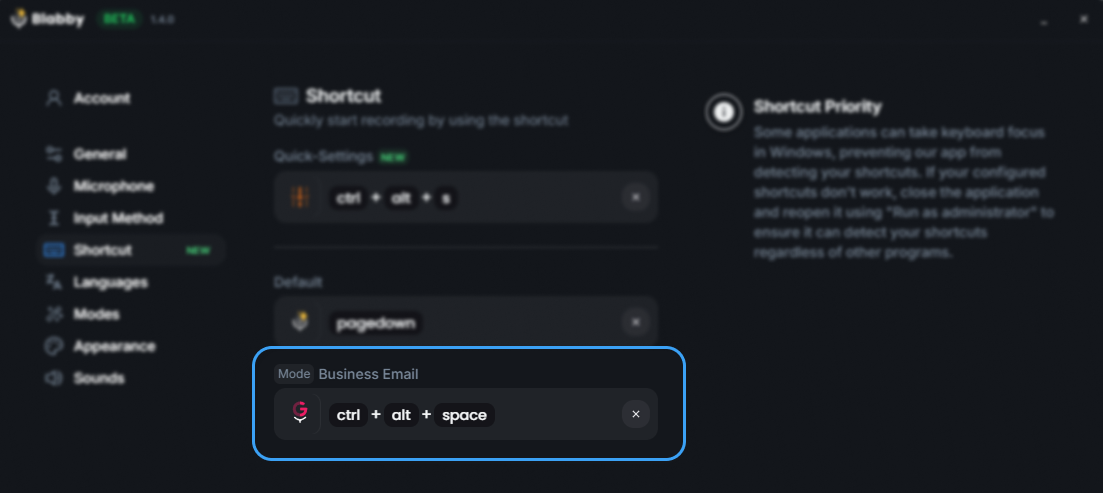
Source: BlabbyAI settings. The shortcut is user-assigned, so it does not collide with a viewer's own bindings.
The feature that does the real work for reporting is custom modes. A mode is a written instruction, in plain English, that runs over what you said after you stop speaking. It is not a template you fill in and it is not a macro language. You describe how you want your speech rewritten and it is rewritten that way every time.
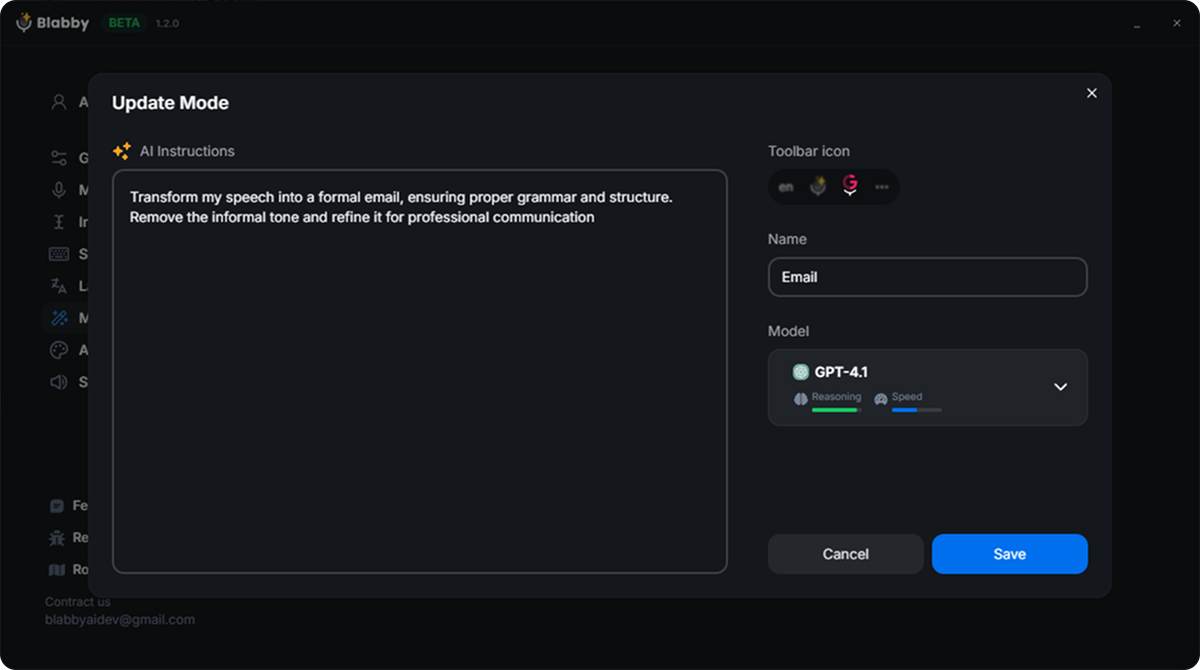
Source: BlabbyAI mode editor. The instruction is plain prose, so a reporting mode is written in a couple of sentences.
A reporting mode is usually three instructions long. Something like: lay the findings out under Technique, Findings and Impression; keep all measurements in millimetres with one decimal; start the impression with the most significant finding. You then dictate normally, in whatever order the study makes sense in, and the output arrives in your house format. Because modes are bound to their own shortcuts, a chest CT mode and a musculoskeletal MR mode can sit on different keys and you switch between them without opening anything.
What a mode is not
The limits are worth stating as plainly as the capabilities. Blabby dictates, so it types text and does not click buttons, save studies or submit reports. It handles one recording at a time rather than editing live mid-sentence, and it keeps no memory between recordings. If you need software that files the report into the record, that is an enterprise platform and this is not one.
Works on a machine you do not administer
The Chrome extension needs no install
Browser-based viewers and client portals are increasingly how teleradiology work arrives, and a managed laptop often will not let you install a desktop app. The extension dictates into any web text field with no download. Same Whisper engine, same free tier.
What the free options actually get you
Four of the eight related searches Google shows for this category contain the word free or download, so it deserves a straight answer rather than a redirect to a pricing page.
| Free option | What you get | Where it stops |
|---|---|---|
| Windows voice typing (Win+H) | Built in, free, types into any field including a viewer or a Word template | General vocabulary, no templates, no way to teach it your house format |
| BlabbyAI free tier | 60 credits a week, roughly 2,000 words, no card. Same Whisper engine paid users get, plus modes | Weekly credit cap. Unlimited is $8.49/mo |
| VoxRad (open source) | Locally hosted speech recognition plus a language model, code on GitHub, plug in your own models | You host and maintain it. The paper reports no measured accuracy |
| RADPAIR trial | 20 free reports over 7 days, no card, then pay-as-you-go credits | A trial rather than a free tier; price not published |
VoxRad deserves a note because it is genuinely unusual: a locally hosted radiology reporting system published in Clinical Imaging in 2025, built as speech recognition plus a language model with template-guided prompting, modular enough that you supply your own models through an OpenAI-compatible API. It is a real architecture and the code is public. It is also a single-author technical description with no measured accuracy figures, no comparator and no sample size, so it demonstrates that the approach exists rather than that it performs.
Three questions that settle it
QUESTION 1
Does the software have to file the report?
If yes, you need an enterprise platform and the decision belongs to whoever holds the contract. If the report is saved by something else, or by you, every standalone tool is open to you.
QUESTION 2
Who is paying, and can they get a quote?
A department with a procurement process can work with quote-only vendors. An individual cannot, and should not spend weeks trying. Published prices exist for a reason.
QUESTION 3
How much of your typing is not a report?
Referral letters, emails, addenda, teaching notes, protocol comments. A reporting platform covers none of them. A cursor-level tool covers all of them.
Question three is the one most comparisons skip, and for a hospital-based radiologist it is usually the one that decides whether a standalone tool is worth having alongside the platform rather than instead of it. The reporting platform owns the report. It does not own the referral letter, the email explaining the finding to a clinician, the addendum typed into a portal, or the note attached to a teaching case. The framing that fits most working radiologists is both, not instead: PowerScribe for what it files, and a cursor-level tool like Blabby for the rest of the day.
A quick way to test whether dictation suits you at all
Setting up dictation on a reading workstation
A reading room machine has constraints an office PC does not, and three of them come up every time.
The shortcut has to not collide
DICOM viewers bind a lot of keys. Blabby lets you choose the shortcut rather than fixing it, which matters more here than anywhere else. Pick something a viewer will never claim, and give each reporting mode its own key.
Dim rooms are quiet rooms
Reading rooms are usually far quieter than a clinic, which helps. A headset or handheld microphone still beats a laptop array microphone, mostly because it stays a constant distance from your mouth as you turn to the screens.
You may not be an administrator
Hospital and client machines are frequently locked down. This is the case the Chrome extension exists for: it needs no install and covers browser-based viewers and portals, which is how a growing share of teleradiology work arrives.
Build the mode before the shift, not during
Write your reporting mode against two or three reports you have already signed, so you can see whether the output matches your house format. Ten minutes once beats correcting the same thing fifty times.
Radiology dictation questions, answered
What is the best dictation software for radiology?
It depends entirely on whether the report has to be filed by the software or only typed. If you read inside a hospital that already licenses an enterprise reporting platform, that platform is the answer, because it owns the report record: Nuance PowerScribe One, Rad AI Reporting and Fluency for Imaging all sit inside the PACS and RIS and structure the report for you. If you read outside one, which covers locums shifts, teleradiology, second opinions, medicolegal reads and teaching files, none of those are practical, because none of them publish a price and none of them sell a single seat online. For that reader the answer is a standalone dictation tool that types at the cursor into whatever window is already open: BlabbyAI is $8.49 a month with a free tier of 60 credits a week and no card required, runs on Whisper large v3 turbo, and works in a DICOM viewer, a Word template, a web form or an email without any integration project. rScriptor publishes $299 per radiologist per month for an individual licence and is a reporting layer that runs on top of whichever dictation tool you already use, and RADPAIR offers pay-as-you-go credits to individuals after a 20-report trial.
How much does radiology dictation software cost?
Most of the category does not say. Microsoft publishes no price for PowerScribe One or for Dragon Medical One, and both product pages offer only "Contact us" or "Buy additional licenses" for existing organisational customers. Rad AI publishes no price and the only call to action on its reporting page is "Request a Demo". The vendors that do publish are the exception and the range is very wide: rScriptor lists $299 per radiologist per month for a 1 to 3 radiologist individual licence, falling to $199 on a 2-year 100-plus seat agreement. Dragon Medical One appears through resellers on Google Shopping at $79 to $99 a month. BlabbyAI is $8.49 a month for unlimited use with a free tier of 60 credits a week and no card. The figures you find quoted for PowerScribe, usually $5,000 to $10,000 per radiologist per year, come from third-party comparison blogs with no vendor quote behind them, so treat them as hearsay rather than pricing.
Does radiology dictation software need PACS or RIS integration?
Only if you want the software to file the report rather than write it. Integration is what lets a platform pull the study, structure the report against a template and write the finished text back into the record. A dictation tool that types at the cursor needs none of it, and vendors say so themselves: VoiceboxMD describes its own product as typing "into any field like a keyboard. Cloud, on-premise, or Citrix", and rScriptor states that it works with "virtually any dictation or word processing software including Powerscribe, Dragon, M-Modal and even Microsoft Word". BlabbyAI works the same way. It is a Windows app and a Chrome extension that put text wherever the cursor already is, so it types into a RadiAnt window, a PowerScribe field, a hospital web form or a Word template without a plugin, an interface project or an IT ticket. The tradeoff is honest: it dictates, it does not file. The report still has to be saved by whatever system owns it.
How accurate is speech recognition in radiology reports?
Less accurate than most marketing implies, and this is measured rather than argued. A 2024 study in Radiology: Artificial Intelligence reviewed 3,233 consecutive CT and MRI reports from a tertiary hospital over twelve months and found that 1,429 of them, 44.2%, contained at least one speech recognition error, with a clinically significant error in 106 reports, or 3.2%. The same paper summarises the wider literature at 20% to 60% of dictated reports containing errors and about 2% containing clinically significant ones. Errors rose with longer reports, with trainee dictation (odds ratio 2.2) and on overnight shifts (odds ratio 1.9). The practical conclusion is not that dictation is unusable, it is that proofreading is part of the job no matter which engine you use, and that a shorter report is a safer report. Blabby runs Whisper large v3 turbo and, like every other tool in this category, produces text that a radiologist has to read before signing.
Can I use radiology dictation software for locums or teleradiology work?
Yes, and this is where standalone tools genuinely beat enterprise platforms rather than merely being cheaper. A radiologist reading per-case work typically supplies their own viewer, often RadiAnt or Horos, and has no licence to the client hospital reporting platform. Enterprise platforms cannot help, because they are sold by quote through a hospital contract and are installed as departmental infrastructure. A keyboard-level dictation tool has no such dependency: BlabbyAI runs on your own Windows machine, types into whatever window is focused, and costs $8.49 a month with a free tier, so it works the same on a client engagement that lasts one afternoon as on one that lasts a year. The Chrome extension covers the same job when the client work happens in a browser-based viewer or portal, which is increasingly common in teleradiology, and it needs no install on a locked-down machine.
Is there free radiology dictation software?
There is free dictation, but there is no free radiology reporting platform worth building a practice on. Windows has built-in voice typing on Win+H that types into any text field including a DICOM viewer or a Word template, at no cost, and it is a reasonable way to test whether dictation suits how you read before paying for anything. Its limits show quickly on radiological vocabulary and it has no way to learn your templates. VoxRad, published in Clinical Imaging in 2025, is a genuinely open-source locally hosted reporting system built on speech recognition plus a language model, and its code is on GitHub, though the paper is a technical description and reports no measured accuracy figures. BlabbyAI has a free tier of 60 credits a week, roughly 2,000 words, with no card required, which is enough to dictate a working day of short reports and decide whether it fits before spending anything.
What do radiologists actually use for standalone dictation?
The public discussion is smaller than the marketing suggests, and it is candid. On r/Radiology a radiologist doing per-case medicolegal work asked for "something similar to Powerscribe without the backend functionality. Basically dictation, templates and basic word processing", having found Dragon "very difficult to use". The replies name Dragon Medical One, which two commenters say works well for that job, and VoiceboxMD, which one describes as easier to navigate than Dragon but requiring a fast connection. Several radiologists admit to dictating into a dummy report in a platform they do have access to and copying the text out, which is a workaround rather than a tool. A separate and more recent thread on alternatives to PowerScribe is close to unanimous that PowerScribe One improved recognition quality and got worse at everything else, with one radiologist writing that "voice recognition is far more accurate, pretty much every other possible aspect is worse". That gap, good recognition attached to software nobody outside a hospital can buy, is what a standalone tool exists to fill.
Can dictation software structure a report into BI-RADS categories?
A general dictation tool cannot classify anything on its own, but a custom mode can be told to format what you dictate. Blabby modes are a free-form written instruction that runs over your speech after you stop talking, so a mode can be told to lay findings out under fixed headings, keep measurements in a consistent format, or arrange a breast report so the assessment sits in its own line at the end. What it is doing is rewriting your words into your template, not deciding anything clinically: the ACR BI-RADS Atlas defines assessment categories 0 through 6, from Incomplete through Negative, Benign, Probably Benign, Suspicious with its 4A, 4B and 4C subdivisions, Highly Suggestive of Malignancy and Known Biopsy-Proven Malignancy, and choosing the right one is the radiologist reading the study. The mode makes sure that once you say it, it comes out formatted the same way every time.
Why is PowerScribe One so hard to buy as an individual?
Because it is not sold as an application, it is sold as departmental infrastructure. Nuance’s PowerScribe One page now redirects to Microsoft Health Solutions, and the Microsoft page that replaces it carries no price, no system requirements and no purchase path, offering only "Contact us". Dragon Medical One is the same, with a "Buy additional licenses" route that assumes you are already an organisational customer. This is a coherent commercial decision on Microsoft’s part, since the product is designed to sit inside a PACS and RIS and be rolled out with an implementation project, and none of that makes sense for one radiologist. It does mean that an individual reading per-case work is not an awkward customer for these vendors, they are not a customer at all, which is exactly why the standalone tier exists.
Does Blabby work inside a DICOM viewer like RadiAnt?
Yes, because it does not target applications at all, it targets the cursor. Blabby is a Windows desktop app that types wherever the text caret already is, the same way a keyboard does, so any window with an editable field accepts it: RadiAnt, Horos and OsiriX report panes, a Word or Notepad template, a hospital web portal, a PowerScribe field, an email. There is no plugin, no application list and no per-viewer setup, so nothing has to be certified or approved for a given viewer to work. The Chrome extension covers browser-based viewers and portals and needs no install at all, which matters on a managed client machine. The limit worth stating plainly is that Blabby dictates, so it types text and does not click buttons, save studies or submit reports.
Sources
- Schmidt RA, Seah JCY, Cao K, Lim L, Lim W, Yeung J. Generative Large Language Models for Detection of Speech Recognition Errors in Radiology Reports. Radiology: Artificial Intelligence. 2024;6(2):e230205.
- Pezzullo JA, Tung GA, Rogg JM, Davis LM, Brody JM, Mayo-Smith WW. Voice Recognition Dictation: Radiologist as Transcriptionist. Journal of Digital Imaging. 2007;21(4):384-389.
- Ankush A. VoxRad: Building an open-source locally-hosted radiology reporting system. Clinical Imaging. 2025;119:110414.
- rScriptor FAQ and published pricing, scriptorsoftware.com, checked September 2026.
- Rad AI Reporting and Microsoft PowerScribe One, vendor pages checked September 2026.
- American College of Radiology, BI-RADS Atlas, assessment categories 0 to 6.
Dictation that does not need a hospital contract
BlabbyAI: Whisper large v3 turbo on Windows, on Android or in Chrome, typing into any text field including a DICOM viewer, a Word template or a hospital web form. Custom modes format your findings into your own report layout. 60 credits a week free, no card. $8.49/mo unlimited, and the Android app is free during the beta.